The EK-Quantum Velocity² ILM Replacement – 1700 is a specialized accessory designed for enhancing the mounting and thermal performance of Intel LGA 1700 CPUs when used with EK-Quantum Velocity² CPU blocks. This product is intended for experienced users and requires careful installation.
Function Description:
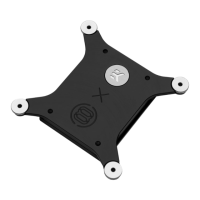
The primary function of the EK-Quantum Velocity² ILM Replacement – 1700 is to replace the stock Integrated Loading Mechanism (ILM) on Intel LGA 1700 motherboards. The stock ILM can sometimes cause uneven pressure distribution on the CPU's Integrated Heat Spreader (IHS), leading to suboptimal thermal contact with the CPU block. This replacement ILM aims to provide more uniform pressure, potentially improving thermal performance and stability for overclocking or demanding workloads. It consists of a backplate and a die guard that work together to secure the CPU and ensure proper contact.
Important Technical Specifications:
- Dimensions (L x H x W): 90x90x14 mm. This indicates the overall size of the ILM replacement assembly.
- Compatibility: Specifically designed for Intel LGA 1700 sockets.
- Material: The components include a Velocity² ILM Replacement Backplate, an ILM Replacement Die Guard, an EK RGB Badge, Velocity² Mounting Nuts, Velocity² - Spring Steel components, and M3 x 12 DIN7991 Screws.
- Included Tools: The package includes an Allen Key 2 mm, an Allen Key 2.5 mm, a TX20 L-Shaped wrench, and thermal grease, providing all necessary tools for installation.
Usage Features:
- Enhanced CPU Mounting: The replacement ILM is engineered to provide a more consistent and even mounting pressure across the CPU's IHS compared to the factory-installed ILM. This can mitigate "bending" or "bowing" issues sometimes observed with LGA 1700 CPUs.
- Improved Thermal Performance: By ensuring better contact between the CPU IHS and the cold plate of the EK-Quantum Velocity² CPU block, the ILM replacement can lead to lower CPU temperatures and more efficient heat transfer.
- Die Guard Integration: The ILM Replacement Die Guard helps protect the CPU die during installation and ensures precise alignment within the socket.
- DIY Installation: The product is designed for user installation, with a detailed step-by-step guide provided. However, it is stressed that installation should be undertaken by adequately trained and experienced individuals due to the sensitive nature of CPU and motherboard components.
- Compatibility with EK-Quantum Velocity² CPU Blocks: This ILM replacement is specifically designed to work in conjunction with EK-Quantum Velocity² CPU blocks, ensuring a seamless fit and optimal performance when paired.
Maintenance Features:
- Pre-installation Cleaning: The manual emphasizes wiping the CPU's IHS clean using a non-abrasive cloth or q-tip before installing the ILM and CPU. This ensures optimal thermal contact and prevents contaminants from interfering with heat transfer.
- Component Replacement: While not explicitly detailed as a maintenance feature, the modular design with individual components like screws and nuts suggests that specific parts could be replaced if damaged, though this would likely fall under repair rather than routine maintenance.
- Thermal Grease Application: The inclusion of thermal grease highlights the importance of proper thermal interface material application, a critical aspect of maintaining optimal cooling performance. Users are expected to apply fresh thermal grease when installing or reinstalling the CPU block.
Installation Process Overview:
The installation process involves several critical steps:
- Removing the CPU Block: If an EK-Velocity² CPU block is already installed, it must be carefully removed by unscrewing the backplate screws using the provided Allen Key 2.5 mm.
- Preparing the Motherboard:
- The CPU must be removed from the socket if installed.
- The stock Torx screws holding the original ILM must be removed from the motherboard using the provided TX20 Key.
- The stock mounting bracket (original ILM) is then removed from the motherboard.
- The CPU is reinstalled into the socket.
- Installing the ILM Die Guard:
- The CPU's IHS should be wiped clean.
- The ILM Die Guard is placed on the motherboard, ensuring alignment with the holes.
- The ILM Replacement Backplate is placed on the back of the motherboard.
- The backplate is secured with four M3 x 12 DIN7991 Screws.
- Installing the Velocity² CPU Block: After the ILM replacement is securely installed, the EK-Quantum Velocity² CPU block can be installed, following its specific installation manual.
Important Considerations:
- Professional Installation Recommended: The manufacturer strongly advises that installation be performed by an adequately trained and experienced person. Improper installation can lead to product damage, incidental, consequential, or indirect damages, for which EKWB disclaims liability.
- User Guide Adherence: Users are instructed to carefully read the manual before beginning the installation process to ensure correct procedures are followed.
- Support and Service: EKWB provides customer support through their website for any assistance required during the installation or usage of the product.
In summary, the EK-Quantum Velocity² ILM Replacement – 1700 is a precision-engineered upgrade for Intel LGA 1700 platforms, designed to optimize the mounting pressure of EK-Quantum Velocity² CPU blocks, thereby enhancing thermal performance and stability. Its installation requires careful attention to detail and is best suited for experienced PC builders.

 Need help?
 General



 To Next Page