TECNOEKA Srl ______________________________________________________________ use and instruction manual
page 12 _________________________________________________________________________________________
3.2
3.2 3.2
3.2
Operating instructions
Operating instructionsOperating instructions
Operating instructions
3.2.1
3.2.1 3.2.1
3.2.1
Control panel
Control panelControl panel
Control panel
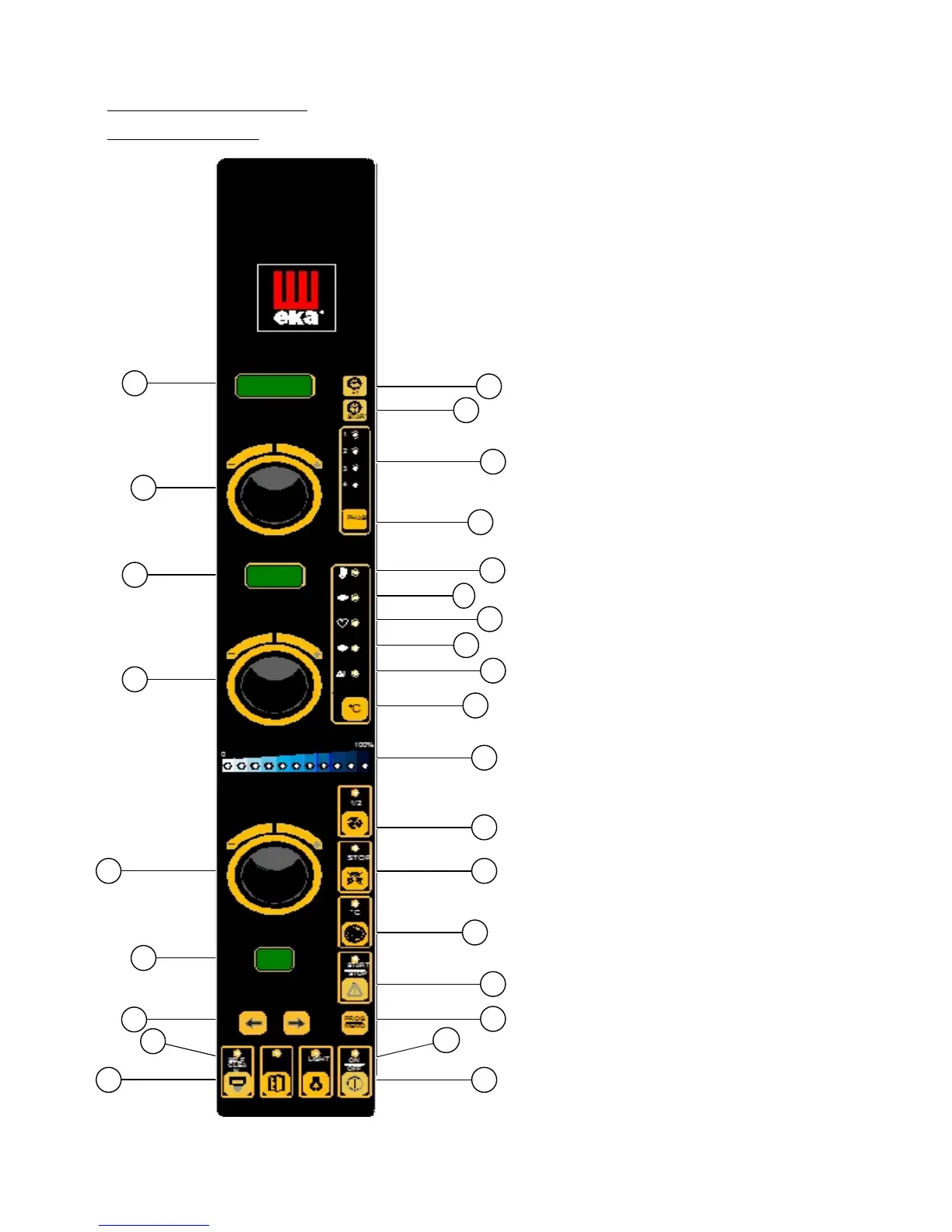
1. Time display
2. “+1” push button and hour/minute display
(on the time display)
3. Current time display push button (on the
time display)
4. Green signal light for an active stage
5. Phase selection push button
6. Time setting knob (“1”)
7. Temperature display
8. Set temperature in cooking chamber
9. Actual temperature in cooking chamber
10. Set temperature for core probe
11. Actual temperature at core probe
12. Set “∆T” temperature
13. Temperature selection push button (on
temperature display)
14. Temperature setting knob (”2”)
15. Climate display led bar
(blue led = steam / red led = dry)
16. Motors at 1/2 speed push button
17. Stop motors push button
18. Pre-heating function push button
19. Climate setting knob (“3”)
20. Start/stop push button for cooking cycle
21. Display programs
22. Storing programs push button
23. View programs push button (1÷99)
24. On/off push button
25. Cooking chamber light push button
26. Wash boiler push button
(NOT ACTIVATED)












 To Next Page