This document is an instruction manual for the EKO Mini LCD Projector, model KP480P. It provides comprehensive information on the projector's general safety, product overview, remote control operation, first-time setup, lens focus adjustment, settings (picture, sound, option), and technical specifications.
Function Description:
The EKO Mini LCD Projector KP480P is designed to project video and images onto a wall or screen. It supports various media sources, including HDMI, USB, and AV IN, making it versatile for different entertainment and presentation needs. The projector features manual focus and keystone correction to ensure a clear and straight image projection, adapting to various setup environments. It offers multiple picture and sound modes, as well as options for language and software updates, allowing for a customized user experience.
Important Technical Specifications:
- Display: Supports up to 1080p (1920x1080) resolution.
- Native Resolution: 800 x 480.
- Contrast Ratio: 1500:1.
- Projection Distance: 1-3 Metres.
- Projection Size: 40" to 130" (inches).
- Lumens: 2000 Lumens (80 ANSI).
- Aspect Ratio: 16:9, 4:3, AUTO.
- Multimedia Playback Format (USB Mode):
- Movie: VOB/MKV/MPG/MP4/MOV/AVI.
- Music: MP3/WAV/WMA.
- Photo: JPG/GIF/BMP/PNG.
- Power Source: 100-240V ~ 50/60Hz.
- Power Consumption: 24W.
- USB Power Output: 5V max. 500mA.
- Dimensions: 125 (w) x 167 (d) × 67 (h) mm.
- Weight: Net: 0.65 kg, Gross: 0.95 kg.
- Connectivity: HDMI, USB, AV IN (Red, White, Yellow to 3.5mm Jack), Headset.
Usage Features:
- First Time Setup:
- Plug the power cable into the AC Port of the projector and then into a wall power socket.
- Press the power button (located on the top of the projector) to turn it on.
- Connect a media source via HDMI, USB, or AV IN.
- Select the desired input source using the "INPUT" button on the remote or projector, navigating with arrow buttons, and confirming with the Circle button.
- Adjust the volume and manually adjust the focus and keystone correction.
- Projector Lens Focus:
- Focus Dial: Turn to adjust the LENS focus.
- LEFT DIRECTION: Towards larger screen sizes for best focus.
- RIGHT DIRECTION: Towards smaller screen sizes for best focus.
- Keystone Dial: Turn to adjust the Tilt Direction.
- RIGHT DIRECTION: Tilts the screen backwards (top of screen) for higher projection on the wall, straightening the picture.
- LEFT DIRECTION: Tilts the screen back to the standard position.
- Remote Control: A remote control (batteries not included) is provided for convenient operation from a distance. It includes buttons for Power, Menu, Source, Navigation (OK, Up, Down, Left, Right), Home, Return, Volume Up/Down, and Mute.
- Settings - Picture: Accessible via the HOME button and SETTINGS menu.
- Picture Modes: Standard, Soft, Vivid, Users (adjustable contrast, brightness, sharpness, colour).
- Colour Temperature: Adjust between Medium, Cool, Warm, Users (Red, Green, Blue).
- Aspect Ratio: 3 modes: Auto, 4:3, 16:9.
- Noise Reduction: Off, Weak, Medium, Strong, Default.
- Rotated Modes: Front, Rear, Ceiling Front, Ceiling Rear.
- Settings - Sound: Accessible via the HOME button and SETTINGS menu.
- Sound Modes: Standard, Music, Movie, Sports, User (adjustable Treble & Bass).
- Auto Volume: Automatically adjusts volume.
- Surround Sound: 3 optional modes: Related, Surround Sound, SRS Trusurround XT.
- Settings - Option: Accessible via the HOME button and SETTINGS menu.
- OSD Language: Adjust between English (default) and Chinese.
- Restore Factory Default: Resets projector settings and device.
- Software Update (USB): Allows firmware updates by plugging a USB storage device with the firmware into the projector's USB port. Only use software provided by the distributor (Ayonz Pty Ltd - info@ayonz.com).
Maintenance Features:
- Cleaning: Do not use chemical or cleaning agents or wet cloths. Only use a dry cloth to wipe down marks or dust after unplugging the product from the power socket.
- Storage: When not using the unit for long periods or when moving it, disconnect the power cord from the wall socket.
- Battery Handling:
- Do not mix old and new batteries or different types of batteries in the remote.
- Remove batteries if not using the unit for a long time.
- Keep batteries away from children and pets.
- Never throw batteries into a fire.
- Ventilation: Do not cover ventilation openings with items like newspapers, tablecloths, or curtains, as this can cause overheating and permanent damage.
- Professional Service: If unusual odors or smoke are noticed, immediately disconnect the unit and contact the service center. The unit should only be serviced by qualified service personnel.
- Safety Precautions:
- Avoid exposing the appliance to rain or moisture.
- Do not tamper with, change, or modify the product.
- Only use accessories recommended by the manufacturer.
- Do not expose the product to splashing or water contact.
- Do not place objects filled with liquids on top of the product.
- Replace parts with the same or equivalent type.
- Do not look directly into the projector lens when it's on, as it can cause eye damage.
- Keep the projector out of reach of children and babies.

 Need help?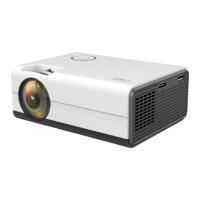

 To Next Page
 General