EKO INSTRUMENTS CO., LTD. - Pyranometer MS-80/80S/80U - Instruction Manual Ver. 1
Pg. 44
A-3. Soft ware (Hibi)
‘Hibi’ means ‘day by day’ in Japanese, and with this program, users will be able to visualise detection signals, set
communication parameters, and rapidly troubleshoot any issues from day one. You can change the settings of the
MS-80S using the Windows software downloadable from the EKO website (MS-80S product page) and the optional
USB cable.
1. Software Installation
Follow the steps below to install “Hibi” configurator software.
1) Download the latest version of the "hibi.zip" file [Compressed file: Zip format] from MS-80S product page
on the EKO website.
2) Unzip “hibi.zip” file and check that the “setup.exe” file exists.
3) Run the “setup.exe” file to install “Hibi” configurator software.
2. Hardware Preparation
After the software is installed, connect the MS-80S with a PC to change the setting..
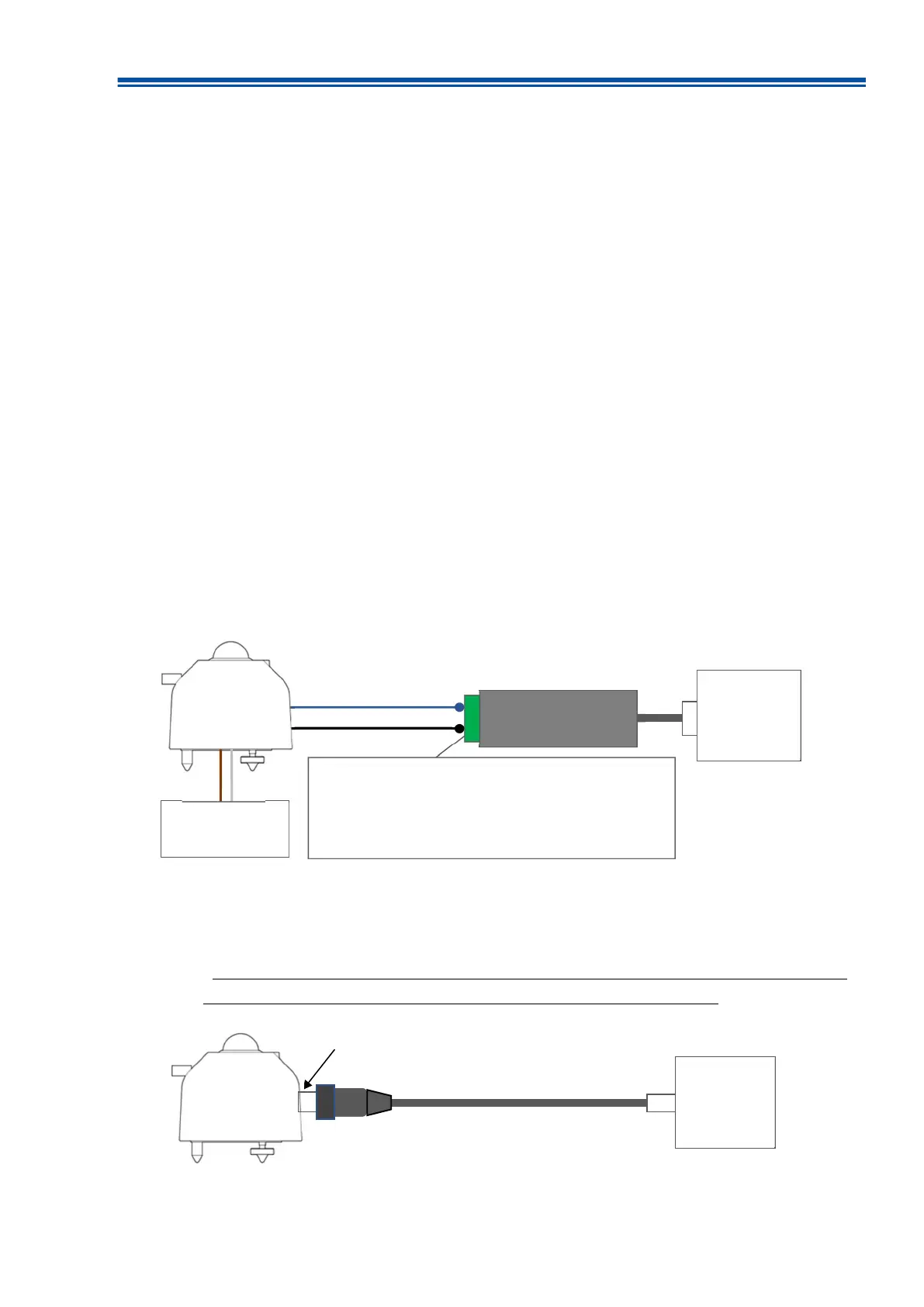
1) After installing the software, connect the USB connector of "RS485/USB Converter cable" to the PC.
2) Connect the ends of the signal cable of MS-80S to the communication terminal of "RS485/USB converter".
3) Connect the power lines of the signal cable to the power supply (DC5V or 8 to 30V), and turn on the power
supply. (Refer to Figure A3-1.)
If you use the optional “EKO Converter cable”, you can install it simply by inserting the cable connector
into the main unit. Power for the MS-80S can be supplied via USB. (See Figure A3-2).
* This conversion cable is for installation, so please avoid using it outdoors for a long time. Because the
ground wire is not connected, surges can damage your PC during a lightning strike.
RS485/USB converter
Power Supply
DC5V, or 8~30V
+
-
+ -
(Terminal block)
MS-80S cable: Blue (+ / A) RS485/USB Converter terminal: (+)
MS-80S cable: black (- / B) RS485/USB Converter terminal: (-)
* Connect the power supply GND and RS485GND
PC
Figure A3-1. Hardware preparation
Connect the cable to MS-80S
PC
Figure A3-2. Using “EKO Converter cable”



 To Next Page