7 Turning EVO On and Off
108842 A
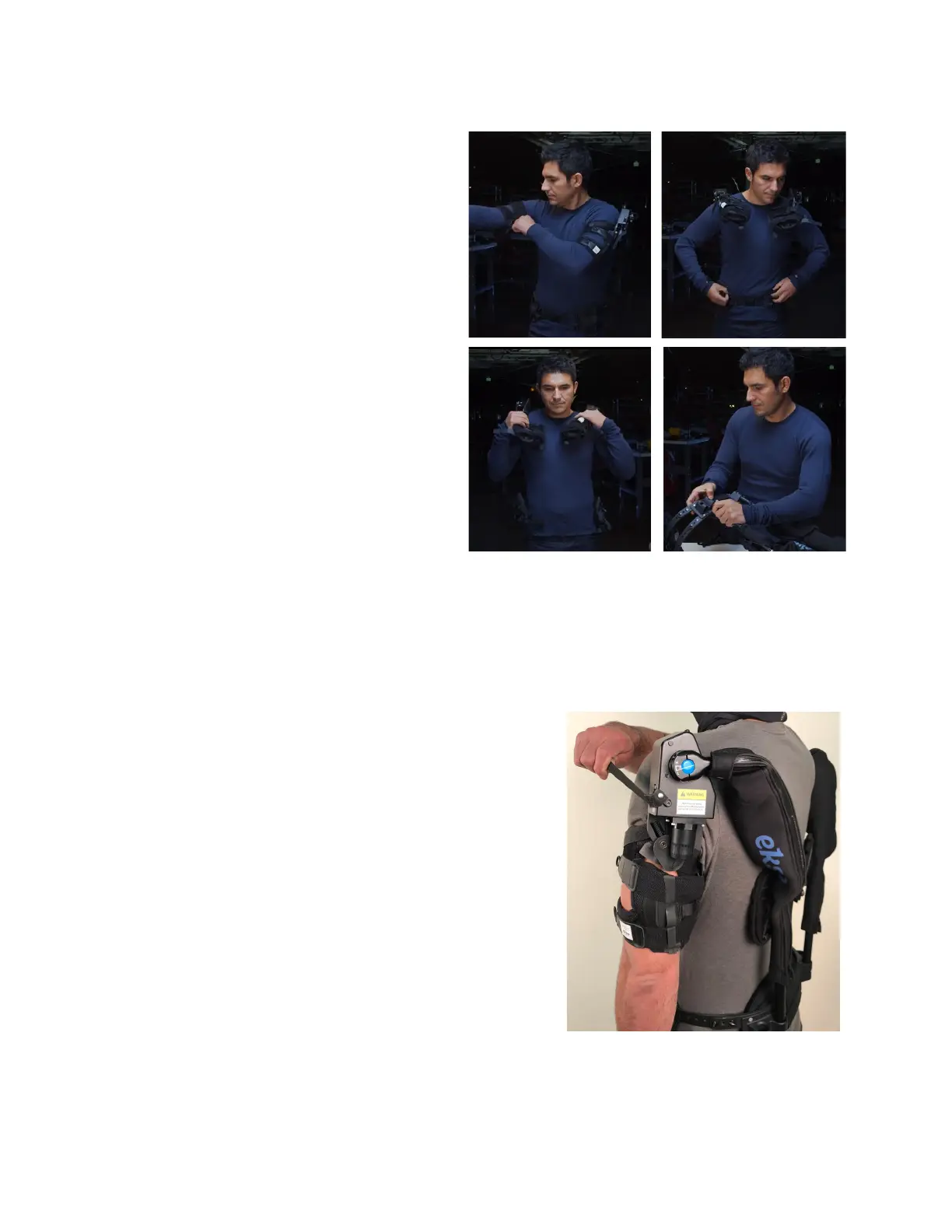
Doffing the EVO
1. Undo and loosen the arm cuff straps. Use the
pull handle strap to slide each arm out of the
arm cuff.
2. Drape the EVO arms over your shoulders.
3. Loosen the hip belt webbing, then release the
hip belt buckle.
4. Lift EVO off your shoulders.
5. Disassemble arms from the hip belt by
pressing the silver buttons on the bottom of the
torso tubes. Place all components back into
the Ekso carrying bag.
CHAPTER 5: TURNING EVO ON AND OFF
Each EVO arm has an ON / OFF switch (with tether) located on the actuator housing. Moving the switch to the ON
position activates the spring support of the actuator. Take care if activating the switch while the EVO is not being worn,
as the arm can raise up in an uncontrolled manner.
Turning EVO On
To turn EVO on, the operator must keep their arm fully down by their
side. The switch on the actuator can then be flipped to the ON position.
Do this for both arms before starting to use EVO.
Turning EVO Off
To turn EVO off, the operator must lower their arm fully to their side.
The switch on the actuator can then be flipped to the OFF position. Do
this for both arms before doffing EVO.
Figure 7: Doffing Evo Steps


 To Next Page