9
Troubleshooting Guide
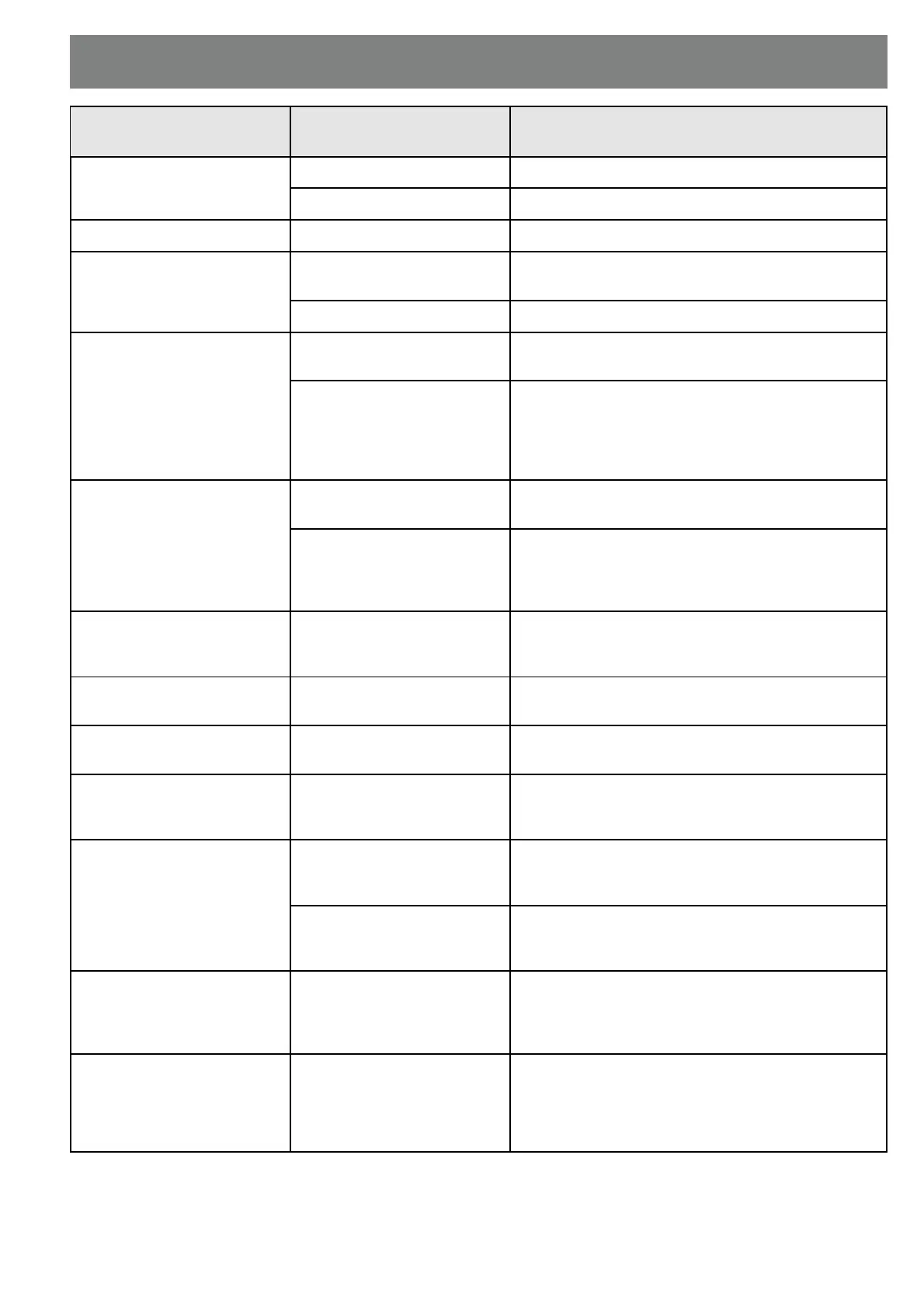
Symptom
(working state)
Possible cause Remedy
No signal (LED off) no mains connection Check mains plug and socket
mains fuse blown Check/replace mains fuse
No signal (LED red) Power mode switch "OFF" Change power mode to "AUTO" or "ON"
No signal (LED green) No input signal Check input connections, exchange RCA
interconnects, check source signal
Auto start not working Service through your dealer
Output level too low
(speaker cable)
Speaker and Line level
inputs used at the same time
If speaker level inputs are used, RCA jacks must be
open (and vice versa)
One channel inverted Disconnect one channel, is the bass level now
higher?
Connect 2nd channel again, but now intentionally
inverted.
Check cables for polarity error
Output level too low
(RCA jack, 1 ch.)
short RCA-link L-R not
inserted
Use (short) RCA interconnect
(RCA jacks, stereo or with
bridge)
Source output level is too
low (pre-amp, surround
decoder)
Increase output level of preamp (min. 0.2 volts are
needed), reduce power amp gain for compensation,
or reduce gain for main (center, effect) speakers
slightly, for compensation increase master volume
Max. output too low
(open air party, dry
placement!)
Subwoofer is too small Use 2 to 4 units, place in front of a wall, increase
"CROSSOVER FREQUENCY"
Max. output slightly too low
(living room)
Placement of subwoofer is
too "open"
Place subwoofer in front of a wall or in a corner.
Use a 2nd ELAC SUB 101 ESP.
Uneven sound Polarity not ideal Switch "POLARITY", if no significant difference is
obtained, move subwoofer 0.5 - 2m and repeat.
Sound in lower voice range
somewhat thin, but bass is
rather thick
High pass filter of ELAC
SUB 101 ESP for main
speakers is not ideal
Connect main speakers directly to power amp
reduce "SUBWOOFER LEVEL", optimise
"CROSSOVER FREQUENCY" and "POLARITY".
Sound with loud tracks
somewhat distorted
Overload of main speakers
and their power amp
Connect main speakers not directly to main amp,
but to ELAC SUB 101 ESP "SPEAKER LEVEL
OUT"
(especially in surround
mode)
Overload of center or effect
speakers and their power
amps
Reduce center or effect level at surround decoder.
Use center mode "Normal".
Loud buzzing noises
(RCA-interconnect)
Contact problems with RCA
interconnect
(adapter for extensions)
Check all connections. For acoustic monitoring of
bad faults, reduce the level at ELAC SUB 101 ESP
to -30 dB. Perhaps the outer rings of RCA plugs
have to be adjusted.
Soft hum
(during pause)
Hum from Source,
ground loop with RCA multi-
connections
Check ELAC SUB 101 ESP for inherent hum:
power mode switch to "OFF", disconnect all inputs,
switch to "ON", controls as in normal use.
With the ear near the speakers there should be a
soft hum, but none at the listening location.


 To Next Page