DMX OPERATOR PRO
7
Section: 6 Basic Control Parts (Cont.)
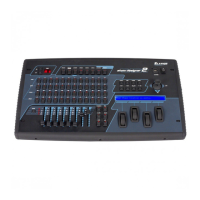
• GROUP button:
The Group button is used to control more than one moving light at a time.
• BLACKOUT button:
The Blackout button takes all DMX values to zero.
• SETUP button:
The Setup button allows access to the DMX Operator Pros menu options.
• FOG MACHINE button:
This button will trigger a compatible fog machine when connected to the rear fog input.
• DEL button:
This button is used to delete relevant Scenes, Chases and Show & Chase steps.
• RECORD button:
The Record button is used to record Scenes, Chases and Shows. It also functions as an Enter
button for various menu options.
• ESC button:
This button is used to cancel or escape relevant operation or modes.
• UP/DOWN buttons:
The Up / Down buttons are used to scroll or adjust desired levels during operation.
• CH.PAGE button:
Press this button to switch between Moving Light Channels 1-8 and Channels 9-16. When the LED
above the button is “OFF”, it means channels 1-8 are active, when the LED is “ON “, it means
channels 9-16 are active.
• FINE button:
When the Fine button is pressed, it allows for fine adjustment of PAN / TILT position (16 bit).
• “Arrow” buttons on all sides of joystick:
These buttons are used to manually make fine PAN / TILT adjustments for selected moving lights.
• Joystick:
The joystick is used to control the PAN / TILT movement for selected moving lights.
• STANDBY button:
This button is used to blackout the Par Can channel's (129-136).
• Fade & Speed button:
This button enables and disables fade time for Par Can channels.
• Full On button:
Pressing this button will temporarily activate Par Can channels 129-136 to 100% full intensity.
• Auto button:
The Auto button is used to activate Auto trigger mode for selected Par Can scene pages.




 To Next Page