6
CONTROL SETTING
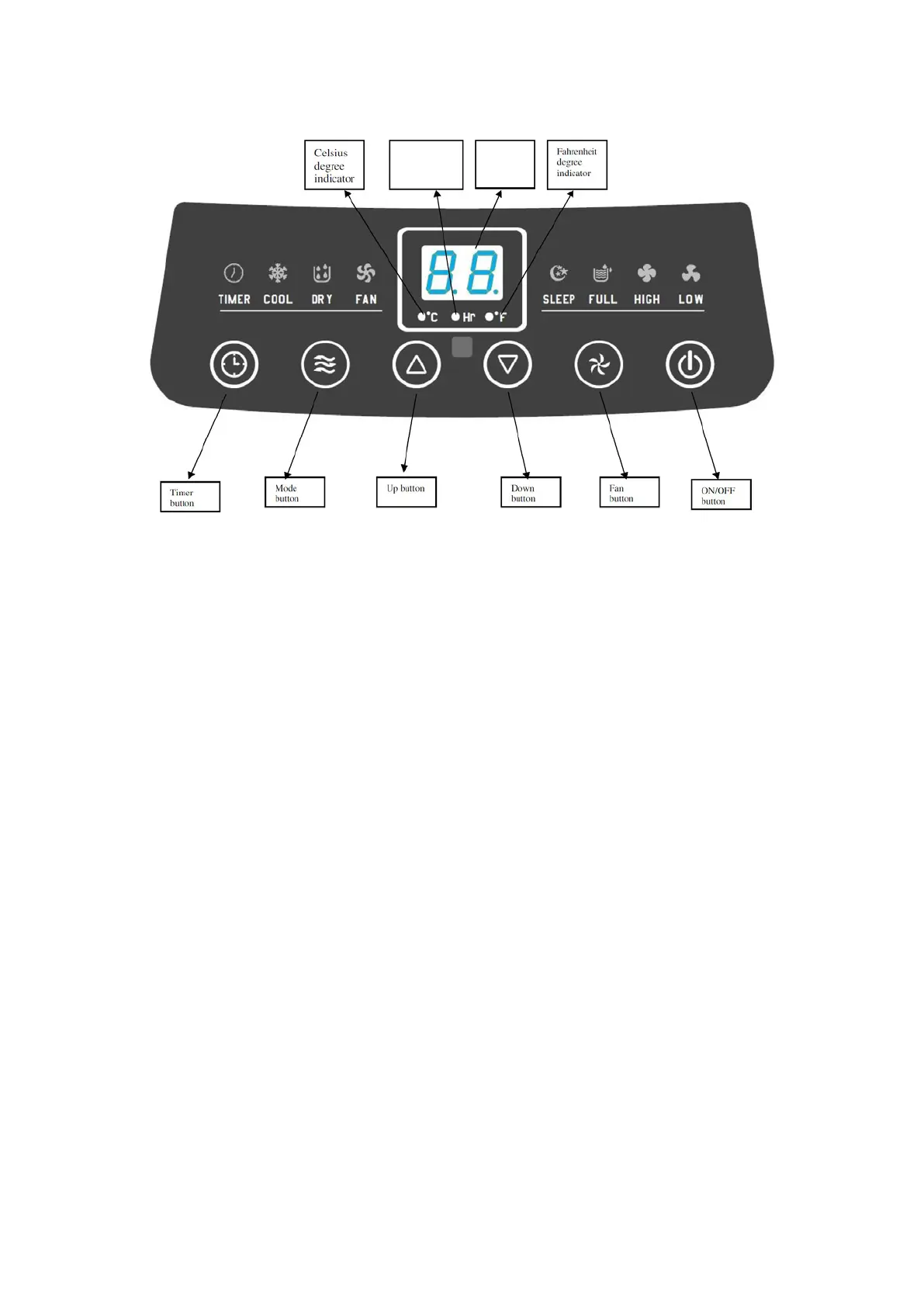
This appliance has three modes: Cooling, Dehumidifying and Fan. The fan has two speeds.
The temperature setting is from 17ºC to 30ºC (62ºF to 86ºF).
1. ON/OFF button
Press this button to turn ON/OFF the appliance.
2. Mode button
Press this button to choose Cooling, Dehumidification and Fan mode when the appliance is
working or Timer on.
3. Fan Speed button
Press this button to select the fan speed of Low and High. This function is not available in
Dehumidifying mode.
4. Timer button
Press this
button to activate Timer-On function in standby mode. When setting the time, the
timer indicator will light and the corresponding timer will illuminate. Press Up and Down button
to increase or decrease the hour from 1 to 24 hours at one hour interval.
When the appliance is in operating condition, press this button to activate Timer-Off function
using the same operating instruction.
5. Temperature/ time Adjusting (Up/Down) button
Press this button during cooling mode to increase/decrease the t
emperature;
Press it at timer mode to adjust timer;
Press Up and Down keys simultaneously to switch Fahrenheit and Centigrade degree
temperature.
This function is not available in Dehumidifying mode.
Timer
indicator
LED
Display


 To Next Page