6
Operation
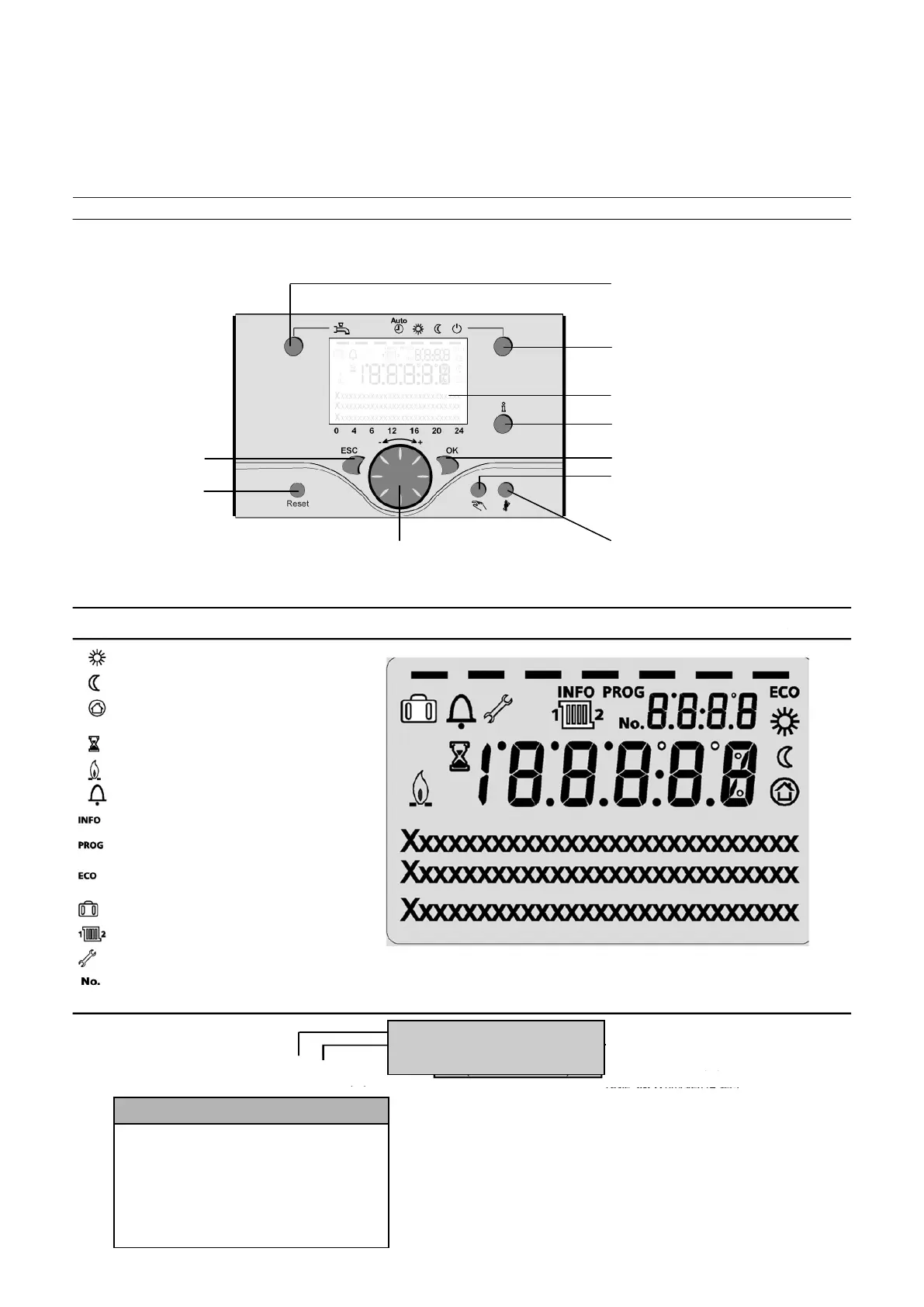
Description of display
Programming
- gew ünschtes Menü
auswählen
- mit Taste OK bestätigen
- mit Taste ESC zurück
zur Grundanzeige
- gew ünschte Benutzer-Ebene auswählen
- mit Taste OK bestätigen
- gew ünschtes Menü auswählen
- mit Taste OK bestätigen
- mit Taste ESC zurück zur Grundanzeige
DHW mode selection
Heating operation mode selection
(Controller Stopp mode when
pressing > 3 sec.)
Display
Info button
Confirm
Manual mode
(Deaeration mode when pressing
> 3 sec.)
Chimney sweeper mode
Enduser
- choose menu
- conf irm w ith OK button
- choose parameter
- conf irm w ith OK button
- change value + - with wheel
- conf irm w ith OK button
- return to main menu w ith ESC button
Heating to comfort setpoint Info level activated
Heating to reduced setpoint Programming
activated
Heating for frost protection setpoint Heating
temporarily switched off
Process running – please weit ECO function
active
Burner operating (only oil / gas boiler)
Error messages
Info level activated
Programming activated
Heating temporarily switched off
ECO function active
Holiday function active
Reference to heating circuit
Maintenance / special operation
Parameter number



 To Next Page