1
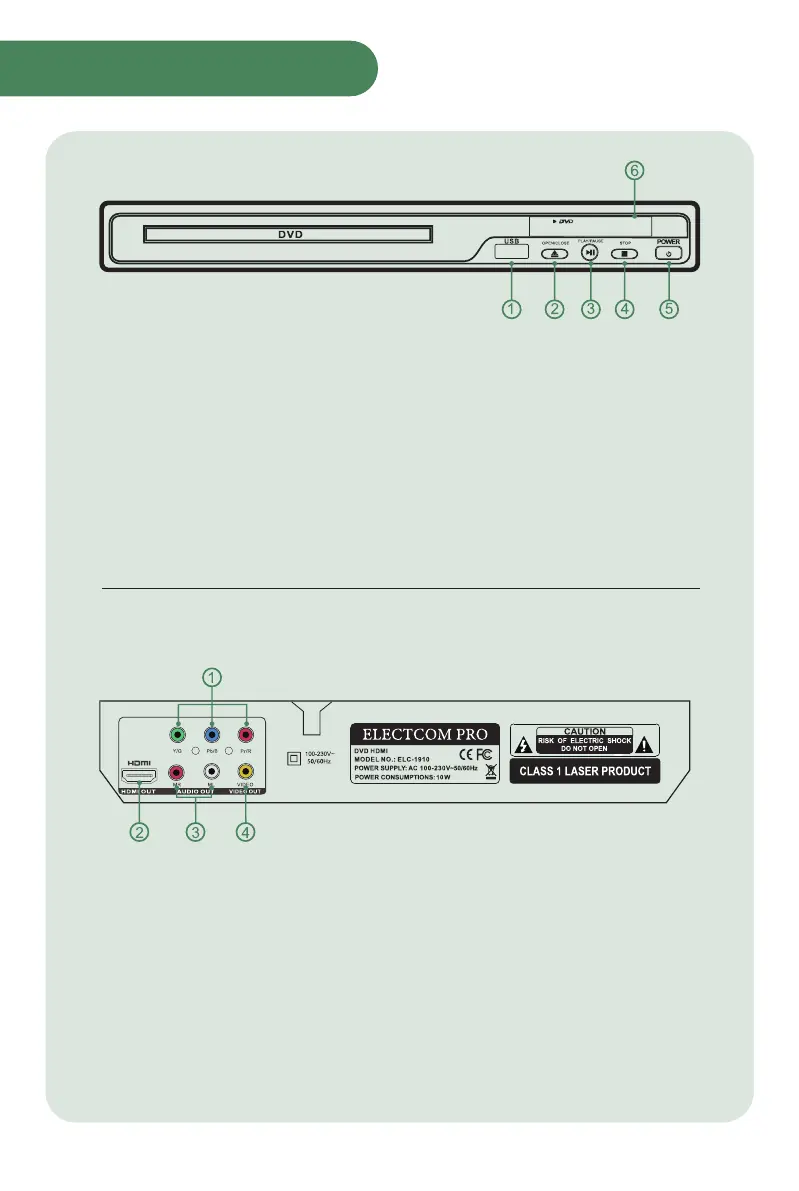
Front Panel
Rear Panel
① USB PORT: Plug in USB
② OPEN/CLOSE BUTTON: Open/close tray
③ PLAY/PAUSE BUTTON: Play start/play pause
④ STOP BUTTON: Return to the beginning of playback
⑤ POWER: Power on/off
⑥ LED DISPLAY: Displays the playing time
①
②
③
④
COMPONENT VIDEO(Y.Pb/Cb. Pr/Cr) OUTPUT:
Video signal output interface
HDMI DIGITAL OUTPUT: HD Video signal output interface
L/R CHANNEL OUTPUT: Audio output interface
VIDEO OUTPUT: Video output interface
38:58
Product Overview



 To Next Page