2
Using the Remote Control
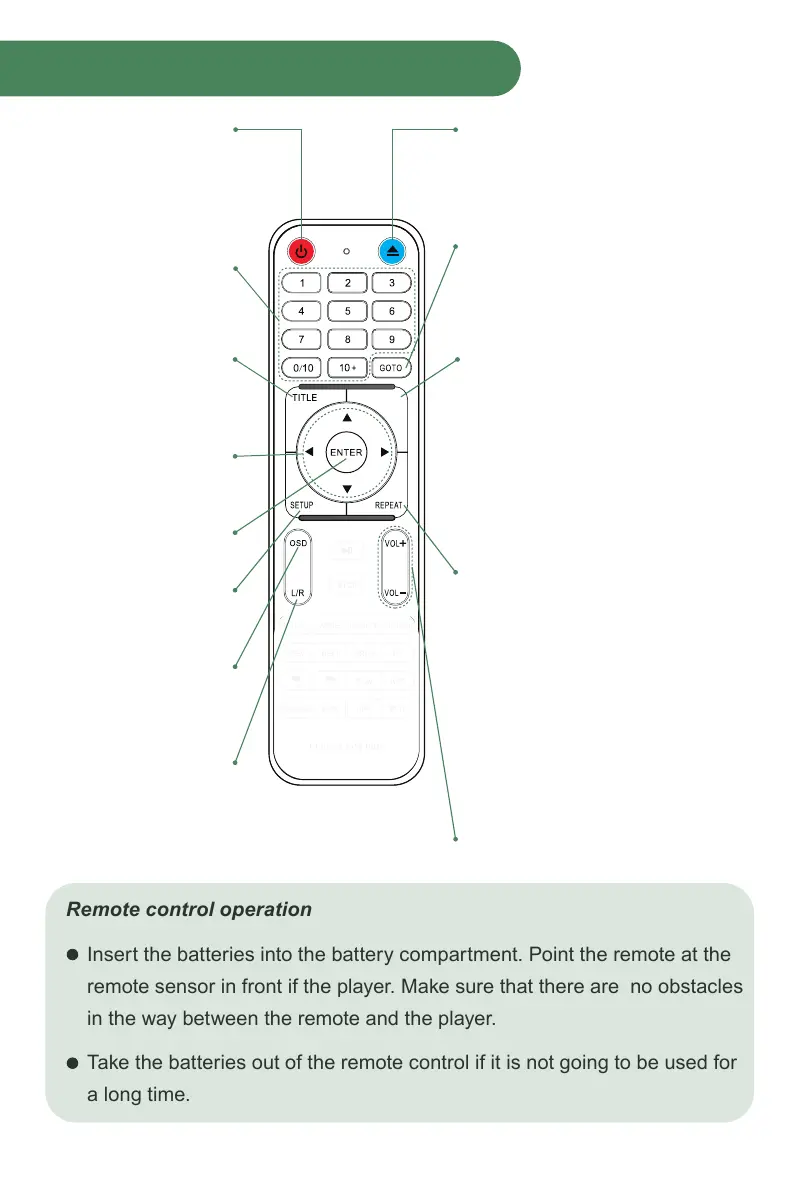
1. POWER ON/OFF
Press to Power On,
press again for Standby
mode.
2. NUMBERS 0-9/10+
While playing
DVD/VCD/CD/MP3
discs, use key to select
desired track/chapter in
menu selection.
3. TITLE
When using DVDs,
press to return to the title
menu.
4. ▲ ◀ ▼ ▶
Select the direction
within the menu.
5. ENTER
Confirm your selection.
6. SETUP
Press to get into SETUP
menu.
7. OSD
Press for the relative
information of the disc
to Display.
8. L/R
When playing VCD or
CD discs. Press button
to select left or right
channel, or stereo.
9. OPEN/CLOSE
Press to load and remove discs.
Place disc into tray with the title side
facing up. Press button again to close
the disc tray.
10. GOTO
Press GOTO button to select title time,
chapter time and track time. You can
use digit keys to input the go to the
specific time.
11. MENU
When playing DVD discs press MENU
once to return to sub menu. Press
MENU again to return to the main
menu.
When playing VCD discs, press MENU
button to turn on PBC, the VCD is
played by menu, press MENU button
again to turn off PBC, then VCD is
played in sequence.
12. REPEAT
Press REPEAT button to repeat a title,
chapter, track or the whole disc.
When playing DVD discs, press
REPEAT button continually, the TV
screen shows chapter repeat, title
repeat, all repeat, repeat cancel in turn.
When playing SVCD, VCD , CD discs,
the sequence is track repeat, all repeat,
repeat cancel.
When playing MP3 discs, the sequence
is single repeat, directory repeat, repeat
cancel.
13. VOLUME+ / VOLUME-
Increase/decrease volume.
MENU
REWIND FORWARD
Remote control operation
Insert the batteries into the battery compartment. Point the remote at the
remote sensor in front if the player. Make sure that there are no obstacles
in the way between the remote and the player.
Take the batteries out of the remote control if it is not going to be used for
a long time.



 To Next Page