3
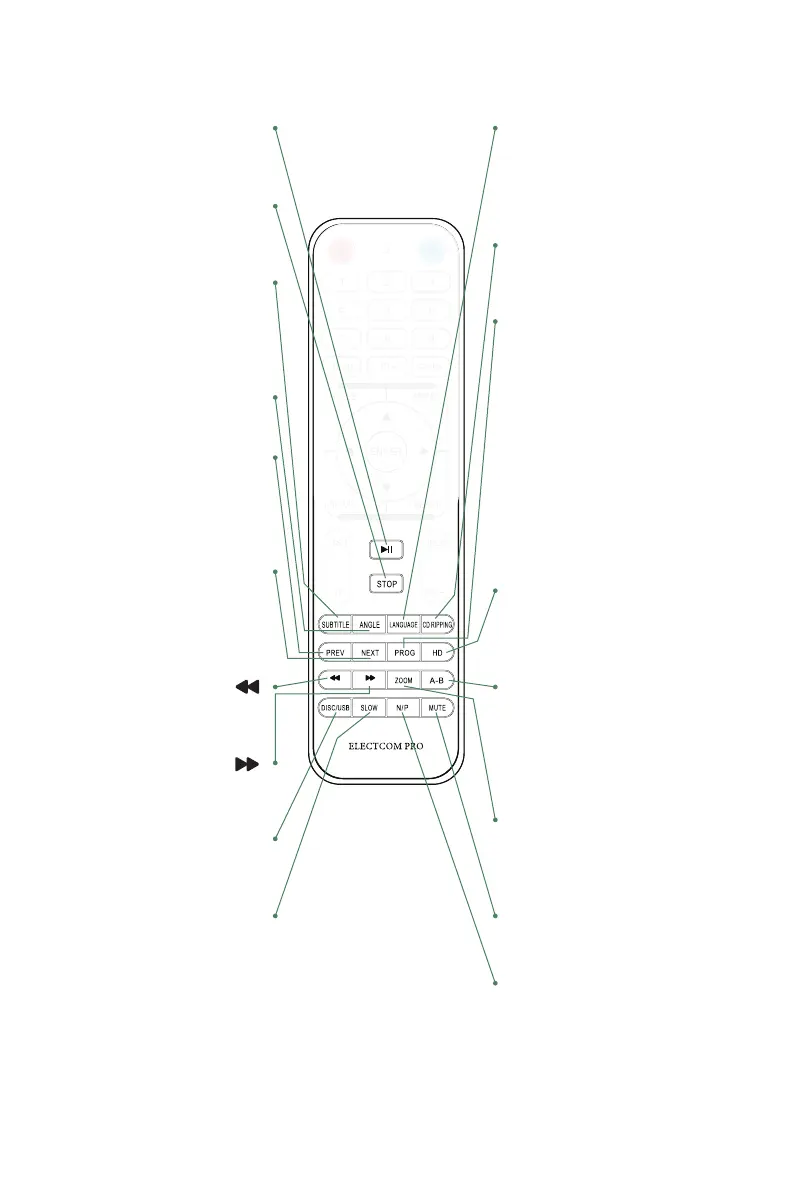
14. PLAY/PAUSE
Press once to pause, press
again to play.
15. STOP
Press to stop media. Press the
Play/Pause button to resume.
16. SUBTITLE
When playing the DVD discs
with multi-subtitles, press
SUBTITLE continually to get to
the language you desire.
17. ANGLE
Change angle in DVD mode.
18. PREV (PREVIOUS,I<<)
In DVD mode, press to go to
previous chapter. With SVCD,
VCD, CD, MP3 discs, press to
go to previous track.
19. NEXT (NEXT, >>I)
In DVD mode, press to go to
next chapter.
With SVCD, VCD, CD, MP3
discs, press to go to next track.
20. REWIND( )
Press this button for quick
rewind search.
21. FORWARD( )
Press this button for quick
forward search.
22. DISC/USB
Press this button to switch the
play between DISC and USB.
23. SLOW
Press to select slow speed
playing.
24. LANGUAGE
When playing DVD with more than
one audio stream, press
LANGUAGE to select what you
desired.
25. CD RIPPING
Press the button to use the CD
ripping function.
26. PROG
If the disc is with 2 or more tracks,
chapters or titles, set up the playing
order as your reference. Press this
button to enter program menu.
Press digit key to input the number
of the track, title or chapter, If the
programmed tracks are over ten
press 10+ to go on programming.
(Maximum 16 programmable items)
use the up / down / left / right key to
move the cursor to the PLAY. Press
ENTER to start Program play.
27. HD
Press the button to choose the
following resolution levels from the
HDMI output.
28. A-B
Press to repeat certain sections.
Press button on start point (A) and
the end point (B) to select section.
Cancel by pressing button a third
time.
29. ZOOM
Press to zoom in, press again to
zoom out. Use arrow keys to move
picture.
30. MUTE
Mute the sound during playing.
31. N/P
Press to switch the TV system
between NTSC and PAL.
MENU
REWIND FORWARD



 To Next Page