EasyManua.ls Logo

Electro-Voice BK-1632 - Bk-1632 Stereo Mixer; Input Channel Controls; Trim

Electro-Voice BK-1632
14 pages
Print Icon
To Next Page IconTo Next Page
To Previous Page IconTo Previous Page
Loading...
BK-1632
STEREO
MIXER
Input
Channel
Controls
SECTION
1.0
1.0
INPUT
CHANNEL
CONTROLS
(Figure
1)
The
input
channel
is
the
beginning
of
the
signal
process¬
ing
phase
of
the
mixer.
Each
input
channel
will
accept
one
signal
source
which
may
be
then
equalized,
have
reverb
or
other
effects
added,
sent
to
a
monitor
system,
and
last
but
not
least,
sent
to
the
main
system
for
the
audience
to
hear.
Each
input
has
a
low
impedance
microphone
input
(the
3-pin
XLR
or
Cannon
connector)
and
a
high
impedance
mic
or
line
input
(Vi
in.
phone
jack).
The
line
input
will
accept
signals
from
an
instru¬
ment,
high-impedance
microphone,
tape
machine,
elec¬
tronic
drummer
or
almost
any
other
audio
source.
Always
make
sure
that
the
channel
fader
(sec.
1H)
or
master
faders
(sec.
2H)
are
down
before
plugging
or
unplugg¬
ing
input
sources.
1
A.
TRIM
The
TRIM
control
adjusts
the
gain
or
amplification
of
the
input
amplifier.
This
is
necessary
to
accom¬
modate
the
wide
varation
in
signal
strength
presented
to
the
mixer
by
the
almost
endless
variety
of
signal
sources
vocal
mics.
instrument
mics,
tape
machines,
etc.
The
TRIM
control
allows
you
to
optimize
the
amplification
for
each
individual
input
source.
This
results
in
the
best
signal-to-noise
ratio
(...
no
hiss)
and
at
the
same
time,
best
freedom
from
overload
distortion.
The
TRIM
control
is
used
to
match
the
gain
of
the
first
preamp
stage
to
the
signal
strength
of
the
source
being
run
through
the
channel.
To
get
the
cleanest,
quietist
operation
from
the
board
it
is
important
that
the
TRIM
control
be
properly
set.
To
set
up
a
mix,
first
set
all
TRIM
controls
at
"O"
(minimum).
Set
all
the
input
and
subgroup
slide
faders
at
"0”.
Then
adjust
the
TRIM
controls
for
a
rough
mix
(see
sec.
11),
and
do
the
fine
tuning
with
EQ
and
faders
as
necessary.
Whenever
possible,
it
is
best
to
try
to
maintain
that
"straight
line”
rela¬
tionship
between
all
faders.
When
this
is
done,
all
the
levels
within
the
console
are
very
close
to
being
optimized
for
the
best
noise
and
distortion
perfor¬
mance.
Once
the
correct
TRIM
setting
is
establish¬
ed,
make
all
volume
adjustments
with
the
appropriate
channel
fader
(sec.
1H).
In
general,
the
lowest
noise
operation
(greatest
dynamic
range)
will
be
obtained
when
the
TRIM
control
is
set
at
a
point
just
below
where
the
CLIP
light
would
flash.
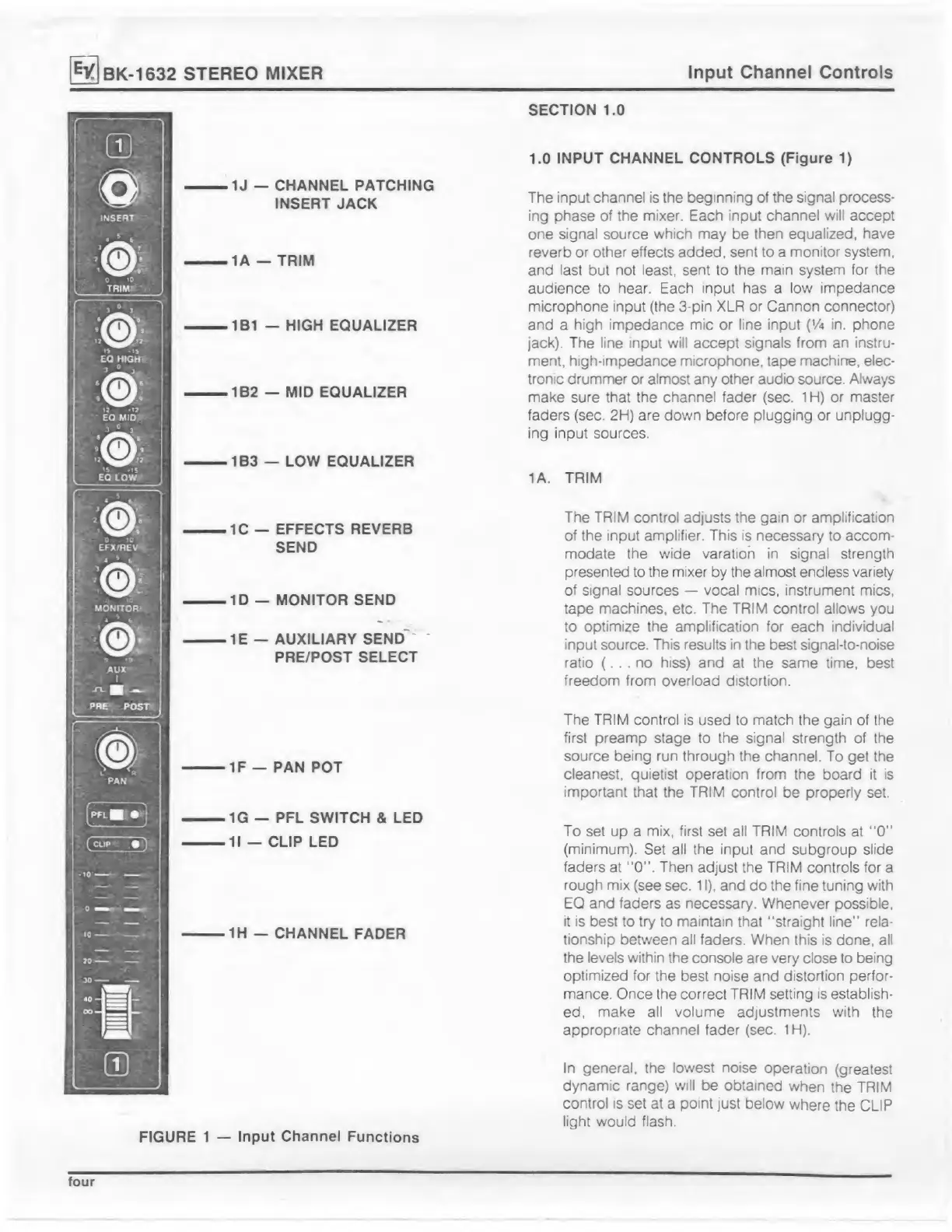
FIGURE
1
Input
Channel
Functions
1J
CHANNEL
PATCHING
INSERT
JACK
>
1A
TRIM
-
1B1
HIGH
EQUALIZER
>
1B2
MID
EQUALIZER
1B3
LOW
EQUALIZER
1C
EFFECTS
REVERB
SEND
ID
MONITOR
SEND
IE
AUXILIARY
SEND
PRE/POST
SELECT
IF
PAN
POT
1G
PFL
SWITCH
&
LED
II
CLIP
LED
1H
CHANNEL
FADER
four

Related product manuals