EasyManua.ls Logo

Electro-Voice BK-1632 - Channel Patching Insert Jack

Electro-Voice BK-1632
14 pages
Print Icon
To Next Page IconTo Next Page
To Previous Page IconTo Previous Page
Loading...
Clip
LED
BK-1632
STEREO
MIXER
set
to
their
designated
normal
operating
points,
the
circuits
in
the
board
are
optimized
for
minimum
noise
and
distortion.
In
other
words,
the
signal
levels
are
high
enough
to
keep
noise
from
creep¬
ing
in
and
low
enough
to
ensure
plenty
of
headroom
and
freedom
from
clipping
distortion.
If
the
fader
must
run
wide
opten
to
get
enough
level,
turn
up
the
TRIM
control
or
increase
the
setting'of
the
left
and
right
submaster
controls.
Conversely,
if
the
fader
must
be
pulled
way
back
to
get
the
right
level,
the
TRIM
control
or
stereo
submasters
should
be
adjusted.
Adjust
the
TRIM
control
if
the
CLIP
LED
lights,
otherwise
adjust
the
stereo
submasters.
For
optimum
performance,
the
channel
FADERS
(sec.
1H)
should
be
run
close
to
the
"0”
mark.
II.
CLIP
LED
The
channel
CLIP
LED
monitors
the
input
channel
circuit
for
clipping
or
overload
(both
before
and
after
the
EQ
section).
If
it
lights,
you
are
bordering
on
distortion.
You’ll
hear
this
in
the
output
as
a
harsh,
blaring
sound
on
volume
peaks
This
might
be
caused
by
excessive
boost
in
the
channel
equalization
controls
(sec.
IB),
or
a
TRIM
control
setting
that
is
too
high
for
the
input
signal
(sec.
1
A).
Generally,
readjusting
the
TRIM
control
(sec.
1A)
will
suffice.
1J.
CHANNEL
PATCHING
INSERT
JACK
(one
supplied
with
the
unit)
This
space
saving
(two-connectors-in-one)
jack
allows
you
to
add
external
signal
processing
gear
to
a
particular
channel,
without
disturbing
any
of
the
other
channels.
A
3-conductor
(stereo)
phone
plug
is
used
for
both
the
output
from
the
channel
preamp,
and
for
the
return
to
the
mixer’s
output
stages
from
the
external
processing
device.
The
diagram
indicates
how
a
channel
patching
cord
should
be
wired.
This
cable
can
also
be
purchas¬
ed
from
any
of
several
audio
cable
manufacturers.
HOW
TO
WIRE
A
CHANNEL
PATCHING
CORD
The
channel
patching
jack
can
be
used
with
equalizers,
limiters,
compressors,
external
reverb
or
dealy
systems
and
the
like.
Just
be
sure
the
device
you
want
to
patch
in
has
line
level
unbalanc¬
ed
inputs
and
outputs.
The
signal
at
the
insert
jack
can
drive
loads
of
2,000
ohms
or
greater,
and
the
external
processing
device
should
have
a
low
out¬
put
internal
impedance
(100
ohms
or
less).
A
nominal
input
signal
is
a
level
of
+4
dBu;
the
maximum
level
is
+20
dBu.
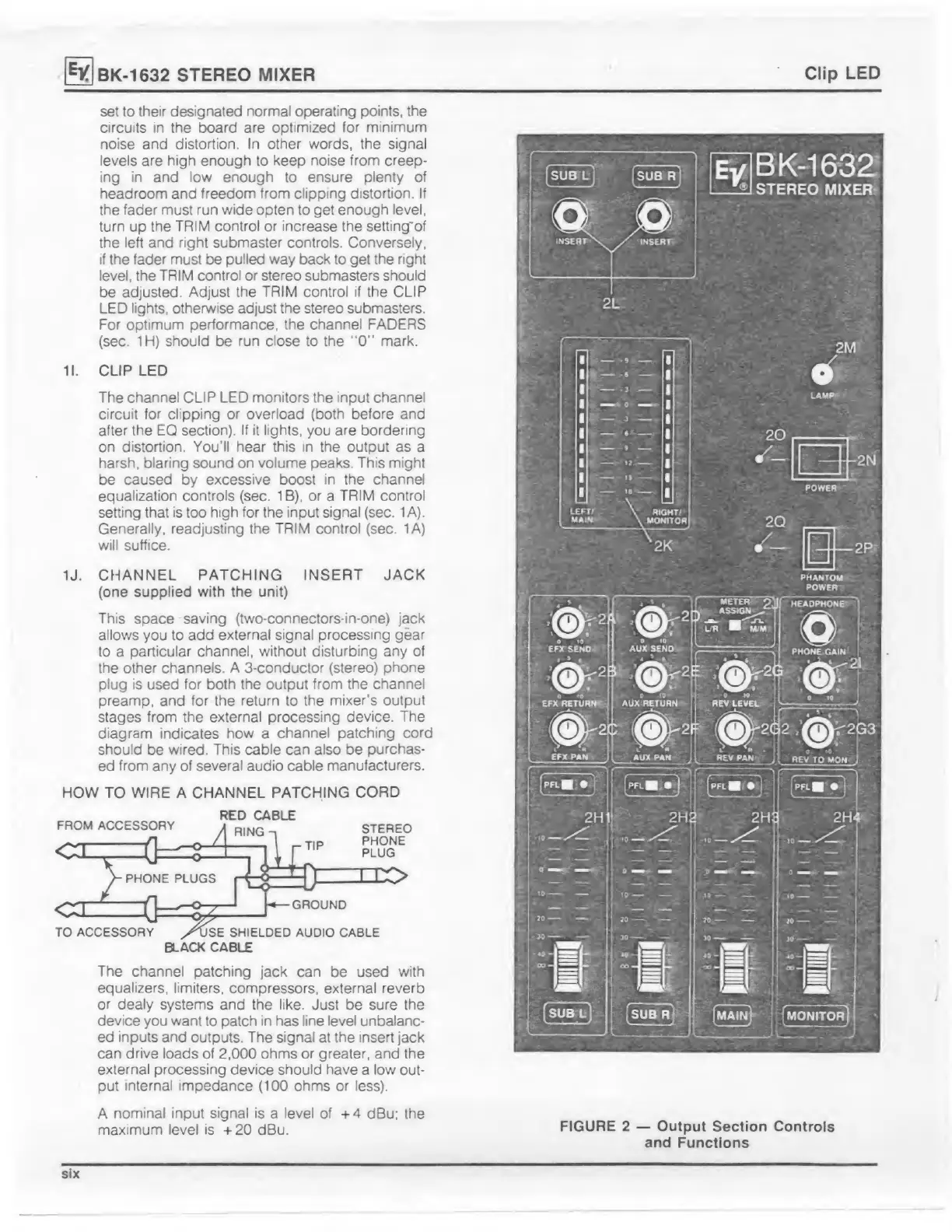
FIGURE
2
Output
Section
Controls
and
Functions
six

Related product manuals