EasyManua.ls Logo

Electro-Voice EVERSE 8 tray - User Manual

Electro-Voice EVERSE 8 tray
2 pages
Print Icon
To Next Page IconTo Next Page
Loading...
Safety
1. Read these instructions.
2. Keep these instructions.
3. Heed all warnings.
4. Follow all instructions.
5. Do not use this apparatus near water other than ex-
plicitly called out in the EVERSE 8 User manual.
6. Clean only with a dry cloth.
7. Do not block any ventilation openings. Install in ac-
cordance with the manufacturer's instructions.
8. Do not install near any heat sources such as radiat-
ors, heat registers, stoves, or other apparatus (includ-
ing amplifiers) that produce heat.
9. Only use attachments/accessories specified by the
manufacturer.
10. Use only with the cart, stand, tripod, bracket, or table
specified by the manufacturer, or with the apparatus.
When a cart is used, use caution when moving the
cart/apparatus combination to avoid injury from tip-
over.
11. Unplug the apparatus during lightning storms or
when unused for long periods of time.
12. No naked flame sources, such as lighted candles,
should be placed on the apparatus.
13. To reduce the risk of fire or electric shock, do not ex-
pose this apparatus to rain or moisture in any other
method than the ones explicitly called out in the
EVERSE 8 User manual. The apparatus should not be
exposed to dripping or splashing without the in-
cluded weather cover or accessory rain cover, as
covered in the EVERSE 8 User manual. Objects filled
with liquids, such as vases should not be placed on
apparatus.
!
Warning!
Do not suspend this product in any other man-
ner than explicitly described in the EVERSE 8
User manual, or Electro-Voice installation
guides. Do NOT use handles to suspend the
loudspeaker. Handles on Electro-Voice loud-
speakers are intended to only be used for tem-
porary transport by people. Items, such as fiber
rope, wire rope, cables, or other types of ma-
terials cannot be used to suspend loudspeaker
from the handles.
!
Warning!
Use of non-authorized accessories or attach-
ments with this or any Electro-Voice product is
at your own discretion. Use of non-authorized
accessories or attachments can result in
product malfunction, injury, or death.
The user assumes all liability and may result in
the warranty being voided.
Short information
Parts included
Quantity Component
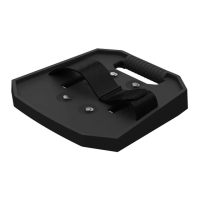
1 Tray mounting base
1 Tray
1 Hook and loop strap
1 DC power cable
1 Quick installation guide
Features
Mounting tray with a secure mounting surface for
wireless microphone receivers like Electro-Voice RE3
or R300, and other equipment such as tablets or
smartphones.
DC power cable included to power your RE3 or R300
receiver with the EVERSE8’s battery.
Available in black and white.
Connection
i
Notice!
Power off both the EVERSE 8 speaker and the
wireless microphone receiver before connect-
ing the tray.
To attach the EVERSE8 tray:
1. Clip the handle adapter on the EVERSE 8 speaker
handle.
The arrow in the handle adapter should point to-
wards the front of the speaker.
2. Line up the screws of the handle adapter with the
screw holes on the tray.
3. Finger tighten the screws.
To attach and connect a wireless microphone
receiver to the EVERSE8 speaker:
1. Place the wireless microphone receiver on top of the
EVERSE8 tray.
2. Secure the wireless microphone receiver with the
hook and loop strap.
3. Connect one end of the DC power cable to the DC
power output on the EVERSE8 speaker.
4. Connect the other end of the DC power cable to the
wireless microphone receiver.
i
Notice!
Ensure you are using the supplied DC power
cable to connect your EVERSE8 speaker to the
Electro-Voice Electro-Voice RE3 or R300 wire-
less microphone receivers.
Always ensure voltage, current and polarity are
correct for the devices you are connecting.
Refer to your devices user manual for details on
operation.
5. Connect one end of the XLR cable to the XLR input
on the EVERSE8 speaker (
INPUT1
or
INPUT2
).
6. Connect the other end of the XLR cable to the wire-
less microphone receiver XLR output.
7. Power on the EVERSE8 speaker.
8. Press the input selection soft key to select the input
channel (
INPUT1
or
INPUT2
).
The soft key will illuminate once selected.
9. Adjust the selected input level to
MUTE
.
10. Power on the wireless microphone receiver.
Ensure the receiver audio level is adjusted according
to the wireless system instructions.
11. Increase the selected
INPUT
level to the desired
level.
Refer to the EVERSE 8 User manual for details on set-
ting input and system levels.
i
Notice!
For more information on adjusting microphone
levels, refer to chapter 6 of the EVERSE8 User
manual, Input & Mixer operation.
Technical data
Material Polypropylene
Color Black or white
Cable length (mm) 500mm
Cable length (in) 19.7in
Cable color Black
Connector OD (mm) 5.5mm
Connector ID (mm) 2.5mm
Connector length (mm) 11mm
Polarity Center positive
Weight (kg) 0.493kg
Weight (lb) 1.0lb
Shipping weight (kg) 0.810kg
Shipping weight (lb) 1.8lb
Dimension (H x W x D)
(mm)
60 mm x 274 mm x 271 mm
Dimension (H x W x D) (in) 2.4 in x 10.74 in x 10.66 in
Shipping dimension (H x W
x D) (mm)
310mm x 330mm x 88mm
Shipping dimension (H x W
x D) (in)
12.2in x 13.0in x 3.5in
Dimensions
271
[10.66]
274 [10.74]
60
[2.4]
mm [in]
Question and Answer IconNeed help?

Do you have a question about the Electro-Voice EVERSE 8 tray and is the answer not in the manual?

Summary

Safety Instructions and Warnings

General Safety Precautions

Standard safety guidelines for operating the apparatus, including water avoidance and ventilation.

Critical Usage Warnings

Important advisories regarding product suspension, non-authorized accessories, and potential risks.

Product Overview and Features

Included Components

Lists all parts included in the package for the EVERSE8 tray.

Key Features

Highlights the mounting tray's functionality for receivers and DC power capability.

Connection and Setup Guide

Attaching the EVERSE8 Tray

Step-by-step instructions for attaching the tray to the EVERSE 8 speaker handle.

Connecting Wireless Microphone Receiver

Procedure for connecting a wireless microphone receiver using DC and XLR cables.

Technical Specifications

Material, Color, and Cables

Details on the materials, color options, and specifications of included cables.

Weight and Dimensions

Provides weight, shipping weight, and physical dimensions in metric and imperial units.

Summary

Safety Instructions and Warnings

General Safety Precautions

Standard safety guidelines for operating the apparatus, including water avoidance and ventilation.

Critical Usage Warnings

Important advisories regarding product suspension, non-authorized accessories, and potential risks.

Product Overview and Features

Included Components

Lists all parts included in the package for the EVERSE8 tray.

Key Features

Highlights the mounting tray's functionality for receivers and DC power capability.

Connection and Setup Guide

Attaching the EVERSE8 Tray

Step-by-step instructions for attaching the tray to the EVERSE 8 speaker handle.

Connecting Wireless Microphone Receiver

Procedure for connecting a wireless microphone receiver using DC and XLR cables.

Technical Specifications

Material, Color, and Cables

Details on the materials, color options, and specifications of included cables.

Weight and Dimensions

Provides weight, shipping weight, and physical dimensions in metric and imperial units.

Overview

The EVERSE 8 tray is an accessory designed to enhance the functionality of the EVERSE 8 speaker system, primarily by providing a secure and convenient mounting solution for wireless microphone receivers and other portable equipment. This tray is available in both black (EVERSE8-TRAY-B) and white (EVERSE8-TRAY-W) to match the aesthetic of the EVERSE 8 speaker.

Function Description

The primary function of the EVERSE 8 tray is to offer a stable platform for mounting wireless microphone receivers, such as Electro-Voice RE3 or R300 models, as well as other devices like tablets or smartphones, directly onto the EVERSE 8 speaker. This integration streamlines the setup for live performances, presentations, or any event requiring a portable sound system with wireless audio capabilities. The tray ensures that the receiver is securely positioned, preventing accidental dislodgement and maintaining a tidy setup.

A key feature of the EVERSE 8 tray system is the included DC power cable. This cable is specifically designed to power RE3 or R300 receivers directly from the EVERSE 8 speaker's internal battery. This eliminates the need for separate power sources for the receiver, simplifying cable management and extending the operational time of the wireless system in portable applications. The cable is designed with specific connector dimensions and polarity (center positive) to ensure compatibility and safe operation with the intended receivers.

Usage Features

The EVERSE 8 tray is designed for straightforward installation and integration with the EVERSE 8 speaker.

Installation of the Tray:

  1. Handle Adapter Attachment: The process begins by clipping a handle adapter onto the EVERSE 8 speaker handle. An arrow on the adapter guides the correct orientation, ensuring it points towards the front of the speaker.
  2. Tray Alignment and Securing: The handle adapter features screw holes that align with corresponding holes on the tray. Users then finger-tighten the screws to secure the tray to the handle adapter, creating a robust mounting point.

Attaching and Connecting a Wireless Microphone Receiver:

  1. Receiver Placement: Once the tray is installed, the wireless microphone receiver is simply placed on top of the EVERSE 8 tray. The tray's design provides a secure mounting surface.
  2. Receiver Securing (Optional but Recommended): For added stability, especially in dynamic environments, the wireless microphone receiver can be secured to the tray using the provided hook and loop strap. This prevents the receiver from shifting or falling during transport or use.
  3. DC Power Connection: The included DC power cable connects the DC power output on the EVERSE 8 speaker to the wireless microphone receiver. It is crucial to ensure that the voltage, current, and polarity (center positive) are correct for the devices being connected. Users should always refer to their device's user manual for detailed operational information.
  4. Audio Connection: An XLR cable is used to connect the XLR output of the wireless microphone receiver to one of the XLR inputs (INPUT1 or INPUT2) on the EVERSE 8 speaker. This establishes the audio signal path from the receiver to the speaker.

System Operation:

  1. Powering On: After all connections are made, the EVERSE 8 speaker is powered on first, followed by the wireless microphone receiver.
  2. Input Selection: On the EVERSE 8 speaker, the user presses the input selection soft key to choose the corresponding input channel (INPUT1 or INPUT2) where the receiver is connected. The soft key illuminates to indicate selection.
  3. Level Adjustment: Initially, it is recommended to adjust the selected input level on the EVERSE 8 speaker to MUTE. Then, the receiver's audio level should be adjusted according to its specific wireless system instructions. Finally, the selected input level on the EVERSE 8 speaker can be gradually increased to the desired level. The EVERSE 8 user manual provides further details on setting input and system levels, as well as adjusting microphone levels.

The tray's design prioritizes ease of use and integration, making it a practical addition for users who frequently employ wireless microphones with their EVERSE 8 speaker.

Maintenance Features

The EVERSE 8 tray is designed for minimal maintenance, focusing on durability and ease of cleaning.

  • Material: Constructed from polypropylene, the tray is inherently robust and resistant to typical wear and tear encountered in portable audio setups. Polypropylene is also easy to clean.
  • Cleaning: The manual specifies cleaning the apparatus with only a dry cloth. This suggests that the tray, being an accessory to the speaker, should also be maintained in a similar manner to preserve its finish and integrity. Avoid using harsh chemicals or abrasive materials that could damage the polypropylene surface.
  • Durability: The components, including the tray, handle adapter, and straps, are designed for repeated use and attachment. The finger-tightening mechanism for securing the tray ensures that no specialized tools are required for assembly or disassembly, facilitating quick setup and breakdown.
  • Cable Care: The included DC power cable should be handled with care. Avoid sharp bends or excessive pulling that could damage the cable or its connectors. Regular inspection of the cable for any signs of wear or damage is recommended to ensure safe and reliable power delivery.
  • Storage: When not in use, the tray can be easily detached and stored. Its compact dimensions allow for convenient storage alongside the EVERSE 8 speaker or other accessories.

Overall, the EVERSE 8 tray is a practical, user-friendly accessory that extends the versatility of the EVERSE 8 speaker system by providing a secure and integrated solution for wireless microphone receivers and other portable devices, all while requiring minimal upkeep.

Electro-Voice EVERSE 8 tray Specifications

General IconGeneral
CompatibilityBluetooth
MaterialPolypropylene
ColorBlack
Drivers8" Woofer
InputsXLR
OutputsXLR
Battery LifeUp to 12 hours

Related product manuals