EasyManua.ls Logo

Electro-Voice EVERSE12-US - User Manual

Electro-Voice EVERSE12-US
84 pages
Print Icon
To Next Page IconTo Next Page
Loading...
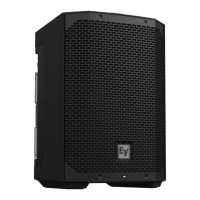
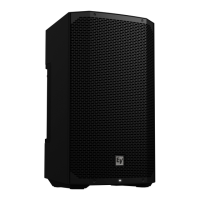
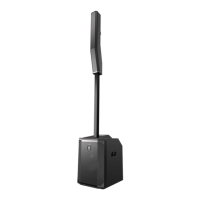
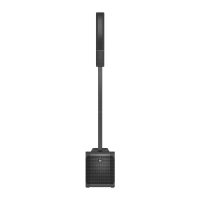
EVERSE Battery‑powered Loudspeaker
EVERSE8‑US, EVERSE8‑EU, EVERSE8‑W, EVERSE12‑EU,
EVERSE12‑US
en
User manual

Questions and Answers

  • M
    Miss Brianna Wilson DVMAug 15, 2025
    What to do if QuickSmart Mobile app does not detect Electro-Voice loudspeaker?
    • K
      Kelsey DunnAug 16, 2025
      To resolve the issue where the QuickSmart Mobile app doesn't detect the Electro-Voice loudspeaker, ensure Bluetooth is enabled on the loudspeaker. For Android devices, ensure location services are activated. Remove the loudspeaker from iOS/Android device settings and restart pairing. Verify that your phone or tablet has the required OS version and the latest updates installed, and ensure the latest QuickSmart Mobile App is installed.
  • B
    Bruce DavisAug 18, 2025
    What to do if Electro-Voice Speakers sound is distorted?
    • B
      Bobby StevensonAug 18, 2025
      If your Electro-Voice Speakers sound is distorted and the front LED is off while the LCD screen shows 'LIMIT' is on, it means the input level is too high. To fix this, reduce the input level or the loudspeaker level knobs to prevent limiting. It may also be caused by an incorrect gain structure or an overdriven source input (mixing console/preamp). Verify the level controls of the source are properly structured by using the VU meter indicator on the LCD screen.
  • K
    Kaitlyn PriceAug 21, 2025
    Why do my Electro-Voice Speakers produce constant noise?
    • T
      tristan83Aug 21, 2025
      If your Electro-Voice Speakers produce constant noise like buzzing, hissing, or humming, there could be several reasons. It might be a defective source or another electronic device; evaluate each component to isolate the problem. Another cause may be poor system grounding or a ground loop; check and correct the system grounding as needed. Ensure the input gain is at a microphone level by slowly increasing the input level to engage the microphone pre-amp. If you're using a mobile device connected via USB and a 3.5 mm jack simultaneously, connect the audio via Bluetooth or disconnect from the USB jack.
  • T
    tonyathompsonAug 25, 2025
    How to troubleshoot no sound from Electro-Voice Speakers?
    • J
      jane59Aug 25, 2025
      If your Electro-Voice Speakers aren't producing sound, improper gain could be the reason. Verify all sources are on. If using a condenser microphone, ensure it's plugged into INPUT 1 via XLR and phantom power is enabled in the menu. Inspect the VU meters on the LCD or in the app; if there's a signal, increase the input and gain controls. If there's no signal, check the wiring. Also, check all cables between the source and the loudspeaker with a multimeter or cable tester and replace any questionable cables.
  • J
    Joshua StokesAug 27, 2025
    Why does my Electro-Voice EVERSE12-US microphone produce acoustic feedback?
    • M
      Michelle SmithAug 27, 2025
      If you're experiencing acoustic feedback from the microphone when the input level is amplified on your Electro-Voice Speakers, first, enable Automatic Feedback Suppression in the DSP Control menu. Also, reduce the microphone levels at the mixing console or input source to correct the gain structure. Change the mode to 'LIVE' or 'SPEECH'. Finally, position the loudspeakers so the microphone is behind them whenever possible.
  • P
    Pamela YoungAug 30, 2025
    What to do if Electro-Voice EVERSE12-US have intermittent output?
    • J
      Justin DavisAug 30, 2025
      If your Electro-Voice Speakers have intermittent output with cracking or distortion, the cause may be a faulty connection. Check all connections at the loudspeaker to ensure they are clean and tight. If the problem persists after checking the connections, inspect the wiring.
  • L
    Laura WilcoxSep 2, 2025
    Why do my Electro-Voice EVERSE12-US Speakers have poor low-frequency response?
    • C
      clinton11Sep 2, 2025
      If your Electro-Voice Speakers have poor low-frequency response, several factors could be responsible. If the SUB menu crossover frequency is activated and no subwoofers are in use, select the OFF position. If SPEECH mode is active, change the mode to MUSIC, LIVE, or CLUB in the DSP control menu. If the input preset is not set to FLAT, change the preset to FLAT in the INPUT DSP control menu. If EQ is active, reset all EQs in the low frequencies in the INPUT and DSP control menu.
  • R
    raymeaganSep 5, 2025
    What to do if Electro-Voice EVERSE12-US Speakers produce no sound with a microphone?
    • M
      Michele WalkerSep 5, 2025
      If your Electro-Voice Speakers aren't producing sound when a microphone is connected to INPUT 1 or INPUT 2, it might be because the microphone requires phantom power. Use a dynamic microphone that does not require phantom power. If using a microphone requiring phantom power, connect it to INPUT 1 via the XLR connector and enable phantom power. Also, slowly increase the input gain knob level to engage the microphone pre-amp.
  • K
    Kelly BrownSep 8, 2025
    How to unlock the DSP control menu on Electro-Voice EVERSE12-US?
    • L
      Lisa BraunSep 8, 2025
      If the DSP control menu on your Electro-Voice Speakers is locked, it's likely because the menu LOCK function has been turned on. To unlock it, press the MASTER VOL knob or input selection soft keys.
  • H
    hooverkevinSep 12, 2025
    What to do if Electro-Voice Speakers don't react to power cycles?
    • S
      Sonya MorrisSep 12, 2025
      If your Electro-Voice Speakers are not reacting to user interaction or power cycles, it may be due to an unforeseen internal operation failure. Try removing the mains and battery, then put the battery back into the loudspeaker. Alternatively, press and hold the soft key for INPUT 1 and INPUT 2 for at least 10 seconds.

Summary

Safety

Important safety instructions

Essential guidelines for safe operation and usage of the loudspeaker.

Battery and internal charger safety rules

Rules for the safe handling, charging, and maintenance of the battery.

Description

Quick setup

Step-by-step guide for initial setup and basic operation of the loudspeaker.

Pairing the QuickSmart Mobile app

Operation

Installation and charging of battery pack

Instructions for installing, charging, and maintaining the battery pack.

Amplifier DSP

Amplifier DSP controls

Overview of the physical controls and interface on the amplifier panel.

DSP controls

Navigation and usage of the digital signal processing (DSP) control menu.

Input & Mixer operation

INPUT DSP control menu

How to control input channels using the DSP menu in MIXER mode.

Troubleshooting

Technical data

Electro-Voice EVERSE12-US Specifications

General IconGeneral
Speaker Type2-way
Power Rating400 W
Frequency Response55 Hz - 20 kHz
Frequency Range (-10 dB)50 Hz - 20 kHz
Max SPL126 dB
Coverage (H x V)90° x 60°
Amplifier Power400 W
BluetoothYes
Battery LifeUp to 12 hours
Enclosure MaterialPolypropylene
TypePowered
Woofer Size12 inch
Crossover Frequency2 kHz
Inputs2 x XLR/TRS combo, 1 x 3.5mm stereo
ConnectorsXLR, TRS, 3.5mm
Outputs1 x XLR
Tweeter Size1 inch
Drivers12" LF driver, 1" HF driver
Tweeter1 in Titanium Dome Tweeter

Related product manuals