5
QUICK SETUP: TRANSMITTER
1. WiththePowerswitchonthetransmitterOFF,installtwofreshAAbatteriesintothetransmitter.
2. PressthetransmitterPowerSwitchuntilthedisplaycomeson.
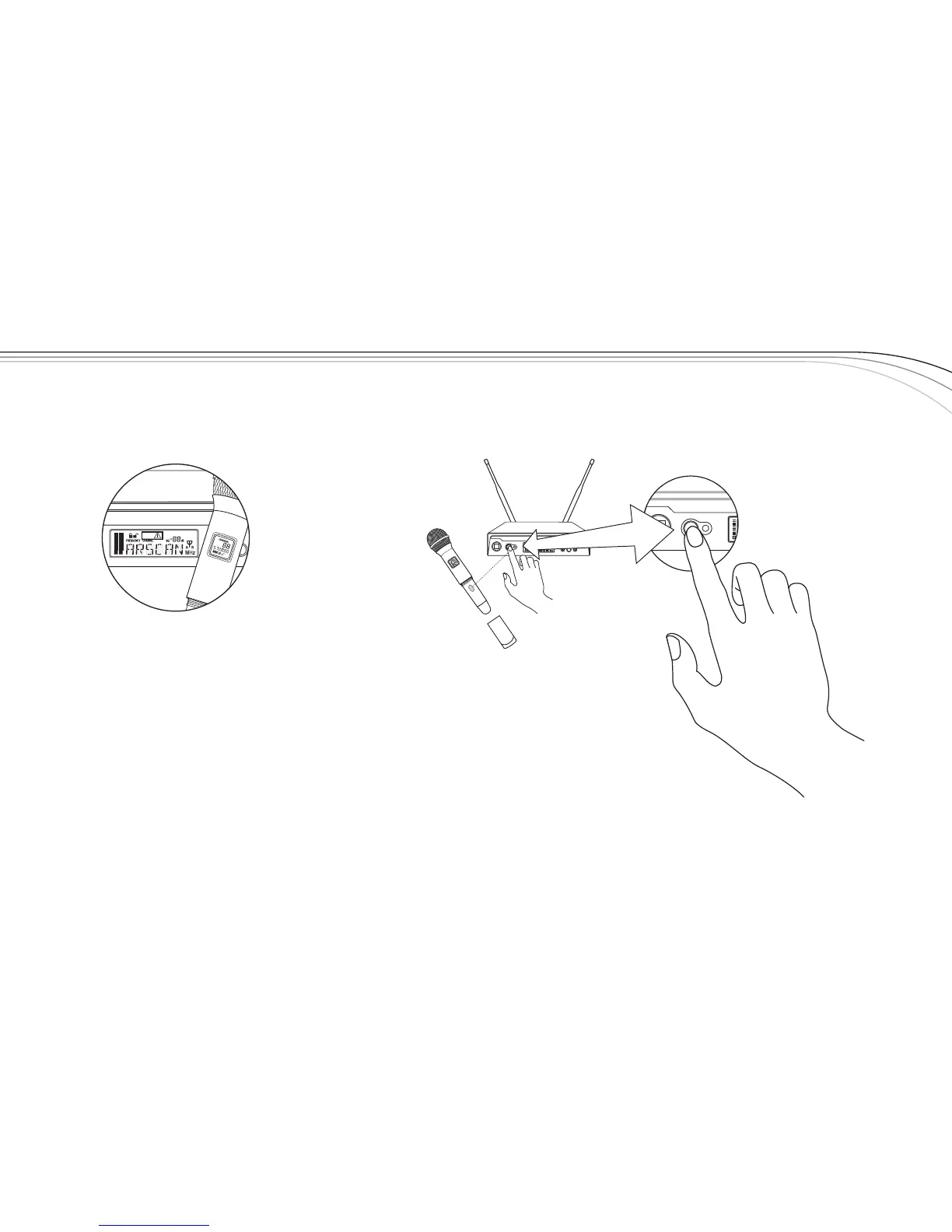
3. LoosenthetransmitterbatterycovertoexposetheEZsyncPort,asshown.
4. HoldthetransmitterwiththeEZsyncPortfacingthereceiver,abouta
foot(30cm)away.*
5. PresstheSYNCButtononthereceiver,SYNCwillshowinthedisplay.
6. Oncethechannelissetinthetransmitter,thedisplaywillswitchtothemain
displayandshowRFandAudioLevels.
*Note: WhenperformingEZsync,makesurelightingconditionsarenottoobright.Extremely
brightlightingcaninterferewithEZsync.
Transmitter “Quick Set-up” is complete.
SYNC
R300
EZsync
Clear
SET
SYNC
EZsync



 To Next Page