14
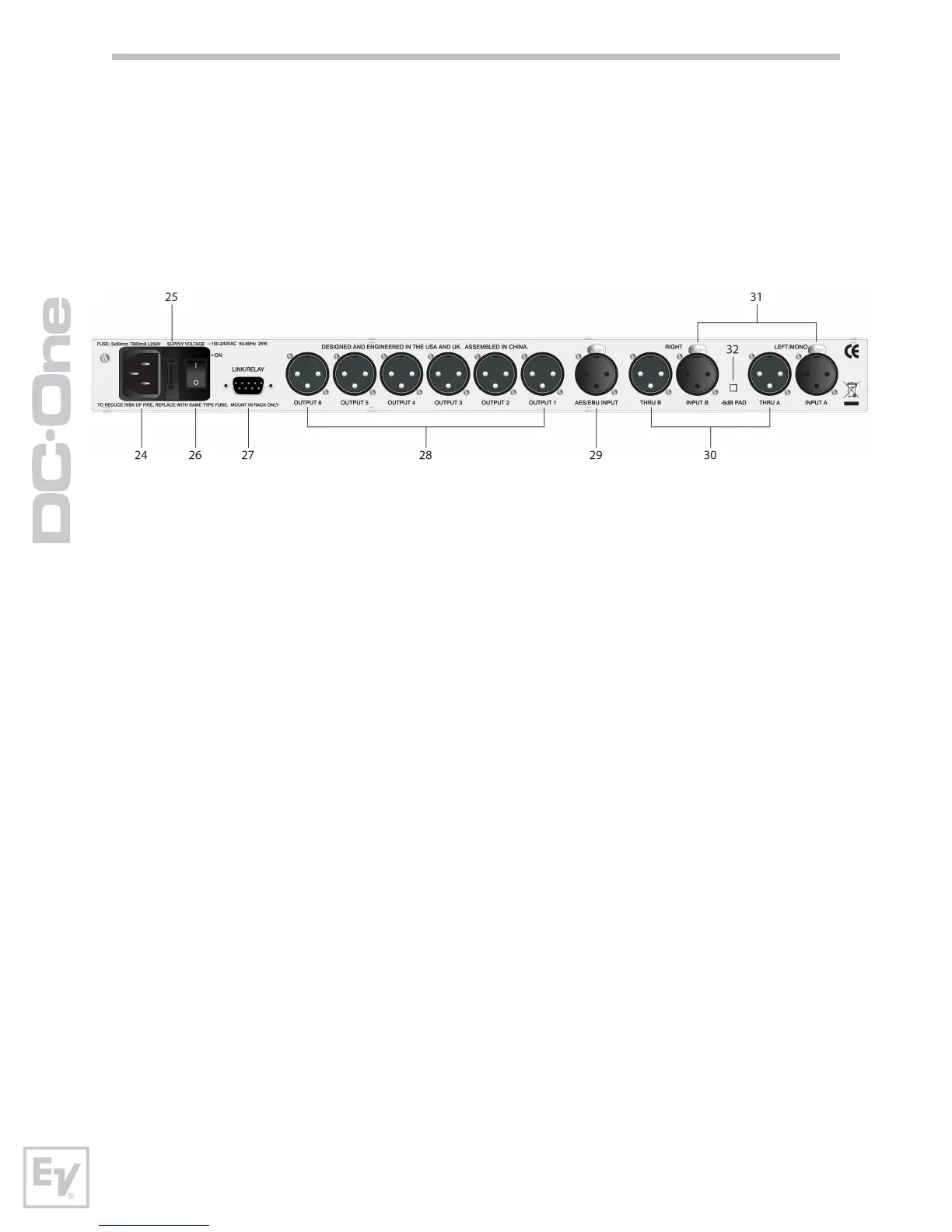
Rear Panel
24- A.C. Inlet
The DC-One features a standard IEC A.C. inlet that will accept universal
power cords. The DC-One power supply is auto-ranging and can accept
voltages from 100 - 240VAC, 50 – 60Hz. Only A.C. cords approved for use in
your country should be connected to the DC-One.
25 – A.C. Fuse
The A.C. inlet includes a fuse holder that contains the mains fuse as well as a
spare fuse. If necessary, replace the fuse only with a specified 5x20mm,
T800mA, L250V replacement. Disconnect A.C. power before replacing a fuse.
Before turning the unit back on, assess the condition of the A.C. receptacle
powering the DC-One. If fuses continue to blow, refer servicing of the DC-One
only to qualified service personnel.
26 – A.C. Power Switch
The A.C. power switch turns power to the DC-One On and Off.
27 – Link/Relay Interface
The operating mode of this dual purpose interface is selected in the Setup
menu. Operating modes are:
RS-232 Interface – Used to link two DC-Ones together in a Master /
Slave setup. Connection is made via a standard 9-pin null-modem serial
interface cable with female connectors.
Contact Closure Port – Eight contact closure pins plus ground for
interfacing to 5v contact closure systems. Each pin can be assigned a
preset that is recalled when voltage on that pin is detected. The lowest
pin number takes priority in multiple controller systems.
23 – Output Channel Function Indicators
Each output channel has a four-segment function display for informational
purposes only. For any given configuration possible with the DC-One, an
output channel may be identified as a sub, low, low/mid, mid, mid/hi, hi or
full range output. One or two adjacent LED are displayed to indicate all
possible output bandpasses. (Full range is indicated by no lit LED’s.)





 To Next Page