8
• The timing of Automatic DST/Summer Time employed by the unit
(see above) is subjected to variations by region and the law in each
country/region. In such a case, cancel the Automatic DST/Summer Time
adjustment.
• If you live in a country/region that has not introduced Daylight Saving
Time/Summer Time, you must cancel Automatic DST/Summer Time
adjustment before using the unit.
Setting the Date & Time
To change the Date/Time, press and hold the
button. The settings will
appear in the following order:
YEAR > MONTH > DAY > 12/24 H > HOUR > MIN
1. Press the
or buttons to toggle through the settings
2. To conrm your selection, press the
button once again.
Setting Alarm 1 & Alarm 2
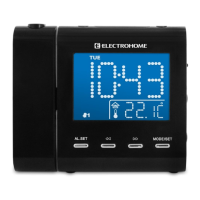
Press the ALARM 1
or ALARM 2 button once to view the current alarm
setting and then press and hold to enter the alarm set mode. The alarm time will
ash, and the settings will appear in the following order:
HOUR > MIN > ALARM MODES > WAKE OPTIONS > RADIO VOLUME
(if applicable)
3. Press the or buttons to decrease/increase the HOUR; press the
or button to conrm HOUR. The MINUTES will begin to ash.
4. Press the
or buttons to decrease/increase the MINUTES; press the
or button to conrm MINUTES. Alarm modes will ash.
Alarm modes allow you to set more than one alarm in a week e.g.,
ALARM 1
set to wake you Monday-Friday and ALARM 2 set to wake
you on weekends.
Alarm mode settings:
1-5 : Monday to Friday
1-7 : Whole week
6-7 : Saturday & Sunday
1-1 : One day of week


 To Next Page