Electronic Control
3-22
Service Mode For Perfect Temp
™
Drawer
Activation
This mode is accessible only when the drawer is in OFF
mode. Press and hold the temperature decrease key (–)
and the temperature increase key (+) for 5 seconds.
Deactivation
Press and hold the temperature (+) key for 5 seconds, or
no keys pressed in 5 minutes returns to the OFF mode
of operation.
Test Operation
The up/down buttons will be used to navigate through
the tests and the ON/OFF button will be used to initiate
the displayed test.
Fan Test
Display shows “F1” for fan on test or “F0” for fan off test.
Heater Test
Display shows “H1” for heater ON or “H0” for heater
OFF.
Damper Test
Display shows “d1” for damper open, or “d0” for damper
closed. Damper movement nay take 30 seconds.
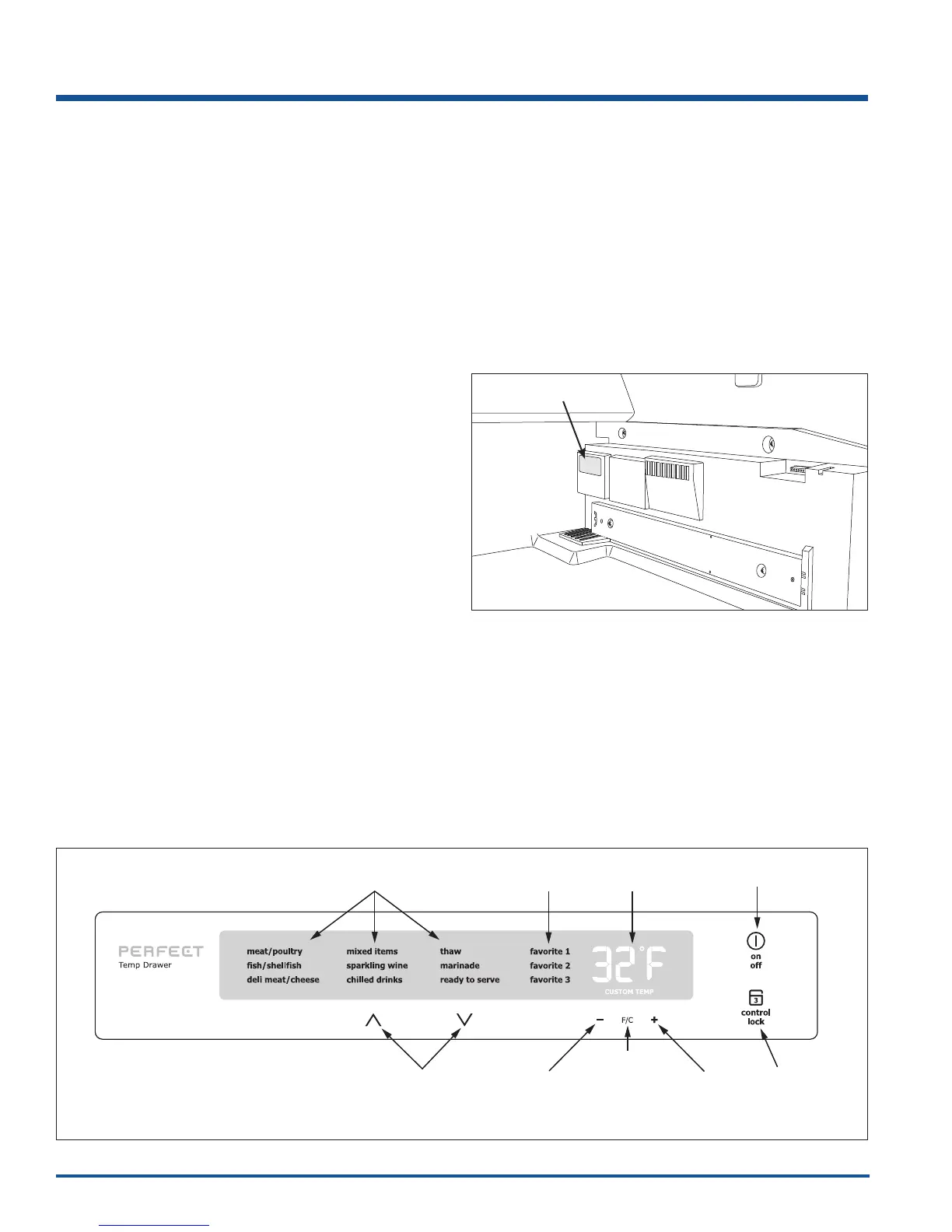
To Test Damper
1. Remove drawer.
2. Start damper test.
3. Observe damper moving open and closed through
the cold air discharge. ( See Figure 3-22)
4. Exit damper test.
Report NTC Temperature Test
(Actuate) – Display shows “b1” for chamber sensor
test. The UI display will show —°F until the main board
responds with associated sensor temperature reading.
See page 3-21 for resistance readings.
Display Test
“L0” for display test. The display test will cycle through
all the display segments with a minimal on time for each
segment.
Figure 3-22. Perfect Temp
™
Drawer Cold Air
Discharge
Cold Air Discharge
Pre-programmed
Settings Settings
Favorite
Temperature
Dispay
ON/OFF
Switch
Control
Lock
Change
Between
Fahrenheit
And
Centigrade
Raise
Drawer
Temperature
Lower
Drawer
Temperature
Scroll
Buttons
Figure 3-21. Perfect Temp
™
Drawer User Interface



 To Next Page