2010 dmm 20/96 599 73 68-54
• LCD
The information described below is also displayed on the LCD:
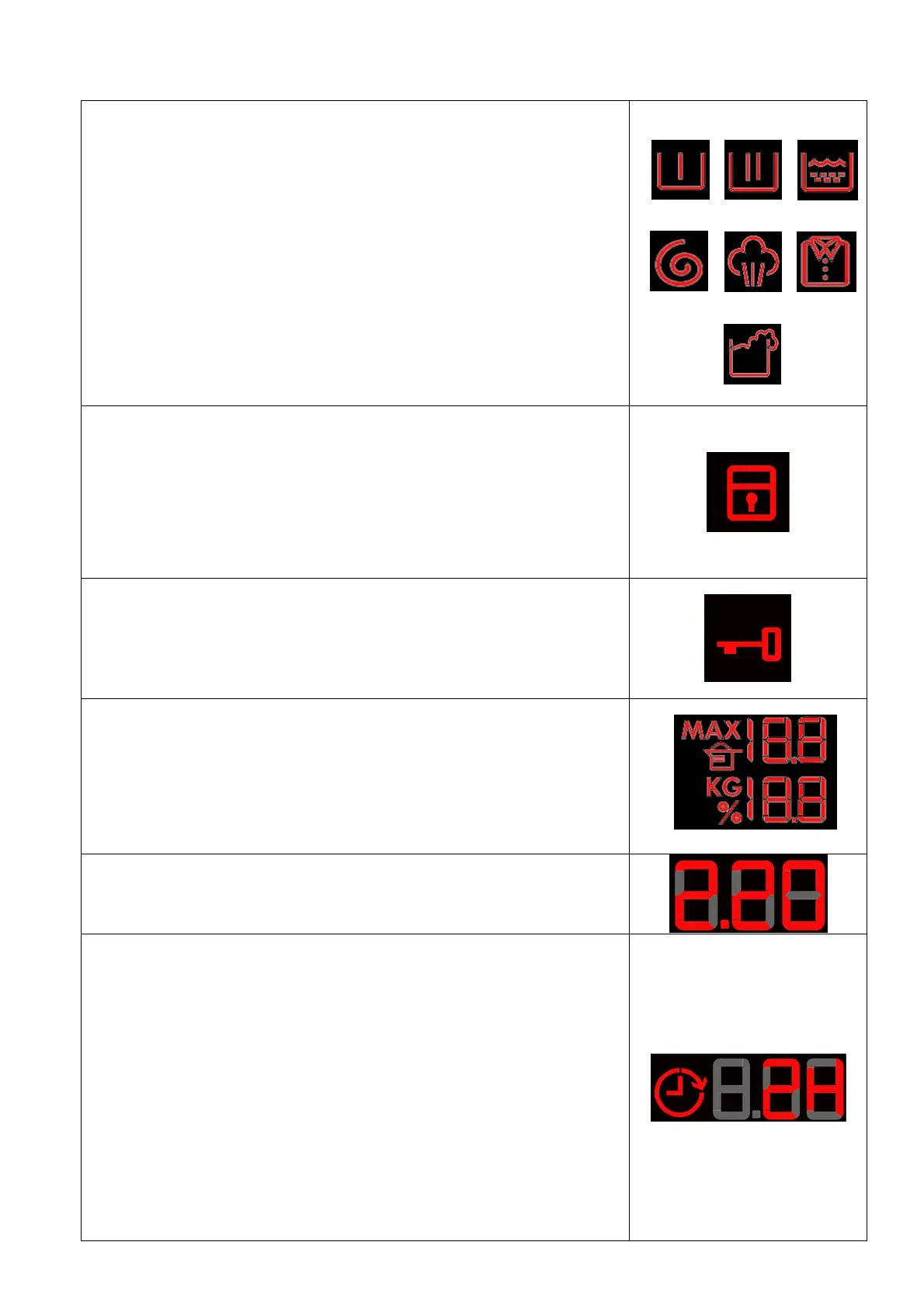
• Programme phases:
The icons represented respectively mean:
1. Pre-wash
2. Wash
3. Rinse
4. Spin
5. Steam combined with the programme (where featured)
6. Rinse Hold
7. Detergent overdose
They light up during the programme setting where featured and during
their performance.
The icon representing the Overdose lights up at the end of the cycle if
during the performance of the programme an excess production of foam
was detected.
1 2 3
4 5 6
7
• Padlock:
The icon lights up when the “child lock” is on.
To indicate that all the buttons are disabled to prevent children from
modifying, starting or pausing the cycle.
A key combination needs to be pressed to activate/deactivate it. It may
be silk-screen printed on the control panel or described in the instruction
manual.
• Door lock:
Lights up when the safety device stops door opening and switches off
when the door can be opened.
It flashes when the device is about to unlock the door (it is noticed with
PTC delaying devices, which need one or two minutes to open).
• Weight sensor:
Group of icons representing the weight information of the laundry inside
the drum.
These represent the maximum load possible and the actual weight of the
laundry inside the drum, and the ratio of these two factors suggests the
quantity of detergent to pour into the detergent dispenser.
See Chapt. 4.1.1.6 on page 21
• Washing programme time:
See description on page 13
• Delayed start
Selected on the related button. After the START/PAUSE button is
pressed, the countdown starts and the delay time decreases hour by
hour, from a delay of 2 hours up to 20 hours () 30’) 60’) 90’) 2h)
3h...) 20h) 0h).
During the last 2 hours, it decreases by 30 mins at a time.
Press the button in sequence to increase the delay by 30’ up to 10 hours,
whereas from 10 hours to 20 hours, the increase is of 1 (one) hour every
time the button is pressed.
During the programme selection phase, a delayed start can be
selected, from 30’ to 20 hours (30’
" 60’ " 90’ " 10h "11h…
"20h "0h) and the time is shown on the LCD display;
during the last hour, the time decreases minute by minute.
To cancel the delayed start time, after the cycle has started, pause the
washing machine using the related button and cancel the option.






 To Next Page