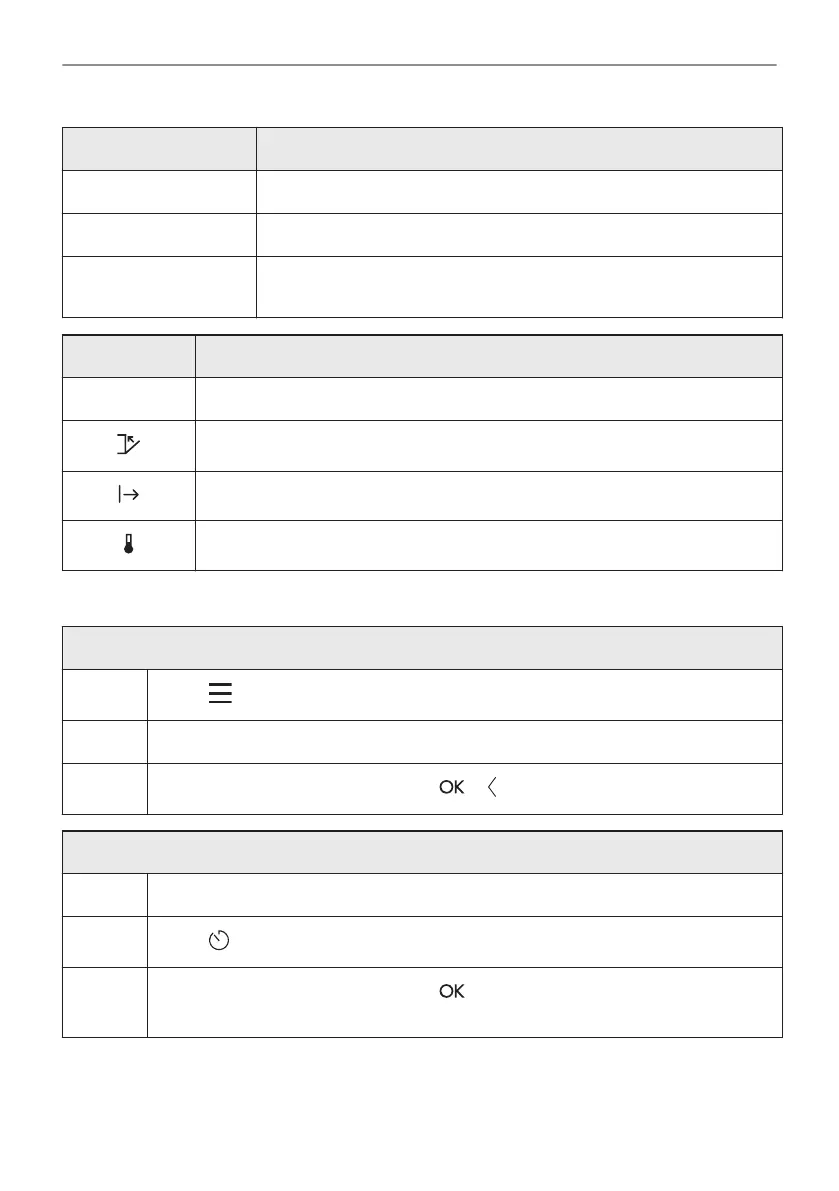
Clock function Application
Delayed start To postpone the start and / or end of cooking.
Time extension To extend cooking time.
Reminder To set a countdown. Maximum is 23 h 59 min. This function has no ef‐
fect on the operation of the oven.
Start criteria Comment
- The timer starts when you turn it on.
The timer starts after closing the door.
The timer starts when cooking starts.
The timer starts when the oven reaches the set temperature.
7.2 How to set: Clock functions
How to set the clock
Step 1
Press: .
Step 2 Press: Settings / Setup / Time of day.
Step 3
Slide and press to set the clock. Press: or .
How to set cooking time
Step 1 Choose a heating function and set the temperature.
Step 2
Press: .
Step 3
Slide and press to set the clock. Press: .
Timer starts counting down immediately.
24/56
CLOCK FUNCTIONS




 To Next Page