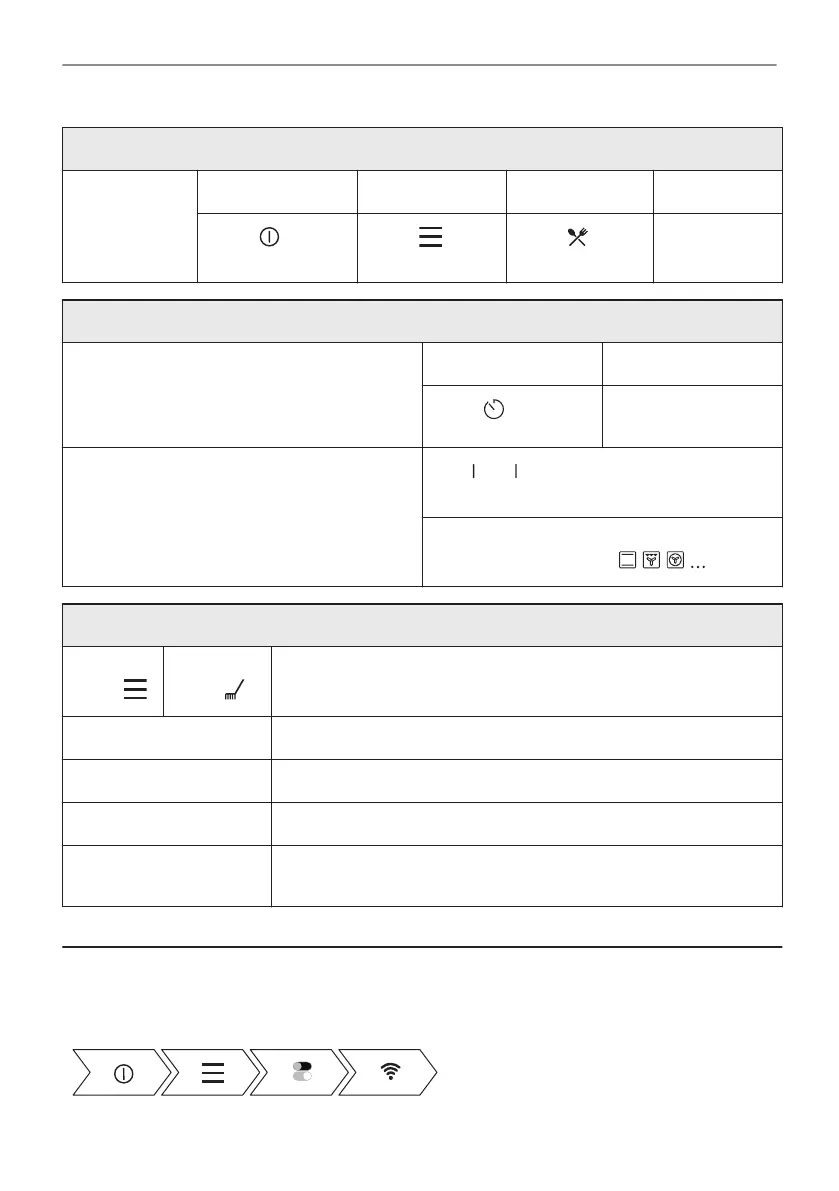
Get to know how to cook quickly
Assisted
Cooking
Step 1 Step 2 Step 3 Step 4
Press: . Press: . Press: Assis‐
ted Cooking.
Choose the
dish.
Use quick functions to set the cooking time or change the cooking function
Quick timer settings
Use the most used timer settings by choosing
from the shortcuts.
Step 1 Step 2
Press: .
Press the preferred
timer value.
10% Finish assist
Use 10% Finish assist to add extra time or
change cooking function when 10% of the
cooking time is left.
- press the preferred time
icon to extend the cooking time.
Change function:
Press preferred function: .
Clean the oven with Steam cleaning
Step 1
Press:
Step 2
Press:
Step 3
Choose the mode:
Steam Cleaning For light cleaning.
Steam Cleaning Plus For thorough cleaning.
Descaling For cleaning the steam generation circuit from residual limestone.
Rinsing For rinsing and cleaning the steam generation circuit after frequent
use of the steam functions.
16. TAKE A SHORTCUT!
Here you can see all the useful shortcuts. You can also find them in the dedicated chapters in
the user manual.
Wireless connection
53/56
IT'S EASY!




 To Next Page