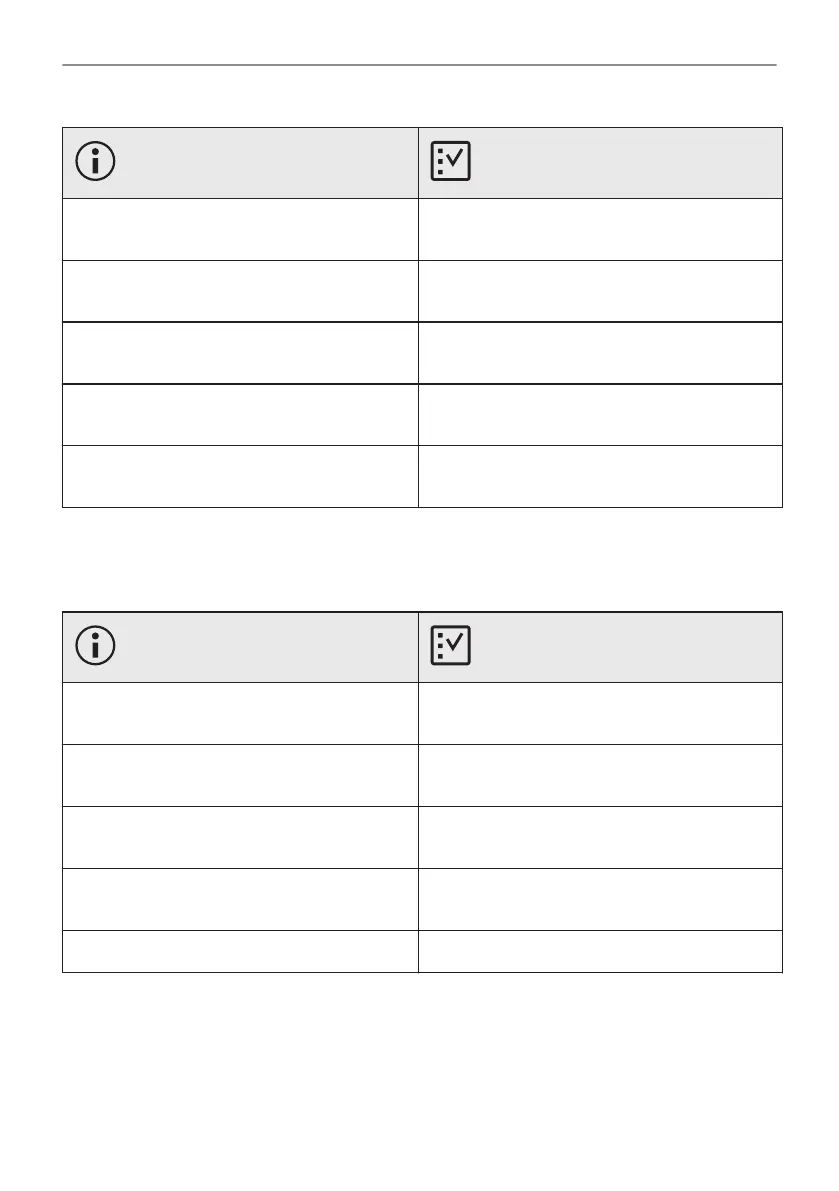
Code and description Remedy
F111 - Food sensor is not correctly inserted in‐
to the socket.
Fully plug Food sensor into the socket.
F240, F439 - the touch fields on the display do
not work properly.
Clean the surface of the display. Make sure
there is no dirt on the touch fields.
F601 - there is a problem with Wi-Fi signal. Check your network connection. Refer to "Be‐
fore first use" chapter, Wireless connection.
F604 - the first connection to Wi-Fi failed. Turn the oven off and on and try again. Refer to
"Before first use" chapter, Wireless connection.
F908 - the oven system cannot connect with
the control panel.
Turn the oven off and on.
When one of these error messages continues to appear on the display, it means a faulty
subsystem may have been disabled. In such a case contact your dealer or an Authorized
Service Centre. If one of these errors occurs, the rest of the oven functions will continue to work
as usually.
Code and description Remedy
F131 - the temperature of the steamer sensor
is too high.
Turn the oven off and wait until it cools down.
Turn the oven on again.
F144 - the sensor in the Water drawer cannot
measure the water level.
Empty the Water drawer and refill it.
F254 - the camera is not connected to the
oven.
Turn the oven off and on.
F508 - the Water drawer does not work prop‐
erly.
Turn the oven off and on.
F602, F603 - Wi-Fi is not available. Turn the oven off and on.
12.3 Service data
If you cannot find a solution to the problem yourself, contact your dealer or an Authorised
Service Centre.
The necessary data for the service centre is on the rating plate. The rating plate is on the front
frame of the oven cavity. Do not remove the rating plate from the oven cavity.
46/56
TROUBLESHOOTING




 To Next Page