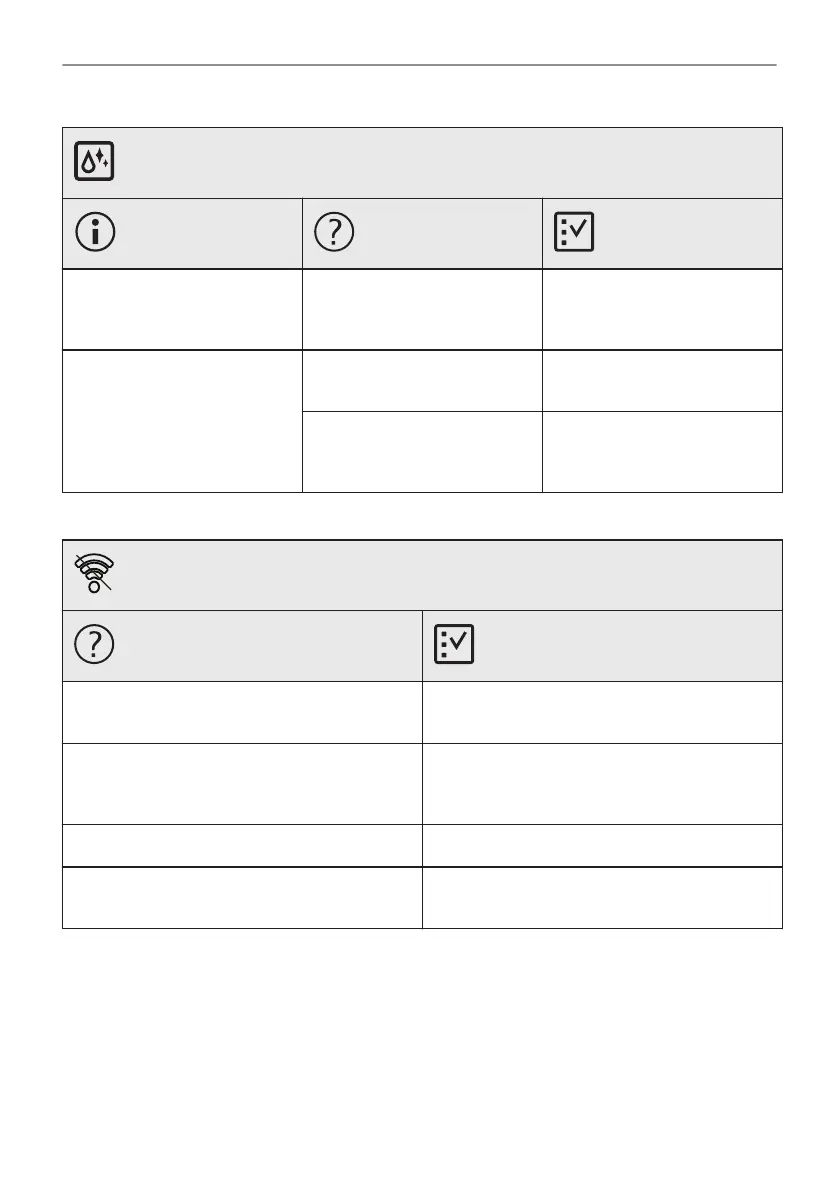
Problems with cleaning procedure
Description
Possible cause
Remedy
There is too much water on
the bottom of the cavity after
cleaning.
You put too much detergent in
the oven before you started
cleaning.
Next time evenly spread the
thin layer of a detergent on
the cavity walls.
Cleaning performance is not
satisfactory.
You started cleaning when the
oven was too hot.
Wait until the oven is cold. Re‐
peat cleaning.
You did not remove all the ac‐
cessories from the oven be‐
fore cleaning.
Remove all the accessories
from the oven. Repeat clean‐
ing.
Power cut always stops cleaning. Repeat cleaning if it's interrupted by power failure.
Problems with Wi-Fi signal
Possible cause
Remedy
Trouble with wireless network signal. Check your wireless network and router.
Restart the router.
New router installed or router configuration
changed.
To configure oven and mobile device again, re‐
fer to "Before first use" chapter, Wireless con‐
nection.
The wireless network signal is weak. Move router as close to the oven as possible.
The wireless signal is disrupted by a micro‐
wave appliance placed near the oven.
Turn off the microwave appliance.
12.2 How to manage: Error codes
When the software error occurs, the display shows error message.
In this section, you will find the list of the problems that you can handle on your own.
45/56
TROUBLESHOOTING




 To Next Page