6
www.electrolux.com
USE3.
1
2
3
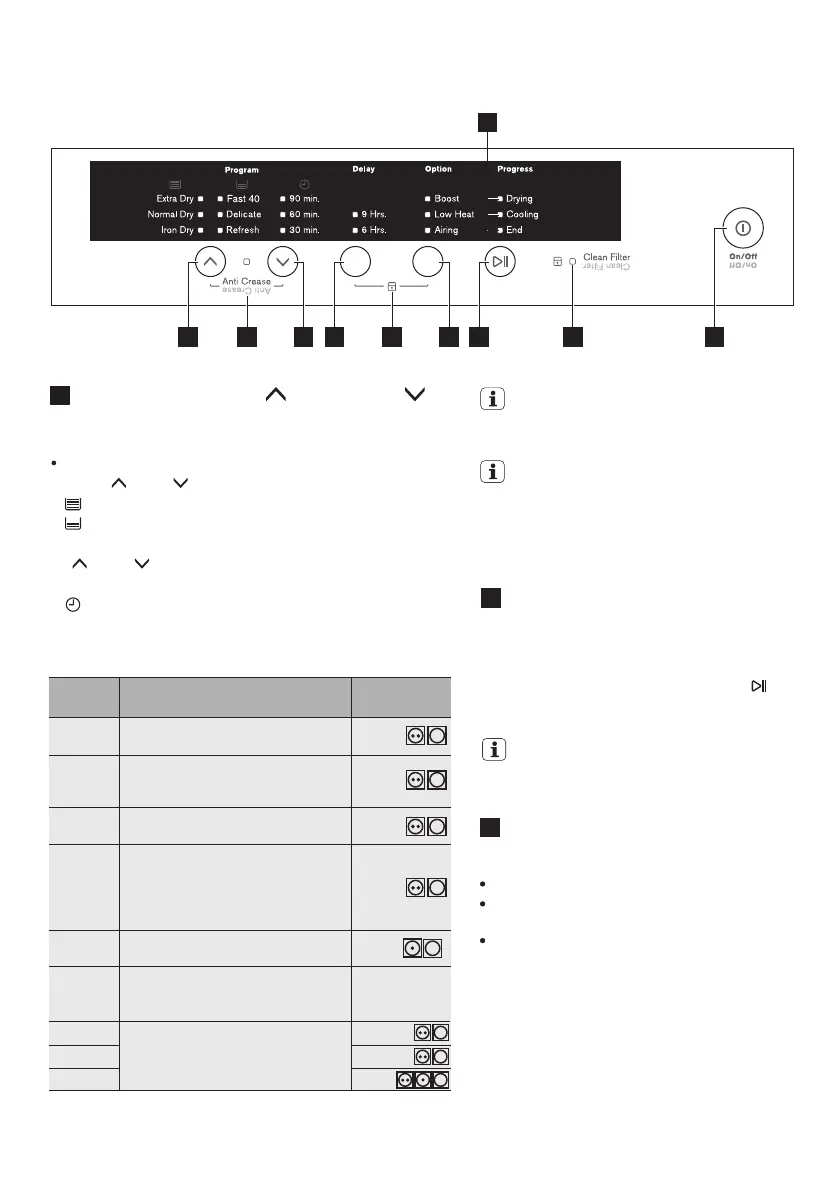
These two buttons used to select dryness program or dry
time as below:
Program Button (Up “ ” and Down “ ”)
This button is a feature that permits you to start
the dryer after a defined number of hours, ranging
from 6 or 9 hours.
To abort Delayed start, press Start/Pause ( ) to
pause the machine then modify or cancel delay
time.
Delay Button
Is used to select one of the following options :
Boost: Higher temperature during drying cycle.
Low Heat: Lower Temperature during drying
cycle.
Airing: No Heating.
Option Button
When a new program is selected while the
dryer is already running, the drying process
will continue using the setting from the new
program.
NOTE: Make sure you have set the
desired program before setting the delay.
For best result we recommend to sort out
your laundry according to fabric type and
spin dry at highest speed available in your
washing machine.
Extra Dry
Ideal for towels or similar such as
cotton and linen.
6.5 kg/
7.5 kg
6.5 kg/
7.5 kg
4 kg
4 kg
4 kg
3-5 pcs
(dry items)
2 kg
Normal
Dry
Iron Dry
Program Textile Type Info
Load Size
Info (Max.)*
Select this cycle to dry everyday
fabrics including cottons, linens and
sheets.
Suitable for ironing such as cotton
and linen.
Delicate
For drying delicate clothing and
Synthetics.
Refresh
90 min.
Refreshing items that have been in
storage for long time (a short cycle
with warm temp).
For drying most fabrics, cotton.
3 kg60 min.
1.5 kg30 min.
Program
Press “ ” and “ ” buttons to select programs as below:
Program Table Guides
If you wish to carry out a timed drying program, pressing
“ ” and “ ” buttons to select desired time, time
available are:
Corresponding LED for selected program will turn on.
3.1 The Control Panel
: Extra Dry, Normal Dry, Iron Dry;
: 90 min, 60 min, 30 min
: Fast 40, Delicate, Refresh.
* Depend on model of Dryer (6.5 or 7.5 kg capacity)
1 1 2 4 85 6 7
9
3
Fast 40
Select this cycle to dry everyday
fabrics, cotton or blended fabrics
that need to be dried quickly.




 To Next Page