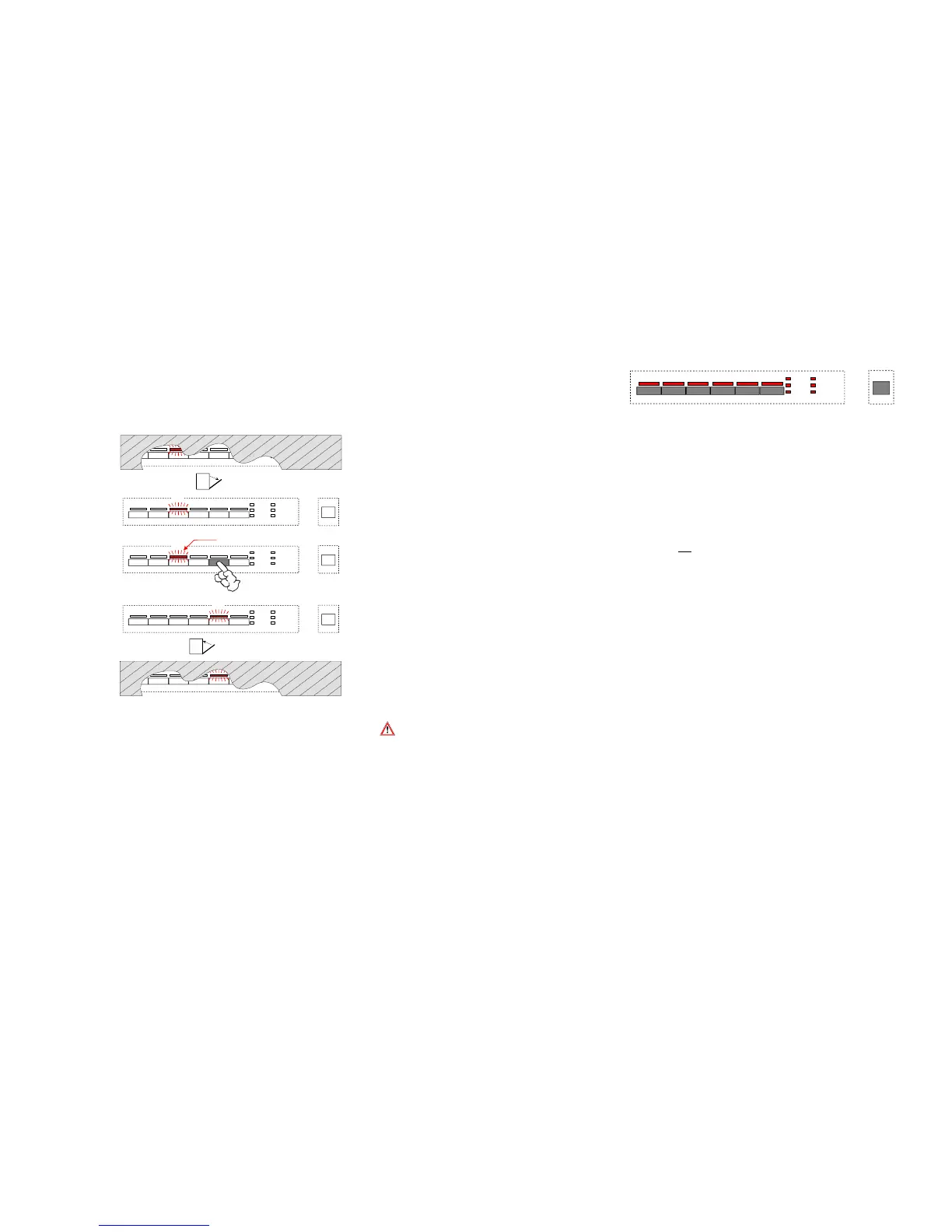
1. Open the door for altering the program!
2. Opening the door stops the cycle.
Ä
Corresponding cycle LED is lit.
3. Press key of the new desired program (in our example S5
) for aprox. 6 seconds.
Ä
Display LED of the running cycle starts flashing.
4. After this time the previous cycle LED goes out and the cycle LED
of the new desired program is lit.
5. The program will start automatically when the door has been closed.
If a program is altered after an already started cycle the new cycle starts
generally from the beginning! This is also indicated in the display by the running time.
Options already selected before are deleted and have to be selected anew.
EDW 1003 / VGA
LD1 LD2 LD3 LD4 LD5 LD6
S1 S2 S3 S4 S5 S6
LD7
LD8
LD9
LD10
LD11
LD12
S0
3.
1.
4.
blinkt
3 Sekunden
S5
LD3
LD3
LD5
2.
LD3
Tür öffnen
5.
LD3
Tür schließen
27



 To Next Page