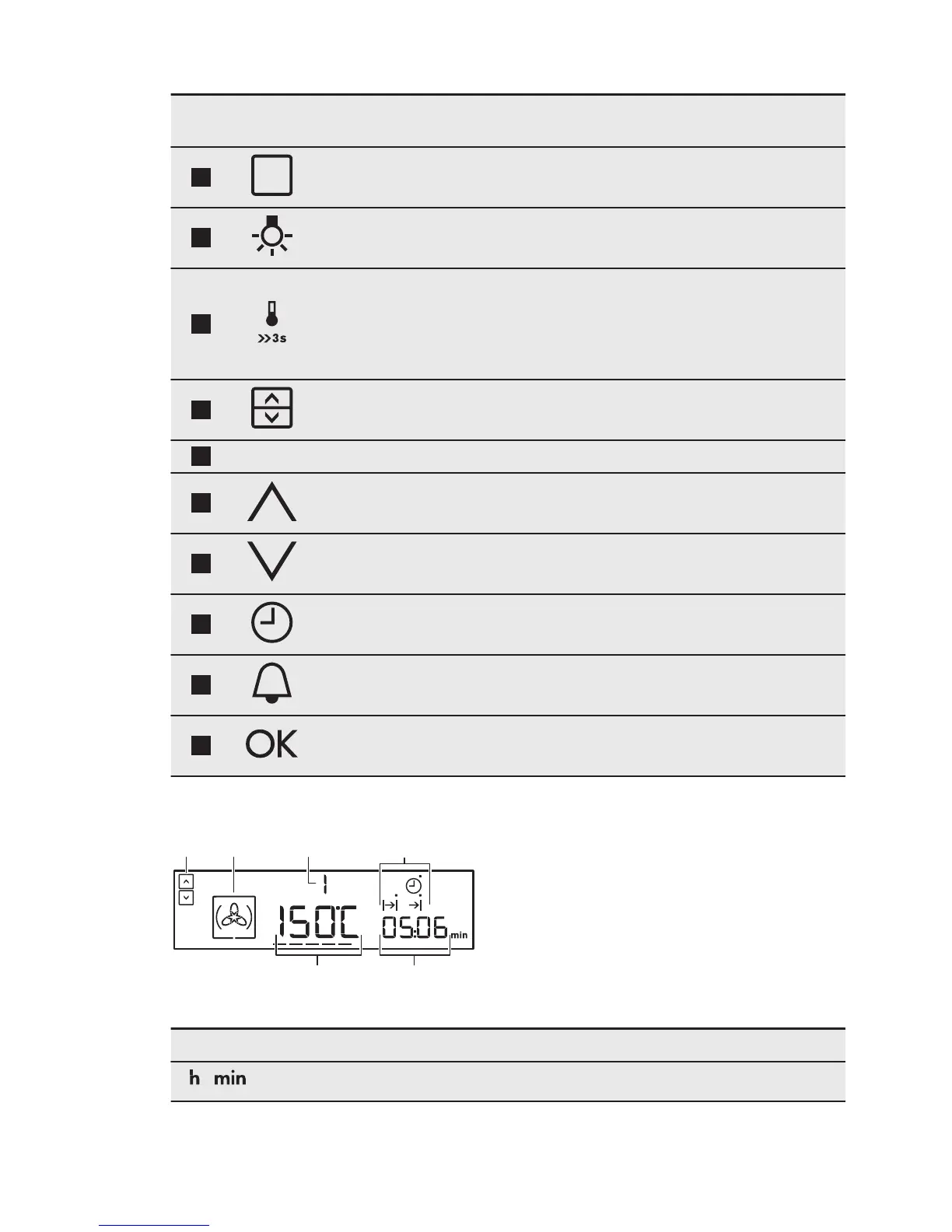
Sensor
Field
Function Description
2
OPTIONS To set an oven function, a cleaning function
or an automatic programme.
3
OVEN LIGHT To activate or deactivate the oven lamp.
4
TEMPERATURE /
FAST HEAT UP
To set and examine the cavity temperature or
the core temperature sensor temperature (if
present). If you press it and hold for three
seconds, it turns the Fast heat up function
ON and OFF.
5
OVEN SELEC‐
TION
To switch between top and main oven.
6
- DISPLAY Shows the current settings of the appliance.
7
UP To move up in the menu.
8
DOWN To move down in the menu.
9
CLOCK To set the clock functions.
10
MINUTE MINDER To set the Minute Minder.
11
OK To confirm the selection or setting. To move
down in the menu.
4.2 Display
A. Top / Main oven indicator
B. Oven function symbol
C. Number of the oven function / programme
D. Indicators for the clock functions (refer to
the table "Clock functions")
E. Clock / residual heat display
F. Temperature / time of day display
Other indicators of the display:
Symbol Name Description
/
h / min A clock function operates.
www.electrolux.com8



 To Next Page