Basic operation
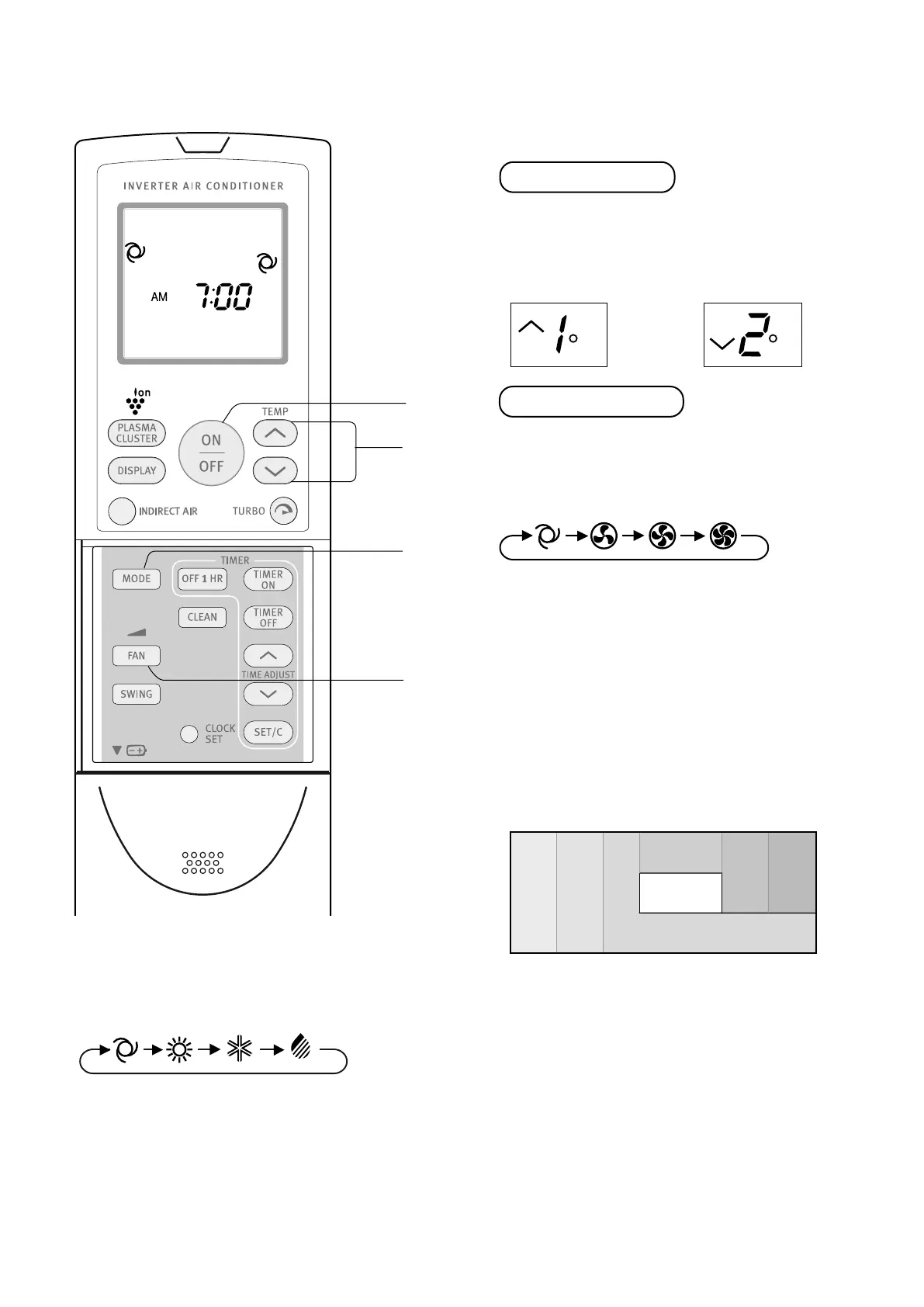
3. Press the TEMP button to set the desired temperature.
• The temperature can be changed in 1°C increments
within the range of 2°C higher to 2°C lower from
the temperatur
e automatically determined by the
air conditioner.
• The temperature can be set within the range of
18 to 32°C.
4. Press the F
AN button to set the desired fan speed.
• In the DRY mode, the fan speed is preset to AUTO
and cannot be changed.
5. To turn the unit off, press the ON/OFF button again.
• The red OPERATION lamp on the unit will turn off.
AUTO/DRY MODE
COOL/HEAT MODE
SWING
CLEAN
FAN
MODE
SET/C
1h
DISPLAY
3
4
5
3
5
C
C
AUTO HEAT DRYCOOL
AUTO SOFT HIGHLOW
AUTO/DRY MODE
COOL/HEAT MODE
SWING
CLEAN
FAN
MODE
SET/C
1h
DISPLAY
3
4
5
3
5
C
C
AUTO HEAT DRYCOOL
AUTO SOFT HIGHLOW
AUTO/DRY MODE
COOL/HEAT MODE
SWING
CLEAN
FAN
MODE
SET/C
1h
DISPLAY
3
4
5
3
5
C
C
AUTO HEAT DRYCOOL
AUTO SOFT HIGHLOW
AUTO/DRY MODE
COOL/HEAT MODE
SWING
CLEAN
FAN
MODE
SET/C
1h
DISPLAY
3
4
5
3
5
C
C
AUTO HEAT DRYCOOL
AUTO SOFT HIGHLOW
AUTO/DRY MODE
COOL/HEAT MODE
SWING
CLEAN
FAN
MODE
SET/C
1h
DISPLAY
3
4
5
3
5
C
C
AUTO HEAT DRYCOOL
AUTO SOFT HIGHLOW
Tips about Auto Mode
In the AUTO mode, the temperature setting and mode are
automatically selected according to the room temperature
and outdoor temperature when the unit is turned on.
modes and temperature settings
During operation, if the outdoor temperature changes, the
temperature settings will automatically slide as shown in
the chart detailed above.
mode changeover
During seasons when you need COOLING during daytime
and HEATING at night, or if the room temperature should
become extremely higher than the temperature setting,
due to supplementary heating equipment, the mode will
automatically switch between HEAT and COOL mode to
keep a comfortable room temperature.
SI
Heat
(24°C)
Indoor temp.
(°C)
the figures in ( ) are temperature settings
Outdoor temp.
(°C)
Heat
(22°C)
Cool
(24°C)
0
29
21
10 18 28 34
Cool
(25°C)
Cool
(26°C)
Dry
(Room temp.–2°C)
Heat
(23°C)
2
5
3
1
4
1. Pr
ess the MODE button to select the operation mode.
2. Pr
ess the ON/OFF button to start operation.
• The red OPERATION lamp on the unit will illuminate.
(Example: 1°C higher) (Example: 2°C lower)
electrolux ESD24HRA & ESD30HRA basic operation 7
AUTO/DRY MODE
COOL/HEAT MODE
SWING
CLEAN
FAN
MODE
SET/C
1h
DISPLAY
3
4
5
3
5
C
C
AUTO HEAT DRYCOOL
AUTO SOFT HIGHLOW



 To Next Page