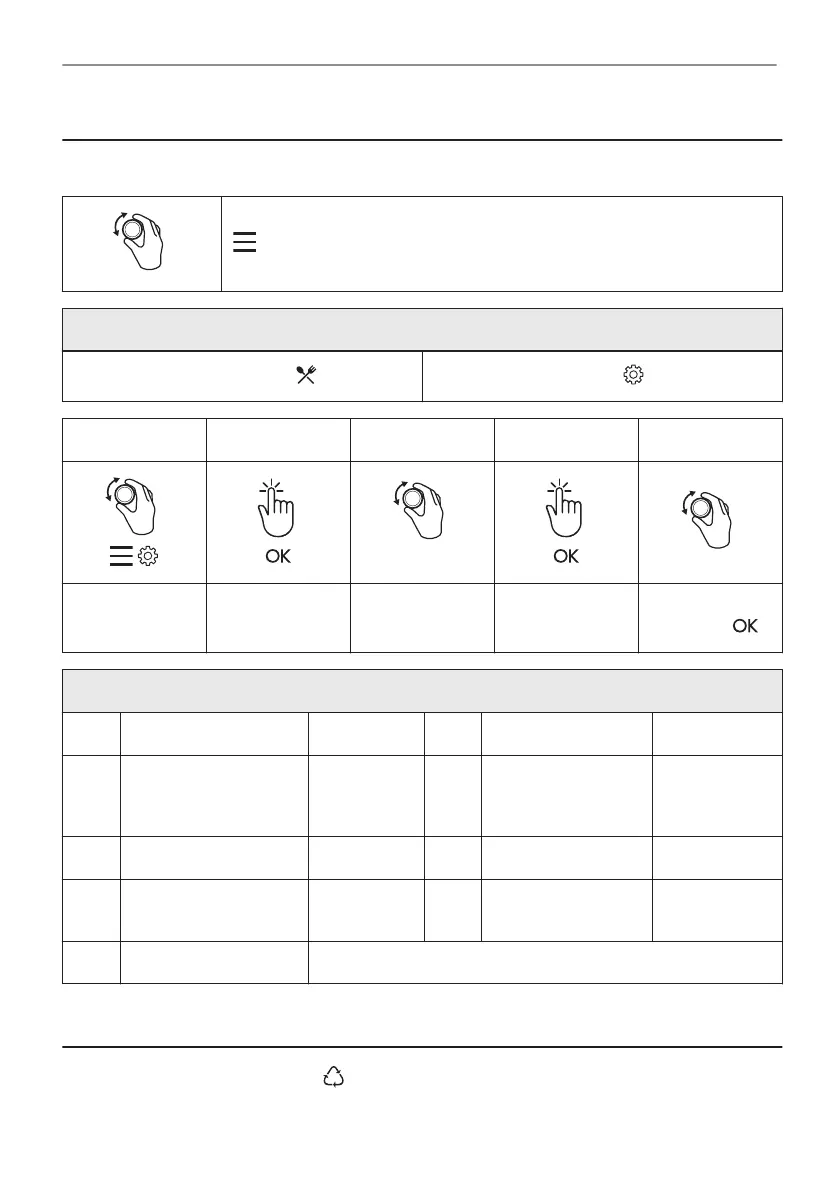
14. MENU STRUCTURE
14.1 Menu
- select to enter the Menu.
Menu structure
Assisted Cooking
Settings
Step 1 Step 2 Step 3 Step 4 Step 5
O1 - O9
Select the Menu,
Settings.
Confirm setting.
Select the set‐
ting.
Confirm setting.
Adjust the value
and press .
Settings
O1 Time of day Change O2 Display brightness 1 - 5
O3 Key tones 1 - Beep
2 - Click
3 - Sound off
O4 Buzzer volume 1 - 4
O5 Uptimer On / Off O6 Light On / Off
O7 Demo mode Activation
code: 2468
O8 Software version Check
O9 Reset all settings Yes / No
15. ENVIRONMENTAL CONCERNS
Recycle materials with the symbol . Put the packaging in relevant containers to recycle it.
Help protect the environment and human health by recycling waste of electrical and electronic
52/216
MENU STRUCTURE



 To Next Page