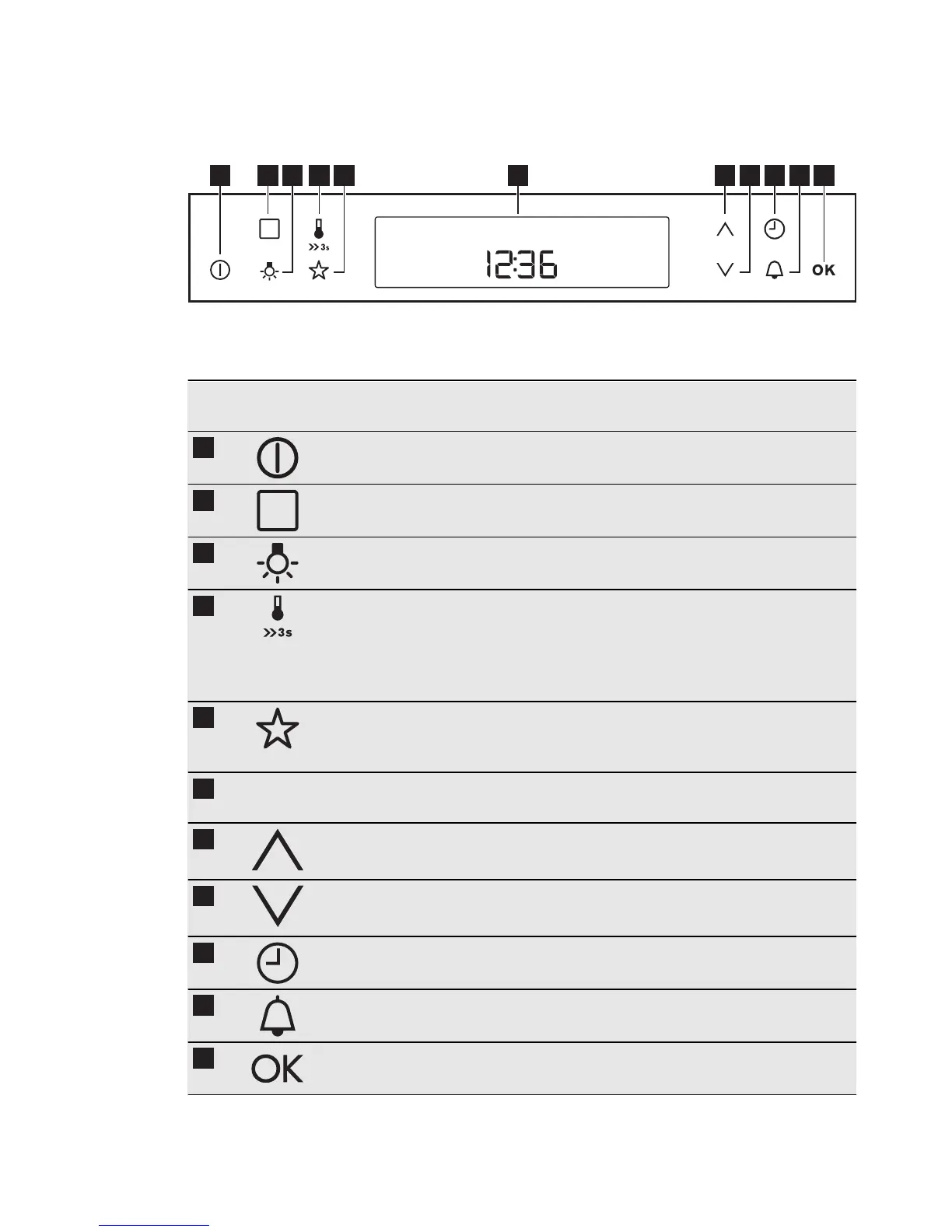
5. CONTROL PANEL
5.1 Electronic programmer
1 112 3 4 65 7 8 9 10
Use the sensor fields to operate the appli-
ance.
Sensor
Field
Function Description
1
ON/OFF To activate and deactivate the appliance.
2
OPTIONS To set an oven function, an automatic
programme or a cleaning function.
3
OVEN LIGHT To activate or deactivate the oven lamp.
4
TEMPERATURE /
FAST HEAT UP
To set and examine the cavity tempera-
ture or the core temperature sensor tem-
perature. If you press it and hold for
three seconds, it turns the Fast heat up
function ON and OFF.
5
MY FAVOURITE
PROGRAMME
To store your favourite programme. Use
it to access your favourite programme
directly, also when the appliance is off.
6
- DISPLAY Shows the current settings of the appli-
ance.
7
UP To move up in the menu.
8
DOWN To move down in the menu.
9
CLOCK To set the clock functions.
10
MINUTE MINDER To set the Minute Minder.
11
OK To confirm the selection or setting. To
move down in the menu.
8
www.electrolux.com




 To Next Page