39
Multi stage will allow you to program up to 3 stages
of cooking. Each stage may be programmed with a
cooking feature, set temperature and a cook time.
Multi stage is ideal when you want to add a keep
warm after a cooking function.
The following functions may be set with multi stage:
• Bake/conv bake
• Broil/conv broil (10 minutes max.)
• Conv roast
• Bread Proof
• Keep warm
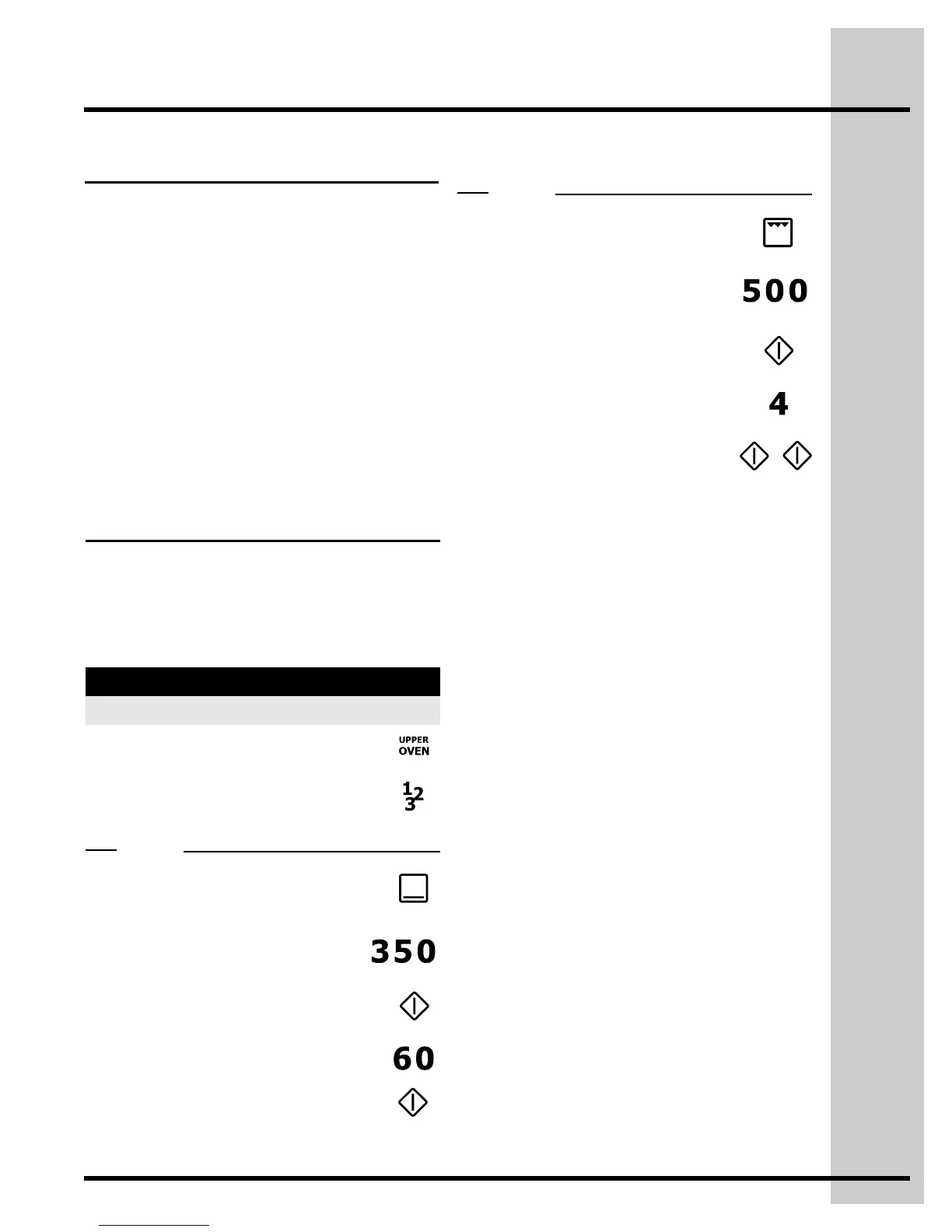
8. Press BROIL
9. Enter 500°F
11. Enter 4 minutes
12. Press START/enter a total
of 2 times to program only 2
stages and begin cooking.
Setting Oven Controls
3. Press BAKE
4. Enter 350°F
6. Enter 60 minutes
7. Press START/enter
1. Press UPPER OVEN
2. Press MULTI STAGE
Setting multi stage
See the example to program a multi stage feature
for a casserole. For stage 1, bake at 350°F for 1 hr.
For stage 2, to brown, broil for at 500°F for 4
minutes.
Example
Example for 2 stages
Step Press
5. Press START/enter
10. Press START/enter
Stage 1
Stage 2
Perfect Program™ multi stage





 To Next Page