SOI/DT 2007-02 dmm 28/66 599 38 61-92
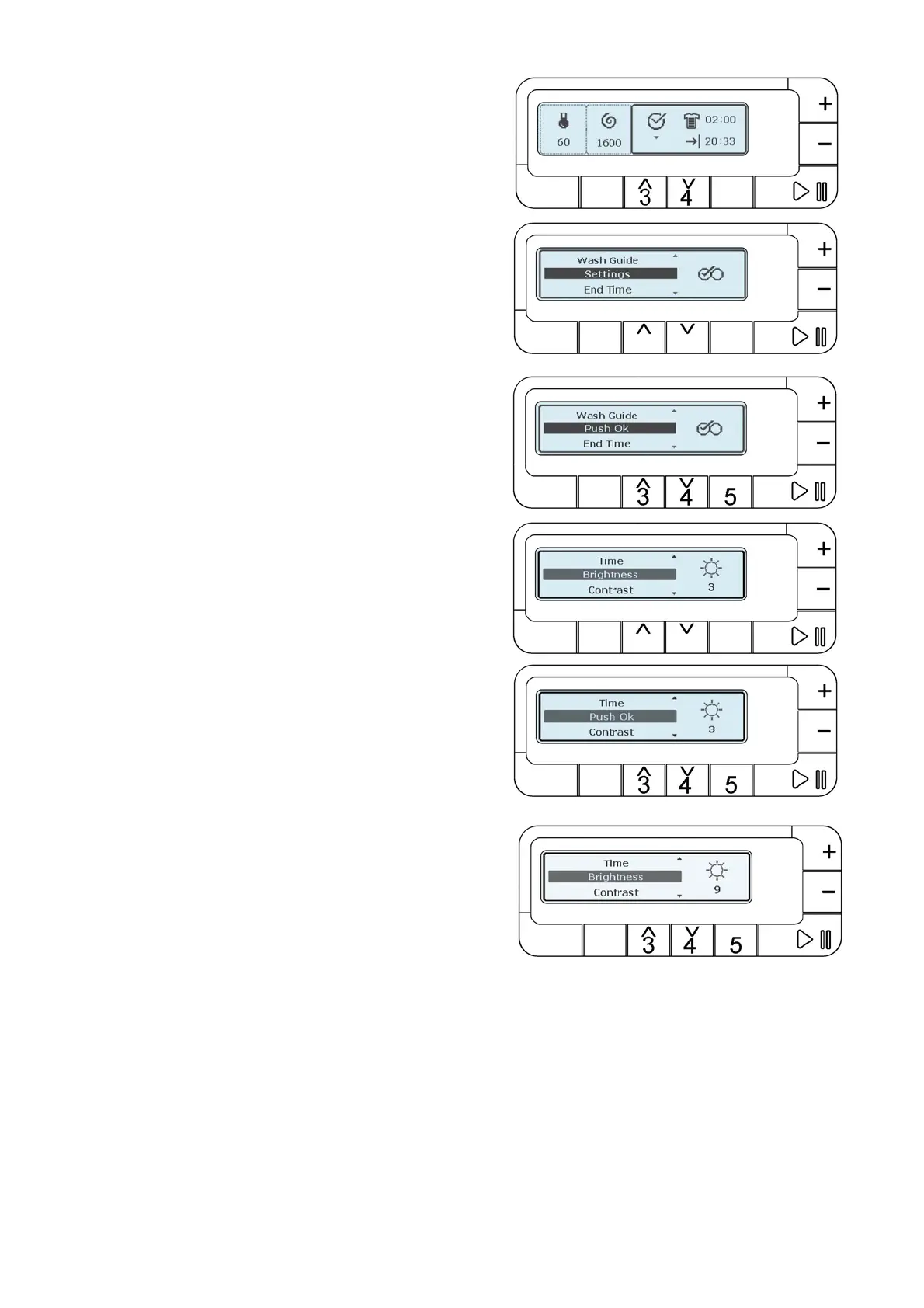
4.2.12.4 Luminosity
Push button 3 or 4 and scroll down the menu till:
“SETTINGS”
Wait two seconds the writing changes to:
“PUSH OK” button 5.
Push button 3 or 4 and scroll down the menu till:
“LUMINOSITY’”
Push button OK (5).
The digit under the sun symbol starts to flash. Now it is
possible to vary the luminosity level pushing buttons 3 or 4 in
sequence. Simultaneously, the LCD display varies and also
the digit changes from zero to nine. Confirm the luminosity
level with button OK (5).
Waiting some seconds or pushing buttons: TEMPERATURE (1) or SPIN (2) the main screen is displayed again.
Pushing button OK (5) the luminosity is selected again.
Pushing button START/PAUSE (6) the washing cycle starts.



 To Next Page