SOI/DT 2007-02 dmm 30/66 599 38 61-92
4.2.12.6 Resetting the settings
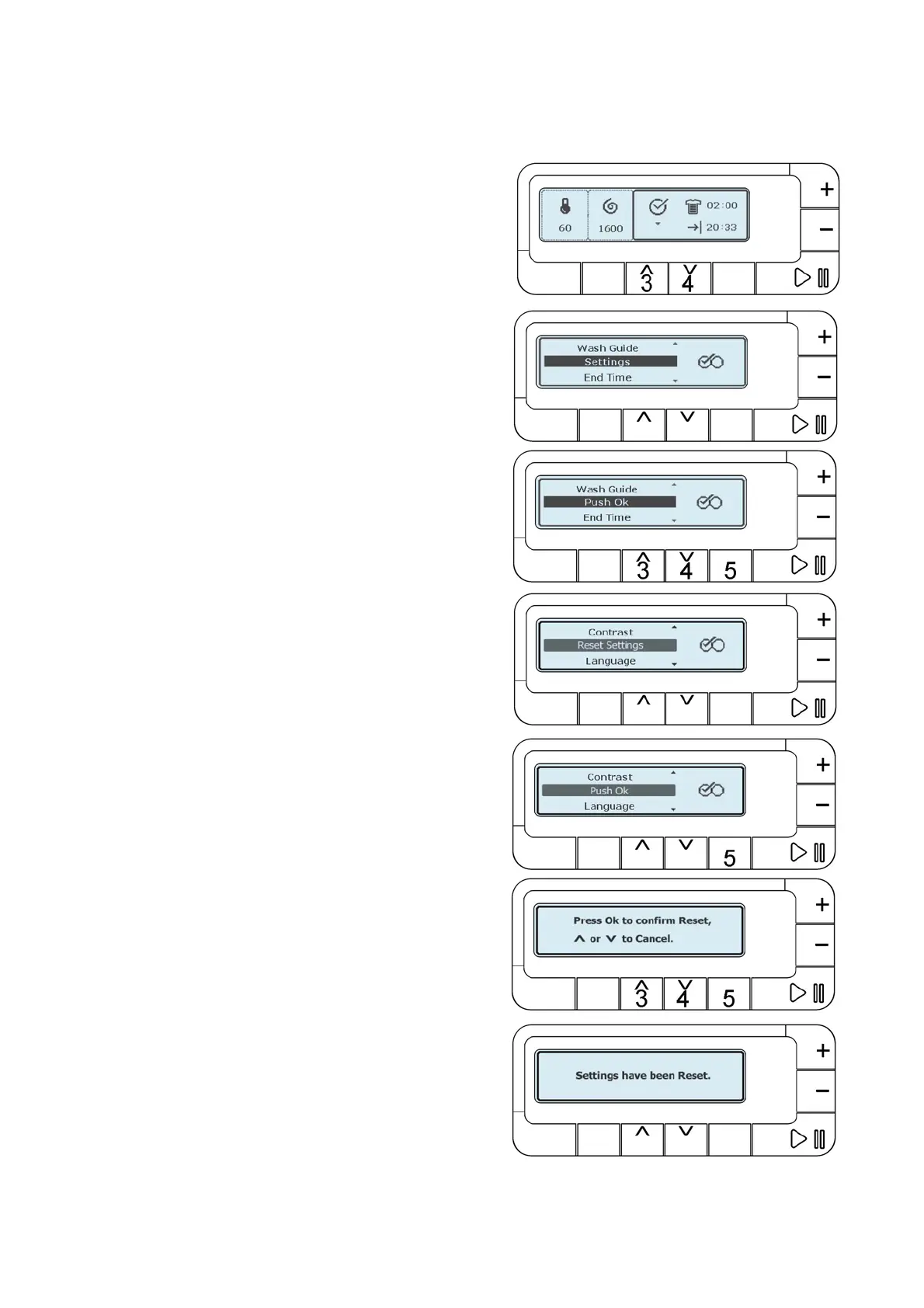
This function allows the user to reset the basic settings set by the factory for:
VOLUME, CONTRAST, LUMINOSITY and the configuration of the CHILD LOCK.
Push button 3 or 4 and scroll down the menu till:
“SETTINGS”
Wait two seconds the writing changes to:
“PUSH OK” button 5.
Push button 3 or 4 and scroll down the menu till:
“RESET SETTINGS”
Wait two seconds the writing changes to:
“PUSH OK” button 5.
After pushing OK the user is asked to confirm the choice. It
is possible to confirm pushing OK (5) or to cancel with
buttons 3 or 4.
If the choice is confirmed, the LCD display shows this screen
for two seconds.




 To Next Page