electrolux water aid washing machine operating your washing machine 21
Delay start option
You can start a wash program after a certain number of
hours have elapsed, ranging from
1 hour to 12 hours.
For example, if you want to start a wash cycle 4 hours from
the current time then proceed as follows:
1. Load clothes into the washing machine.
2. Put detergent and softener in dispenser drawer as
described on pages 7 and 8.
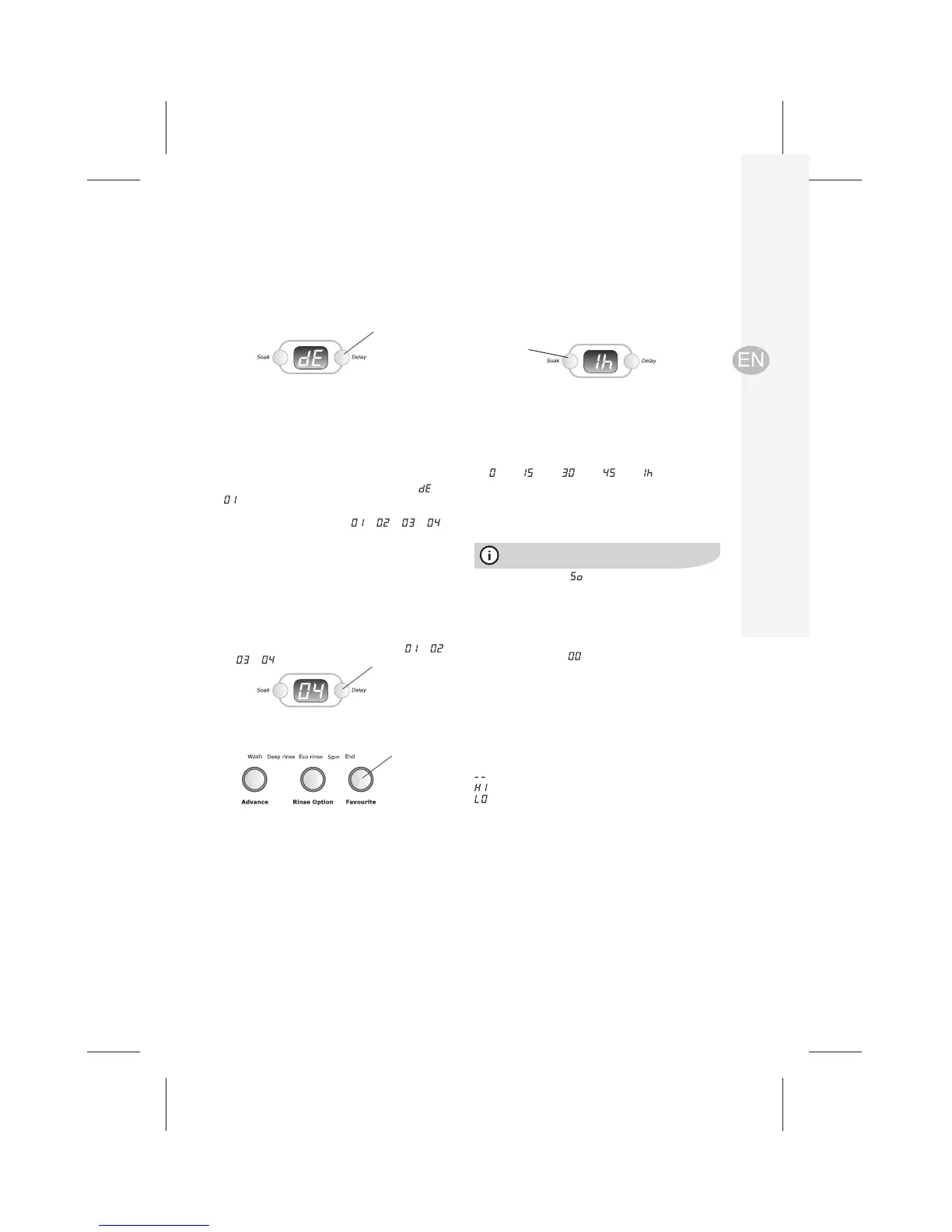
3. With the machine in pause mode, press Delay.The
digital display will show the alternating symbols
and
indicating a delay start of 1 hour.
4. Press the Delay button repeatedly until the required delay
time is shown in the display eg.
--> --> --> .
The washing machine will start the wash cycle in
4 hours time.
DO NOT PRESS Start/Pause
5. Select your wash program and other options if required.
To use Delay start with a favourite wash program
1. Ensure you have selected and stored your favourite
wash program. (See “Favourite button” section on the
page 20)
2. Press the Delay button repeatedly until the required
delay time is shown in the digital display eg.
-->
--> --> -->etc.
3. Press the Favourite button, your favourite wash
program will start after the delay time has expired.
DO NOT PRESS Start/Pause.
Cancelling a Delay start
Cancel a Delay start by pressing Start/Pause eg. you may
have set your washer for a delayed start and changed your
mind.
Adding detergent for a Delay start Model 806
When using powder detergent, wipe the inside of the
dispenser drawer dry before you put the detergent in,
Otherwise in may harden and not dissolve correctly.
Delay
button
Delay
button
Favourite
button
Soak option
This option allows you to soak heavily soiled clothes at the
beginning of the wash.
To do this, select the wash program you want to use, then
press the Soak button.
Soak
button
The lid must be closed to allow Soak functions to operate,
including the Intensive wash program 6 min. soak.
During the soak period will be displayed and there will
be a short agitation at intervals to maximise the effect of the
detergent.
The wash will begin automatically at the end of the soak
period.
To cancel the soak period at any time, press the Soak
button repeatedly until
is displayed.
Customising the auto sensing water level
If you are not happy with the water level when using auto
sensing water level selection, you can adjust the auto level
to be either higher or lower when you are in the program
setting mode.
With the auto sensing level selected, holding the Water
Level button depressed for 3 seconds will show the Auto
Adjust setting on the digital display:
optimised auto water level (factory set)
20mm higher than optimised water level
20mm lower than optimised water level
Each press of the Water Level button after the first press
will change the Auto Adjust setting to the next water level
selection.
When the setting is the one you want, as shown in the
digital display, save it by pressing Start/Pause. The washer
will then be ready to start a wash program.
Pressing this button repeatedly gives you the soak
selections in the digital display,
eg.
mins-- mins-- mins-- mins-- hour.



 To Next Page