7. OPERATING INSTRUCTIONS
Some of the following instructions
can only be used by using the
Control Panel�
It is not necessary to use the
drainage hose in the "cool" mode�
Cooling mode
Fan mode
Heating mode (on some models)
In this mode the exhaust adaptor hose
MUST be used�
In this mode, there is no need to use the
exhaust hose or drainage hose�
In this mode the exhaust adaptor hose
MUST be used�
In this mode, fan speed cannot be
selected�
7.1
Usage of the Control Panel
1. Press the “mode” button until the Cool
mode indicator is lit�
2. Press the "fan speed" button to
choose the fan speed according to the
illumination of the fan speed indicator�
You can choose the “hi”, “med”, “low”,
or “auto” fan speed setting�
3. Press the “ ” or “ ”button to choose
the temperature you want�
1. Press the "mode" button until the "Heat"
indicator is lit�
2. Press the " " & " " Temp buttons for
desired setting�
3. Connected drain hose� See 7�3
Drainage section�
6. AIR CONDITIONER FEATURES
6.1
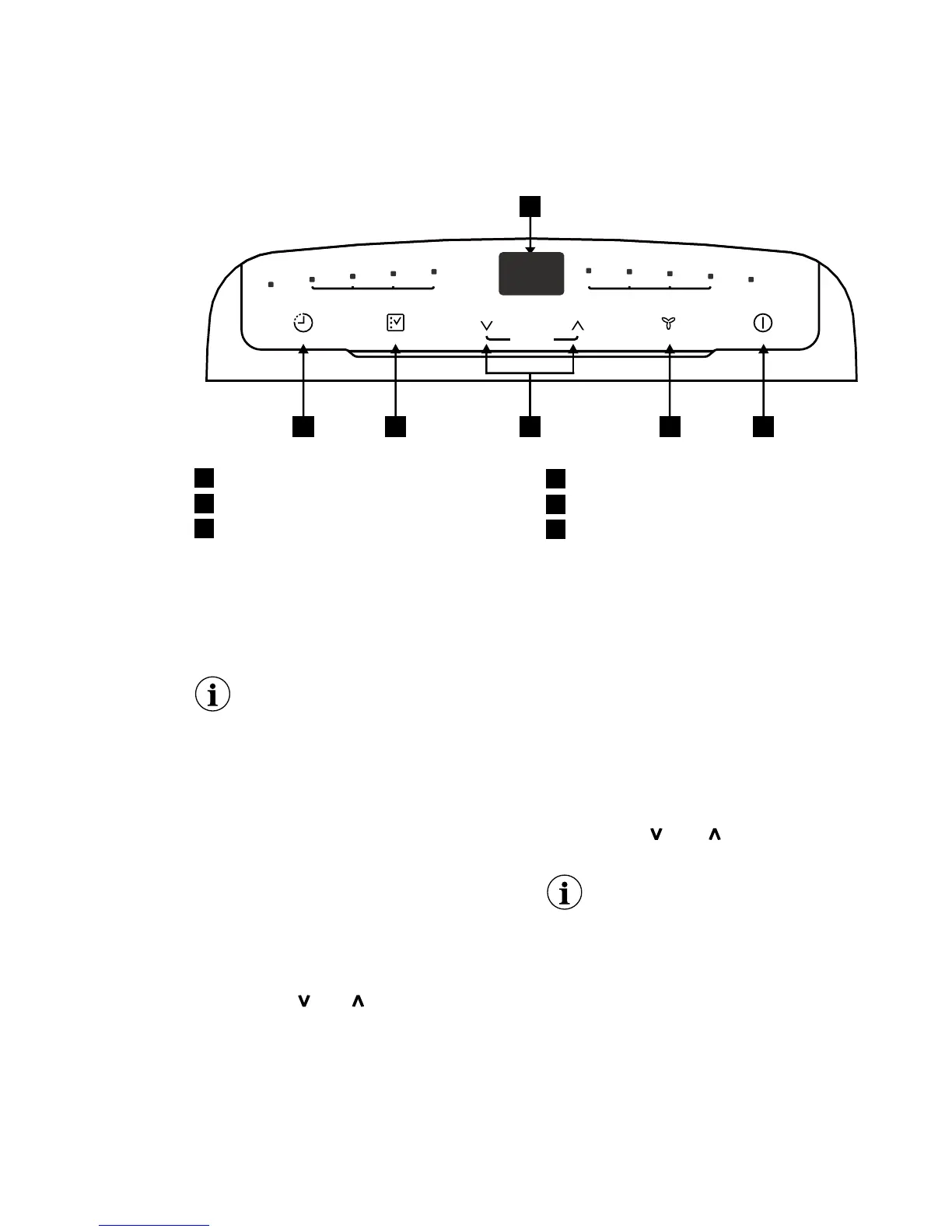
CONTROL PANEL
1
23456
cool dryfan autotimer hi medlow auto filter
hold 5s
filter reset
temp/timer
on/off
fan speed
mode
timer
1
2
5
3
4
6
Displays temperature/time
Power ON/OFF
Mode Selection
Fan Speed / Filter Reset
Adjust Temperature or Timer
Timer
Dry mode
Press the “mode” button until the Dry
mode indicator is lit� The screen displays
the room temperature�
At the same time, the “low” fan indicator
lights�
Note: In this mode, fan speed cannot be
selected�



 To Next Page