14 Installation
INSTALLING THE CABINET GLIDES
m I m [] [] [] [] [] [] [] [] [] [] B [] [] [] [] [] [] m []
The cabinet glides mount to the inside of the cabinet. The glides on the
coffee maker slide into the cabinet glides. The guide system allows the
coffee maker to slide in and out of the cabinet for loading the coffee bins
and for maintenance.
To install the cabinet glides:
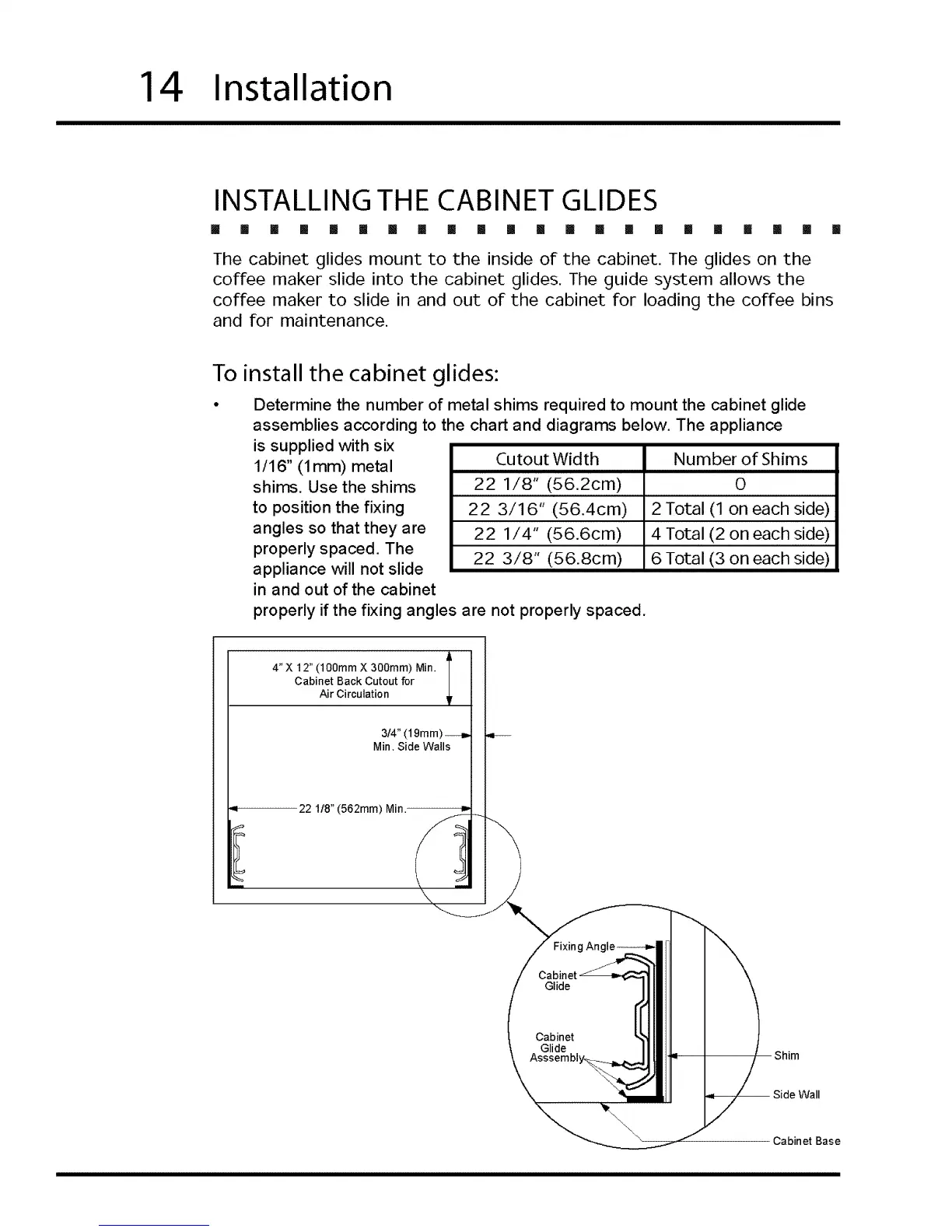
Determine the number of metal shims required to mount the cabinet glide
assemblies according to the chart and diagrams below. The appliance
is supplied with six
1/16" (1 mm) metal
shims. Use the shims
to position the fixing
angles so that they are
properly spaced. The
appliance will not slide
in and out of the cabinet
Cutout Width Number of Shims
22 1/8" (56.2cm) 0
22 3/16" (56.4cm) 2 Total (1 on each side)
22 1/4" (56.6cm) 4 Total (2 on each side)
22 3/8" (56.8cm) 6 Total (3 on each side)
properly if the fixing angles are not properly spaced.
4"X 12" (100ram X 300ram) Min.
Cabinet Back Cutout for
Air Circulation
3/4" (19mm)--_
Min, Side Walls
22 1/8" (562mm) Min.
Glide
Cabinet
Glide
Asssembl _
Shim
Wall
Cabinet Base








 To Next Page