EasyManua.ls Logo

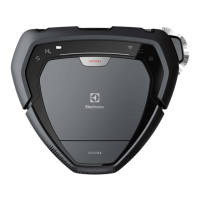
Electrolux PURE i9 - User Manual

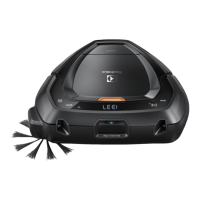
Electrolux PURE i9
460 pages
Print Icon
To Next Page IconTo Next Page
Loading...
Instruction Book
GB INSTRUCTION BOOK
FR MDE D’EMPLOI
BG   
CZ PŘÍRUČKA K POUŽI
DE ANLEITUNG
DK VEJLEDNING
EE KASUTUSJUHEND
ES
MANUAL DE INSTRUCCIONES
FI OHJEKIRJA
HR KNJIŽICA S UPUTAMA
HU HASZNÁLATI ÚTMUTATÓ
IT ISTRUZIONI
LT INSTRUKCIJŲ KNYGELĖ
LV LIETOŠANAS PAMĀBA
NO BRUKSANVISNING
PL INSTRUKCJA OBSŁUGI
RO MANUAL DE INSTRUCIUNI
SR 
RU
  
SE BRUKSANVISNING
SI NAVODILA ZA UPORABO
SK VOD NA POUŽÍVANIE
TR TALİMAT KİTAPÇIĞI
UA 

Table of Contents

Questions and Answers

  • E
    Emily DavilaSep 9, 2025
    Why Electrolux PURE i9 returns to the Charging base before the room is properly cleaned?
    • T
      tgutierrezSep 9, 2025
      If your Electrolux Vacuum Cleaner returns to the Charging base before the room is properly cleaned, it is likely because the robot is returning to the Charging base to charge the batteries. The robot will automatically continue the cleaning program as soon as the batteries are recharged.
  • A
    aellisAug 23, 2025
    What to do if my Electrolux PURE i9 robot does not start?
    • M
      Mitchell HillAug 23, 2025
      If your Electrolux Vacuum Cleaner robot does not start, it could be due to a couple of reasons. First, the dust container might not be present or properly closed; place the dust container in the robot and properly close the lid. Second, the robot might be lifted; place the robot on the floor before starting.
  • K
    kanebrandyAug 25, 2025
    Why my Electrolux PURE i9 Vacuum Cleaner does not move or clean properly?
    • A
      April WeaverAug 25, 2025
      If your Electrolux Vacuum Cleaner robot isn't moving or cleaning properly, there might be several reasons. First, ensure the bumper can move freely by removing any obstructions. Also, check the wheels for any entangled threads or debris, clean if necessary, and replace any damaged parts such as the brush roll or side brush. Finally, the dust container might be full or blocked, so empty and clean it. If the robot is stuck, place it where it can move freely. If the robot is operating on a slippery surface, move it to a new location.
  • T
    torresmatthewAug 26, 2025
    Why Electrolux Vacuum Cleaner robot does not start?
    • M
      Mrs. Jade ChaneyAug 26, 2025
      If your Electrolux Vacuum Cleaner robot isn't starting, check that the dust container is correctly placed and the lid is properly closed. Additionally, ensure the robot is placed on the floor before attempting to start it.
  • J
    James MillerAug 27, 2025
    What to do if my Electrolux PURE i9 has no charge indication?
    • M
      Mark ColeAug 28, 2025
      If your Electrolux Vacuum Cleaner shows no charge indication, ensure the power cord and adapter are properly assembled and connected to the mains. Connect the adapter connector to the charging base, and the power cable to the mains. Verify that the charging plates on both the robot and the charging base are connected. Also, check the plug and cable for any damage.
  • T
    Todd KellyAug 29, 2025
    What to do for battery related problems with Electrolux PURE i9?
    • B
      Brady SmithAug 29, 2025
      If your Electrolux Vacuum Cleaner is experiencing battery-related problems, ensure you are using the original Electrolux Charging base that came with the robot. If a replacement is needed, use Electrolux Charging base (ANC: 406000071). If the batteries are malfunctioning, replace both battery packs. If the product temperature is too high, let the robot pause outside the charging station for 6 hours. Also, make sure the batteries are properly connected to the robot.
  • S
    Stephen CarterSep 17, 2025
    How to solve software issue on Electrolux Vacuum Cleaner?
    • M
      Melissa McclainSep 18, 2025
      If you're experiencing a software issue with your Electrolux Vacuum Cleaner, please update the robot’s software. If a software upgrade has failed, please redo the software update.
  • A
    Amanda CastilloSep 18, 2025
    What to do if I get a system error on Electrolux PURE i9?
    • T
      Tanya WarnerSep 18, 2025
      If your Electrolux Vacuum Cleaner is showing a system error, please restart the desired operation.
  • L
    Laurie MillerSep 7, 2025
    How to display the time on Electrolux PURE i9 Vacuum Cleaner?
    • S
      Sharon WillisSep 8, 2025
      If the time is not displayed on your Electrolux Vacuum Cleaner, it is because the current time is not set. When the robot is connected to WiFi, the time will automatically be set.
  • B
    burkevincentSep 4, 2025
    How to resolve a software issue on Electrolux PURE i9?
    • M
      Maria MunozSep 4, 2025
      To resolve a software issue on your Electrolux Vacuum Cleaner, first, please update the robot’s software. If a software upgrade has failed, please redo the software update.

Summary

Overview of the Robot

Description of Robot Components

Detailed list and numbering of all robot vacuum cleaner parts.

How to Use the Robot Vacuum Cleaner

Installation of the Robot

Guide for setting up the charging base and placing the robot.

Battery and Charging Status

Explanation of the robot's battery indicators and charging states.

Robot Storage and App Connection

Robot Storage

Instructions for storing the robot when not in use for extended periods.

Connecting to the PUREi9 App

Guide on downloading and connecting the robot to the mobile application.

Robot Operation Modes

Cleaning Schedule

Information on how to set up a cleaning schedule via the app.

Cleaning Modes

Explanation of how to start, pause, and terminate cleaning cycles.

Robot Usage Features

Auto Docking and Charging

How the robot returns to the charging base after cleaning.

Recharging During Cleaning

Process of the robot recharging itself mid-cycle to resume cleaning.

Crossing Thresholds

How the robot detects and handles thresholds or obstacles.

ECO Mode

Explanation of the ECO mode for reduced power and noise.

Advanced Usage Tips

Manual Docking

Instructions on sending the robot back to the charging base manually.

Spot Cleaning

How to use the robot for intensive cleaning of a small area.

Tips for Best Results

Preparing the Cleaning Area

Advice on clearing the floor for optimal robot performance.

Limiting the Cleaning Area

Methods to restrict the robot's cleaning to specific zones.

Emptying Dust Container Between Cleanings

Importance of regularly emptying the dust container for performance.

Robot Handling and Power Management

Manual Handling and Moving

Guidelines for safely carrying and manually moving the robot.

Multi-Floor Cleaning

Advice on using multiple charging bases for multi-level homes.

Turning the Robot Off

Procedure for completely powering down the robot.

Dust Container Maintenance

Emptying the Dust Container

Step-by-step guide to removing and emptying the robot's dustbin.

Filter Maintenance

Cleaning and Replacing the Filter

Instructions for cleaning and recommended replacement schedule for the filter.

Maintenance

Cleaning the 3 D Vision System

How to clean the robot's camera for optimal navigation.

Cleaning the Wheels

Instructions for removing hair and debris from the robot's wheels.

Cleaning the Side Brush

Guide on removing and cleaning the robot's side brush.

Brush Roll and Battery Maintenance

Cleaning the Brush Roll

Steps to remove and clean the main brush roll.

Cleaning the Air Channel

Procedure for clearing debris from the robot's air channel.

Changing the Batteries

Instructions for replacing the robot's battery packs.

Error Handling

Identifying Errors

How error codes are displayed and communicated by the robot.

Resolving Errors

Steps to take after an error has been fixed to resume cleaning.

Consumables and Accessories

Performance Kit

Details on the PUREi9 Performance kit, including part numbers.

Power Brush

Information about the PUREi9 Power brush and its part numbers.

Charging Base

Details on the charging base, including part numbers.

Battery Pack

Information on the battery pack, including part numbers.

Safety Precautions

General Safety and Usage

Important safety information for using the robot, including warnings.

Prohibited Usage Conditions

Conditions under which the robot must not be used (e.g., wet areas, flammable gases).

Warranty Limitations

Information on what the product warranty does not cover.

Preparation for Cleaning Safety

Safety advice on preparing the cleaning area to prevent accidents.

Vision System Safety Considerations

How environmental factors can affect the robot's vision system.

Consumer Information and Sustainability

Battery Product Environment and Operation

Guidelines for operating, charging, and storing the robot's battery.

Dew Condensation Warning

Information about dew condensation and how to handle it.

Preserving Battery Life

Tips for maintaining the robot's battery life and performance.

Environmental Concerns and Recycling

Information on battery disposal and recycling of the product.

Customer Care and Service Information

Data needed when contacting customer service for support.

Electrolux PURE i9 Specifications

General IconGeneral
StyleRobot
ColorBlack
Total Power-
Suction Power4.2 W
Dust Bin Capacity0.7 L
Power Controls-
Operating Radius-
Cord Length-
Hose Length-
Automatic Cord Rewind-
Exhaust Filter-
Motor Protection Filter-
Park system-
?leaning Area-
Noise Level75 dBA (Normal) / 70 dBA (Eco)
Cleaning ModesSingle room
FeaturesThree-point maneuverability
Brushes and AccessoriesTurbo Brush Floorhead STB 305-3
Power Consumption-
Battery Life40min (Normal) / 60min (Eco)
Battery Capacity-
Weight and Dimensions IconWeight and Dimensions
Depth325 mm
Height85 mm
Width325 mm
Net Weight3.3 kg

Related product manuals