the display, e.g. if the programme is
to be started in 12 hours.
If the display is showing 20h and you
press the button again, the time de-
lay will be cancelled. The display will
show 0'and then the duration of the
selected programme.
3. To activate the delay timer, press the
START PAUSE (Start / Pause) button (6).
The amount of time remaining until the
programme is set to start is continuously
displayed (e.g. 15h, 14h, 13h, … 30' etc).
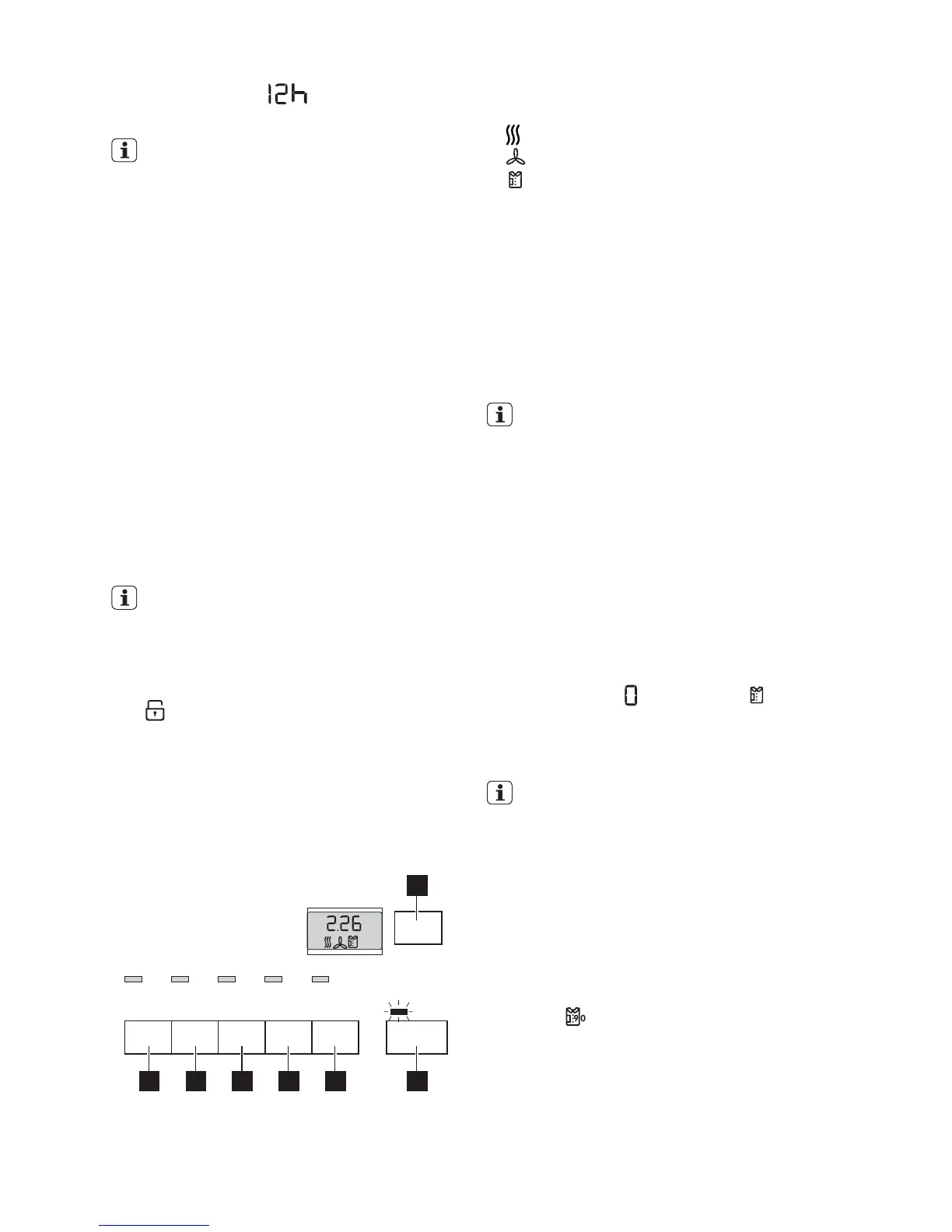
CHILD LOCK function
The child lock can be set to prevent a pro-
gramme being accidentally started or a pro-
gramme in operation being accidentally
changed. The child lock function locks all
buttons and the programme knob. The child
lock can be activated or deactivated by hold-
ing down the LONG ANTI-CREASE (Knitter-
schutz Plus) (3) and BUZZER (Signal) (4) but-
tons simultaneously for 5 seconds.
– Before programme is started: Appli-
ance cannot be used
– After programme is started: Pro-
gramme in operation cannot be
changed
The
icon appears in the display to indicate
that the child safety device is activated.
The child safety device is not deactivated
once the programme comes to an end.
If you want to set a new programme, you
must first deactivate the child safety device.
Starting the programme
7
654321
Press the START PAUSE (Start / Pause) but-
ton (6). The programme is started.
The programme phase is shown in LCD by
appropriate icon:
–
- drying phase indication
–
- cooling phase indication
–
- anti-crease phase indication
During program selection all appropriate
phase icons are displayed. When program is
started only current cycle phase is indicated
by single icon.
Changing programme
To change a programme which has been se-
lected by mistake once the programme has
started, first turn the programme selector to
OFF (Aus) and then reset the programme.
The programme can no longer be
changed directly once the programme
has started. If nevertheless there is an
attempt to change the programme on
the programme knob, the programme
progress display and the maintenance
indicators flash. If an option (excluding
the buzzer ) is set, Err appears in the
multidisplay. The drying programme is
not however affected by this (laundry
protection).
Laundry unloading
Once the drying cycle is complete, display
shows a blinking
, anti-crease icon ap-
pears on LCD. If the BUZZER (Signal) button
(4) has been pressed, an acoustic signal
sounds intermittently for about one minute.
The drying cycles are automatically fol-
lowed by an anti-crease phase which
lasts around 30 minutes. The drum ro-
tates at intervals during this phase. This
keeps the laundry loose and free of crea-
ses. The laundry can be removed at any
time during the anti-crease phase. (The
laundry should be taken out towards the
end of the anti-crease phase at the latest
to prevent creases from forming.) If
LONG ANTI-CREASE (Knitterschutz
Plus)
function has been selected, the
anti-crease phase is lengthened by 60
minutes.
1. Open door.
2. Before removing the laundry, remove fluff
from the micro-fine filter. It is best to use
a damp hand for this purpose. (See “Care
and cleaning” chapter.)
electrolux 11



 To Next Page