1
Note !! If Programming is activated
when the machine power is subse-
quently switched on, a test and
diagnosis program will start.
Caution
The control circuit board in this
dryer contains hazardous volt-
ages. Refer servicing to qualified
personnel.
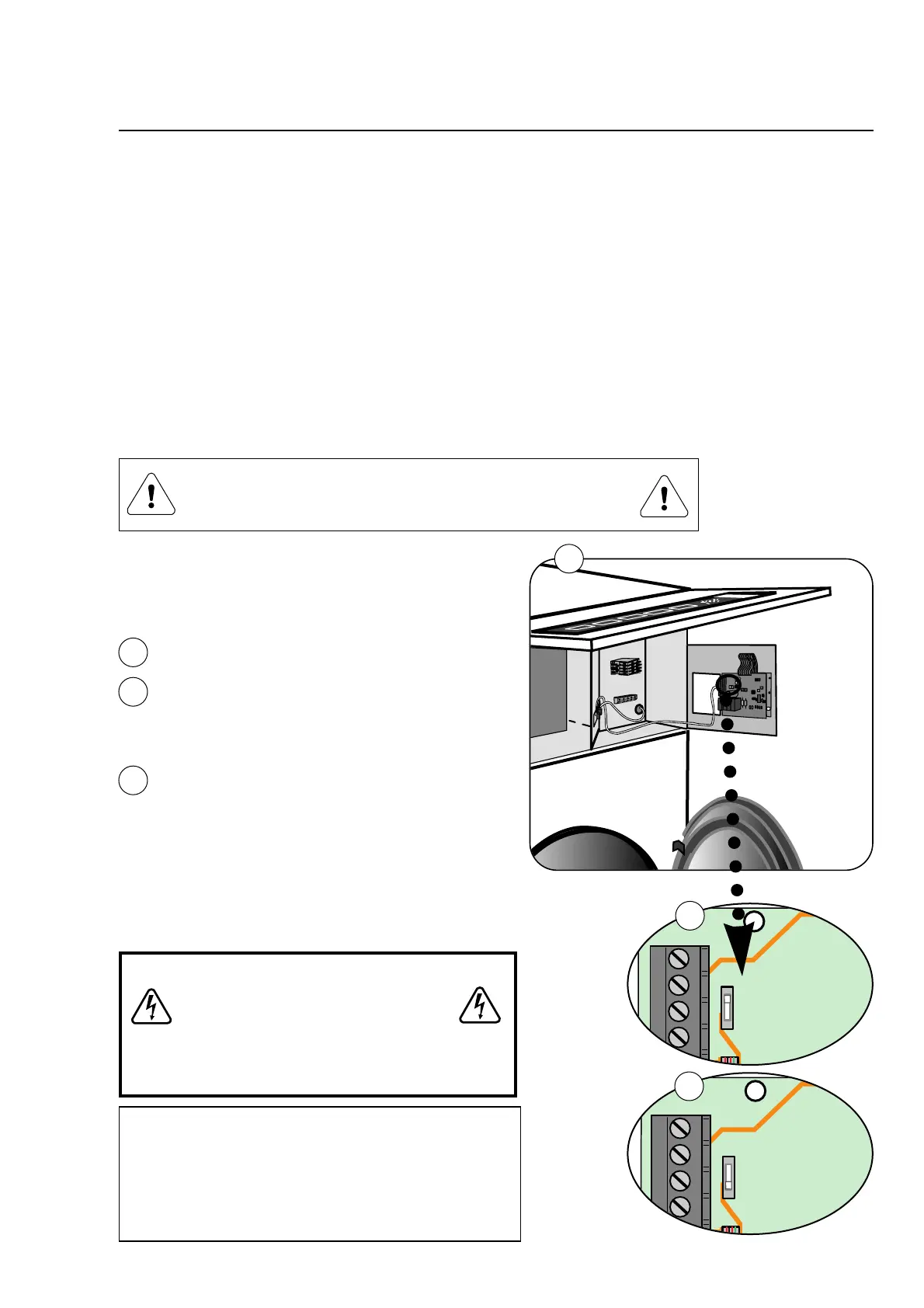
Switching to Programming mode
• Open the loading door (the door must be
kept open).
•
Open the door of the control panel.
• Move the switch on the circuit-board to posi-
tion SP, fig. 2.
• Program the dryer as described on following
pages.
• End of programming. Move the switch back
to normal mode, fig. 3.
1
2
2
3
3
The programming mode is used for chang-
ing (programming) preset machine values
At the factory, the tumble-dryer has been set to specific val-
ues for:
Time, temperature, cooling, reversing, etc. These values can
be adjusted in the programming mode.
The parameters shall always match to the specific dryer
type.
The machine parameters can be changed by switching the
electronic control to Programming mode. The display will
read SP and the three push-buttons will now be used to
change the programming parameters, (see next page).
Programming mode
Normal mode
Programming is only to be carried out by qualified
personnel.









 To Next Page