17
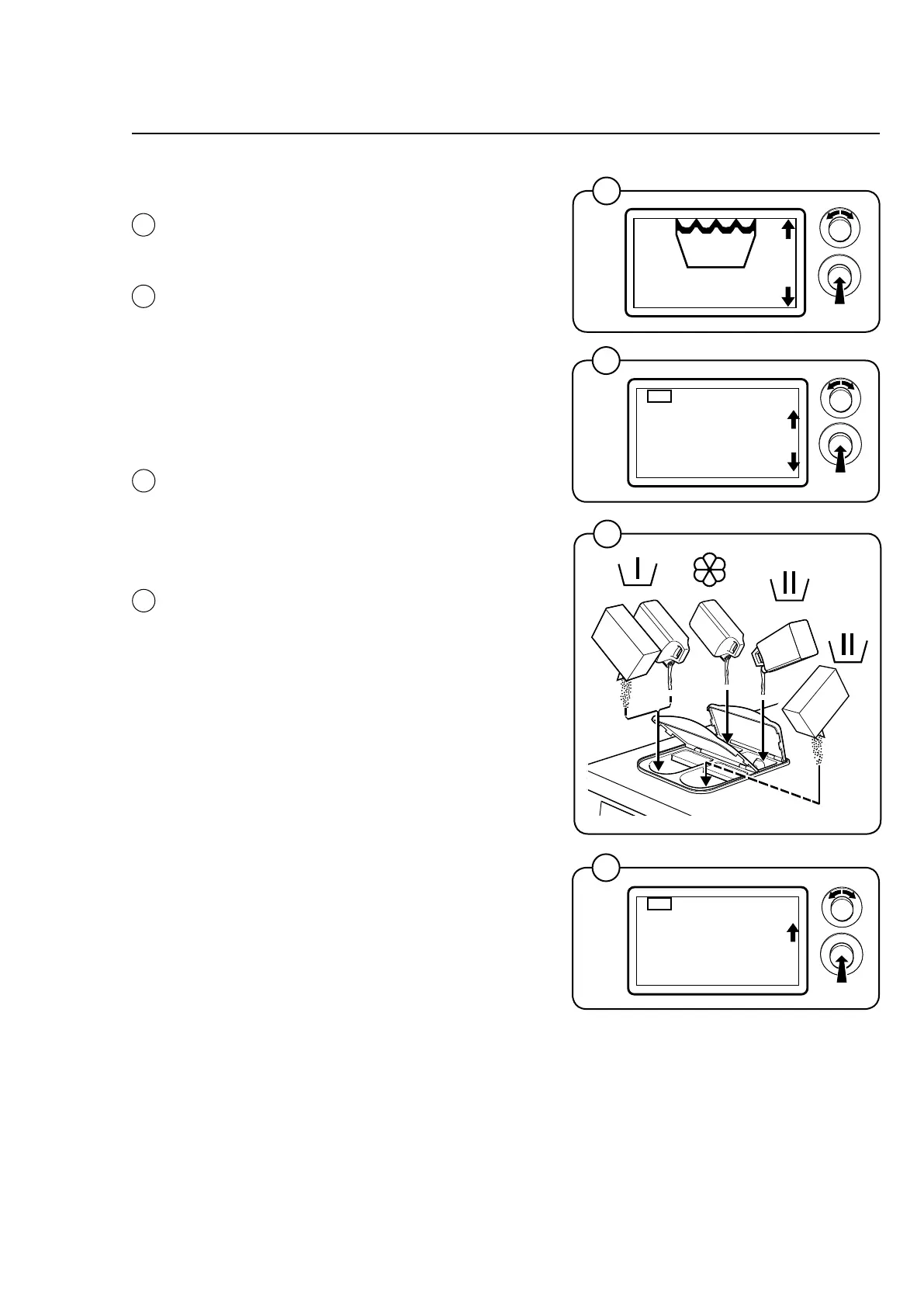
Starting with control knob
• Selectthedesiredwashprogramwiththe
control knob and confirm by pressing the
knob.
• Addanyoptionstotheselectedwashpro-
gram. Select from the list with the control
knob and confirm by pressing the knob.
Note!
Max two options can be chosen for each
wash program
• Ifthemachinehasacoinmeter,insertthe
correct amount of coins/tokens.
• Addthecorrectamountofdetergentand
softener.
Note!
Refer to the dosages on the detergent
packaging. Do not overdose.
• SelectSTARTwiththecontrolknobandpress
the knob.
Handling
6179/6180
6182
1
60°
2
4
6179/6180
6179/6180
6204
6204
3
60°
60°
5343
Alt.
NORMAL 60
OPTION
OPTION 1
NORMAL 60
START
OPTION 1
4
2
3
1









 To Next Page