28
Maintenance
Every month (only for mop machines)
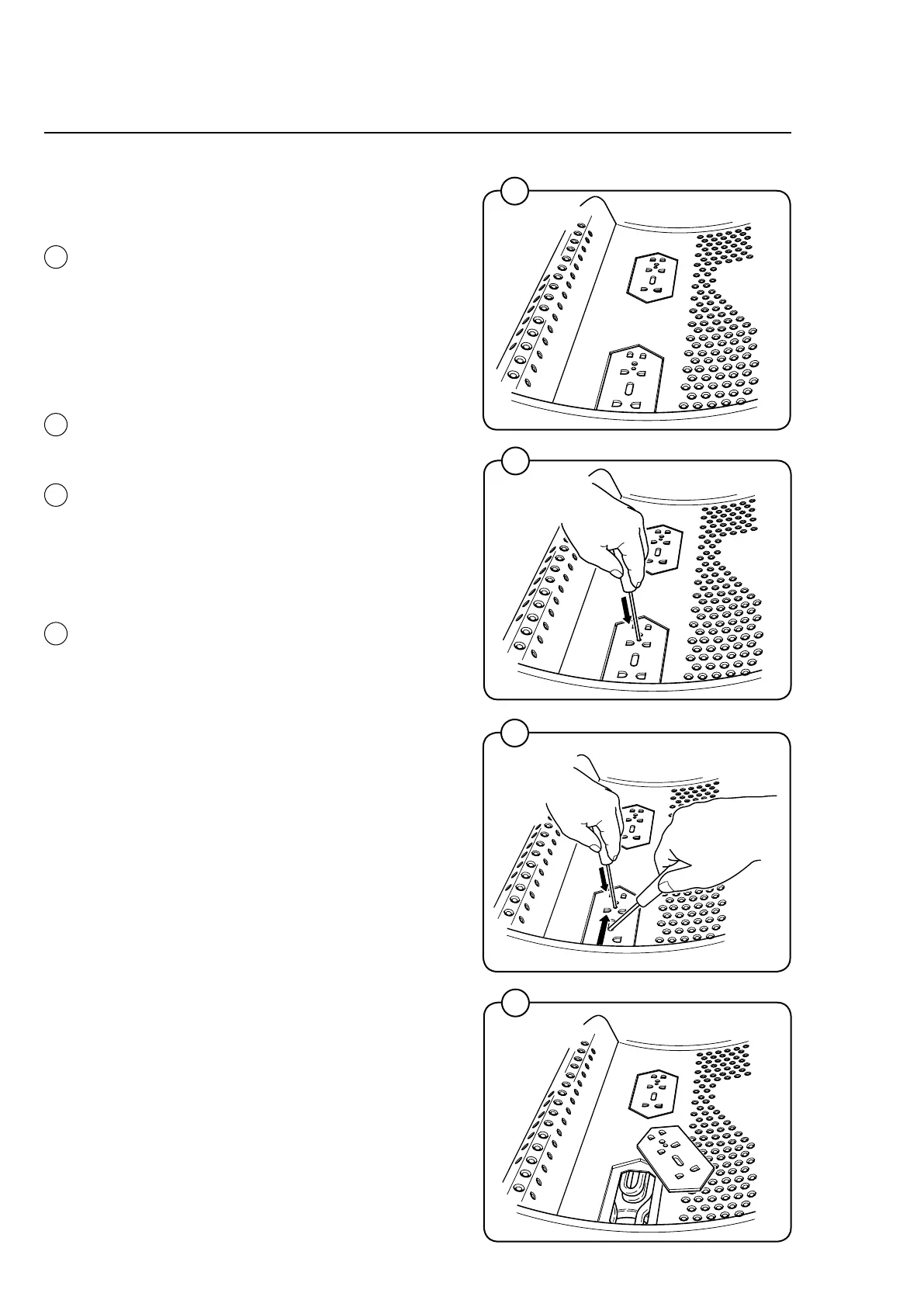
Cleaning the mop elements
• Dependingonthesizeofthemachine,
you will find one or two core covers in the
machine’s inner drum so that the elements
can be cleaned if so required. The front cover
is located directly above the drain, while the
other is in front of the element retainer.
Two small screwdrivers are required to re-
move the core cover.
• Useascrewdrivertopressdownonthe
retaining plate in the round hole on the core
cover.
• Placetheotherscrewdriverintheovalhole
on the core cover and through the round hole
in the retaining plate
• Pushtheretainingplatetowardsthescrew-
driver which is pressing down on the retaining
plate.
• Removethecoreelement/elementsandclean
the elements. If the elements are very dirty, it
may be wise to remove the elements from the
drum when cleaning them.
• Thecorecoversarerettedinreverseorder,
with the difference that it is not necessary to
press on the retaining plate; you only need
to push the retaining plate back into place.
When you hear a clicking sound, the retaining
plate is in position.
2
3
4
1
1
2
3
4









 To Next Page