24
Timer
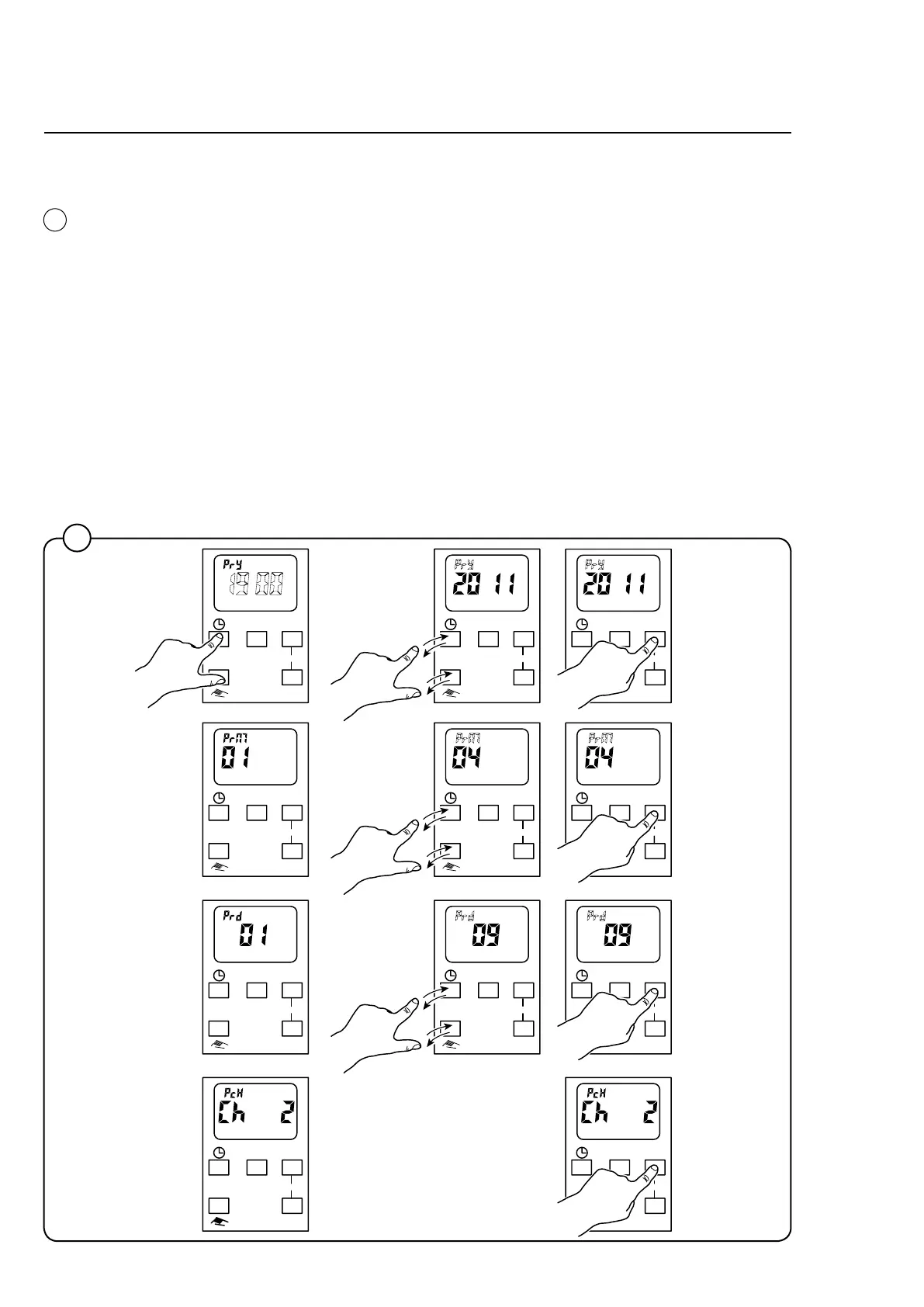
Setting the date (year, month and day)
Set the date in the time display menu in the right-hand corner of the display:
1. Press and hold the clock symbol and hand symbol simultaneously, until
"PrY" is shown in the display. Press repeatedly on both buttons simultan-
eously until the desired year is shown.
2. Press "OK".
3. "PrM" is now shown on the display. Press repeatedly on both buttons si-
multaneously until the desired month is shown.
4. Press "OK".
5. "PrD" is now shown on the display. Press repeatedly on both buttons simul-
taneously until the desired day is shown.
6. Press "OK".
7. The display now shows "CH 2". Press "OK" without making any changes.
7408
4
4
Day OK
Prog
Reset
Day OK
Prog
Reset
Day OK
Prog
Reset
Day OK
Prog
Reset
Day OK
Prog
Reset
Day OK
Prog
Reset
Day OK
Prog
Reset
Day OK
Prog
Reset
Day OK
Prog
Reset
Day OK
Prog
Reset
Day OK
Prog
Reset










 To Next Page