6"
C. Fasten the brackets on the wall with the screws,
making sure the brackets are in the correct direction
D. Gently insert the heater body to the bottom of the
brackets first and then push the heater body on to the
top of the brackets
Warning: Be sure to keep the distance between the
heater and floor, wall and so on at least 30cm.
Warning! When drilling holes, always check to ensure
there is no wiring, pipework, etc. in the area to be
drilled.
Warning: Before plugging in the unit make sure the
radiator is properly attached to the wall. Otherwise
problems can occur.
HOW TO USE:
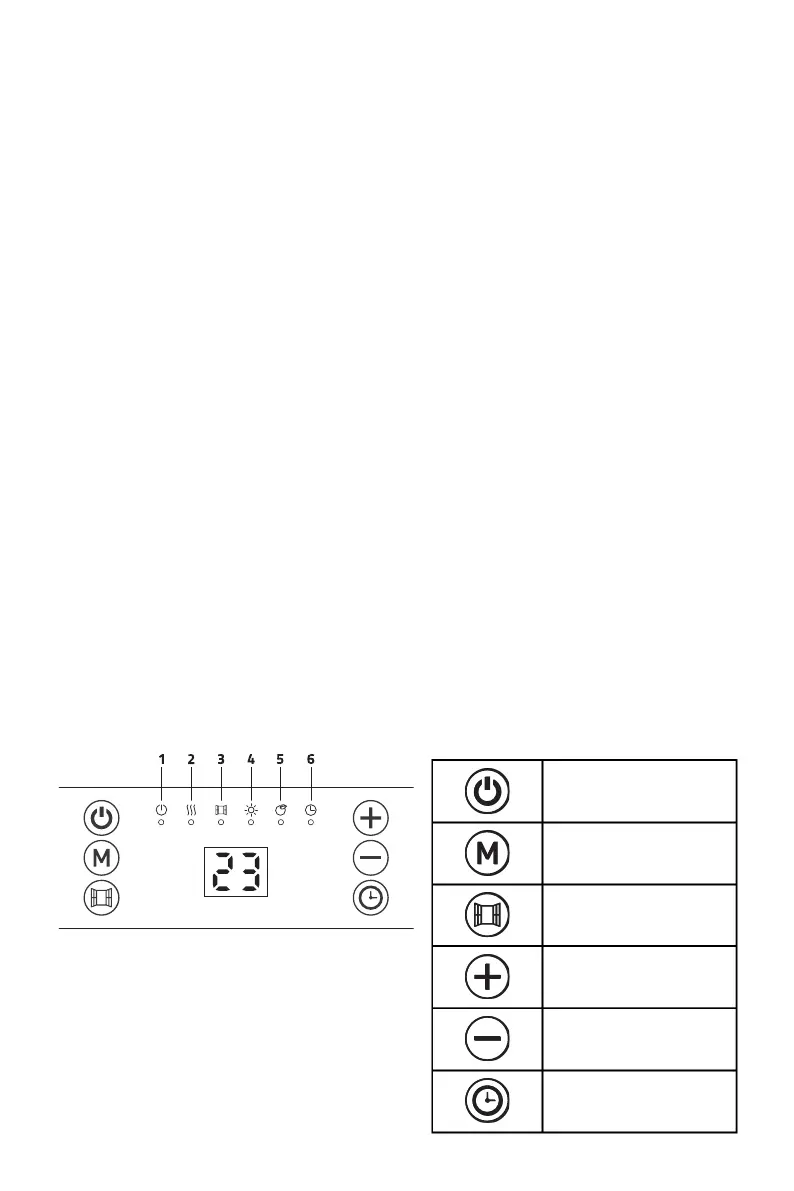
Control panel
① Standby: on/off
② Heating condition
③ Open window function
④ Comfort mode
⑤ ECO mode
⑥ Timer



 To Next Page