8"
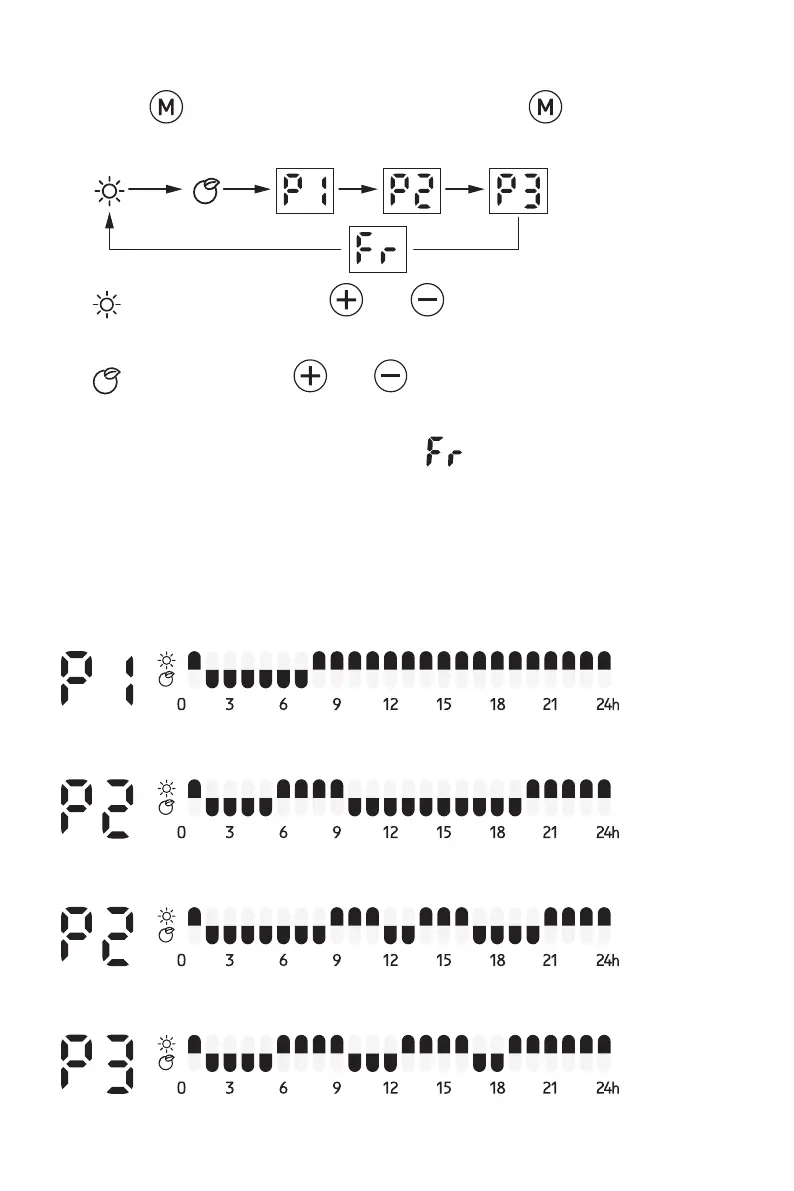
HEATING MODE:
- Press to enter mode selection. By pressing , the heating mode
runs in a continuous cycle as below:
-
- Comfort mode: Press and to set the temperature from 5-
35℃.
- ECO mode: Press and to set the temperature from 1-31ºC.
Note: ECO mode=Comfort mode - 4ºC
- Anti-frost mode: the screen displays . The set temperature is 7ºC.
The temperature can’t be adjusted.
- P1/P2/P3: Pre-set heating programs.
Note: You must make sure the time and day are set first.
P1: (Monday-Sunday) non adjustable program
P2:(Monday-Friday) non adjustable program
P2:(Saturday-Sunday) non adjustable program
P3:(Monday-Friday) Adjustable program



 To Next Page