Monday
Tuesday
Wednesday
Thursday
Friday
Saturday
Sunday
program No.3
Monday
Tuesday
Wednesday
Thursday
Friday
Saturday
Sunday
program No.4
Monday
Tuesday
Wednesday
Thursday
Friday
Saturday
Sunday
program No.5
Monday
Tuesday
Wednesday
Thursday
Friday
Saturday
Sunday
program No.6
Monday
Tuesday
Wednesday
Thursday
Friday
Saturday
Sunday
program No.7
U
Monday
Tuesday
Wednesday
Thursday
Friday
Saturday
Sunday
L
Monday
Tuesday
Wednesday
Thursday
Friday
Saturday
Sunday
Monday
Tuesday
Wednesday
Thursday
Friday
Saturday
Sunday
program No.1
program No.2
Monday
Tuesday
Wednesday
Thursday
Friday
Saturday
Sunday
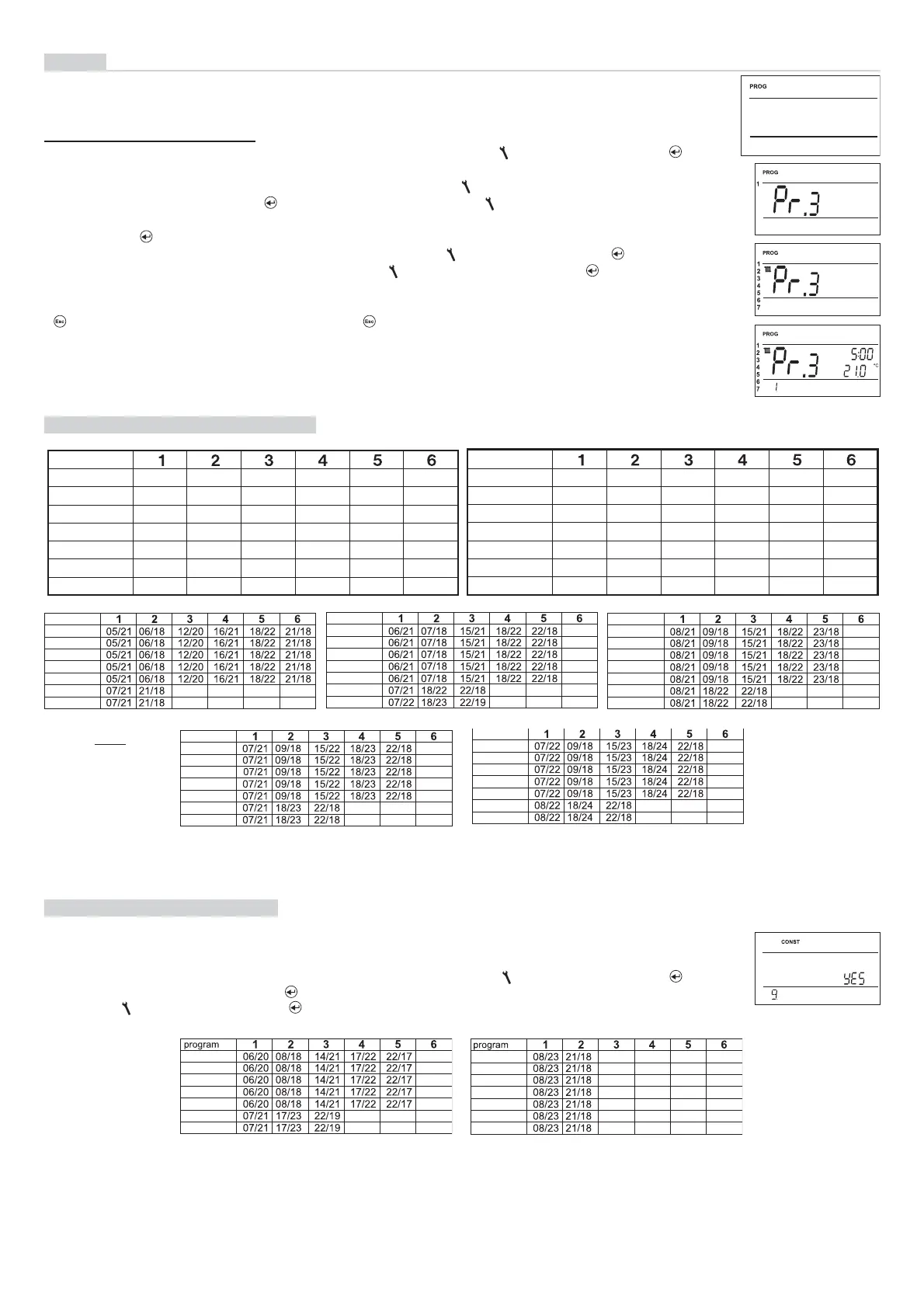
Tables of temperature programs:
Note:
5/21 means
that the required
temperature at 5
o’clock is 21 °C
All the
indicated
programs
can be
changed!
PROGRAMMING
SELECT dAY
TIME CHANGES
SELECT PROGRAM
Odd-EVEN MOdE
Even or odd week selection:
4
PROG
You can set 9 weekly programs with 6 temperature changes per day. The Pr1 and Pr2 programs are empty;
Pr3 to Pr7 programs are set by default. The PrU and PrL are also set by default, intended for the EVEN/ODD
week option (for details, see page 6).
Press twice the “ MENU “ button, choose the PROG mode by turning the “
“ button, and press the “ “
button to confi rm.
The selected program number is fl ashing on the display. Turning the “ “ button, choose the program which
you want to change and press the “ “ button to confi rm. Turning the “ “ button, choose the number of
days to be programmed (you can program day-by-day or 1-5 = Mon-Fri, 6-7 = Sat-Sun, or 1-7 = Mon-Sun)
and press the “ “ button to confi rm.
The 1st change time starts fl ashing; set the time by turning the “ “ button and press the “ “ button to
confi rm. Set the temperature for this time by turning the “ “ button and press again the “ “button to con-
fi rm. The 2nd change time appears on the display. Proceed in the same way as with the fi rst change setting.
In this way, you can set up to 6 temperature changes per day. To return one step back, shortly press the
“ “ button; to return to the main menu, press the “ “ button long.
After changing the preset program, check whether all the changes made conform to your requirements!
It is not necessary to apply all six changes to one day!
(PROGRAMMING)
Change in the program settings:
This setting is suitable, for example, for shift operation (the requirements on thermal comfort in the object
change every week). The PrU and PrL programs will alternate automatically. The programs can also be modi-
fi ed according to your requirements.
Press twice the “ MENU “ button, choose the CONST mode by turning the “
“ button, and press the “ “
button to confi rm. Repeat pressing the“ “ button until the constant No. 9 appears on the LCD. Set YES by
turning the “ “ button, and press the “ “ button to confi rm.


 To Next Page