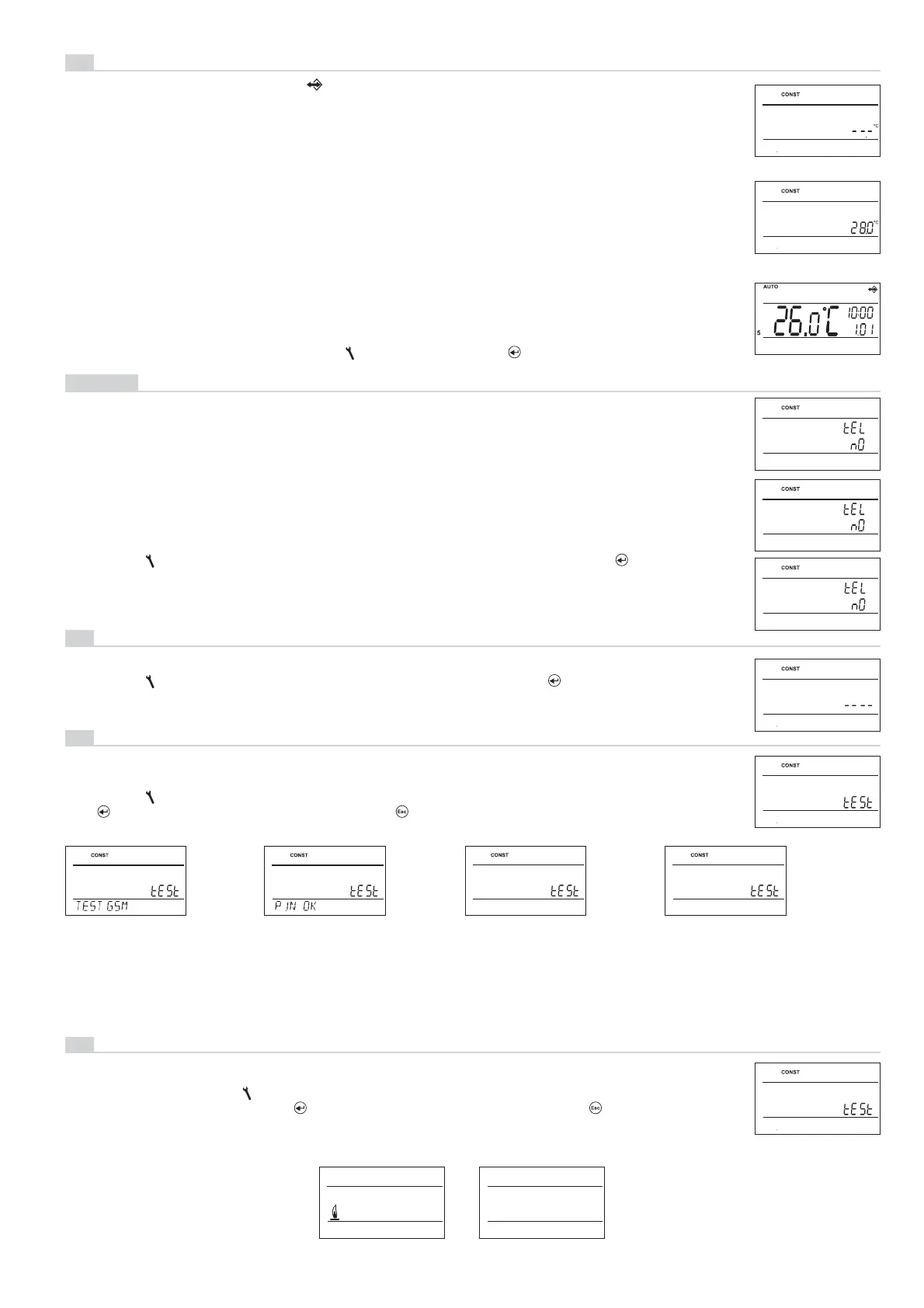
ERROR PIN
Checking the
GSM module.
PIN entered
correctly.
Wrong PIN.
Reset PT32GST
and enter PIN
again.
13
ENTER PIN
14
GSM TEST
EXT SENSOR12
12
EXT SENSOR
EXT SENS STOP
INSERT SIM
SIM card not inser-
ted. Insert the SIM
card, disconnect
power to the 5 s,
make adjustment
and repeat test.
TO SENdER
TO ANOTHER NR
420000000000---
tEL nO
When choosing 2) and 3) option we enter a phone number n the international format (420123456789),
to which return SMS messages on the thermostat condition should be sent. Is possible to enter a phone
number min. 10-digit to 15-digit.
PHONE NUMBER SETTING
Turning the “
“ button, enter the phone number stepwise; confi rm each setting with the “ “ button.
Allows the following options:
1) TO SENdER = SMS will be sent back to the telephone number from which the message was sent.
2) TO ANOTHER NR = SMS will be sent back to the telephone number entered in the thermostat.
3) bOTH NUMbERS = SMS will be sent back to both telephone numbers (combination options 1 and 2).
15
RELAY TEST
RELAY TEST
Testing the correct connection the thermostat to boiler
(this function is identical with the TEST mode
in the main menu).
Start the test by turning the “ “ button. The output relay is switched on/off several times (the ON/OFF
messages appear on the LCD). The “
“ button displays the next constant; pushing “ “ you return to
the main menu.
15
ON OFF
7
13
Enter the PIN code of the SIM card inserted in the thermostat.
PIN CODE SETTING
Turning the “ “ button, enter 4 digits stepwise; confi rm each setting with the “ “ button.
GSM TEST
14
12
The external sensor can be used for:
1, control according to the room temperature - the sensor is located in the room ( - - - option)
2, control according to the fl oor temperature - the sensor is located in the fl oor (- - - option)
EXTERNAL SENSOR SELECTION
Set the external sensor option by turning the “
“ button and press the “ “ button to confi rm.
( - - - set by default)
- - - If connected, the external sensor measures the temperature at the place of its installation
(suitable, for example, for places at which the thermostat cannot be located, yet you want to
control according to this room);
15…99,5°C If connected, the external sensor monitors the fl oor temperature; the maximum
temperature allowed for fl oor heating must be set
(control according to the room
temperature, with simultaneous fl oor temperature monitoring).
If the preset limit temperature is exceeded, the thermostat is switched off irrespective of the room
temperature, and the “EXT SENS STOP” message appears on the LCD. The heating device is switched
on again if the external sensor temperature drops by 0.5 °C.
If the external sensor is unconnected or faulty, the “EXT SENS ERROR” message appears on the LCD.
If an external sensor is connected, the symbol appears on the LCD (to approx. 2 minutes).
3, maximum fl oor temperature monitoring - the sensor is located in the fl oor (selection of 15 to 99,5°C)
After setting the PIN code of the SIM card inserted in the thermostat is performed to test the GSM
module and PIN validation.
Turning the “ “ button to start test of GSM module and checking of PIN code.
The“ “ button displays the next constant,; pushing “ “ you return to the main menu.


 To Next Page