11. THE SEQUENCER
40
LENGTH Sets the duration of the retrig velocity curve in fractions of, or rational or integer multiples of, a
step (0,125 - INF). 1/16 is the nominal length of one step. This setting aects the behavior of the velocity
curve (see directly below), by defining the boundaries of its envelope.
VEL. CUR Sets the velocity curve fade out/fade in of the retrig (-128 to 127). -128 corresponds to a com-
plete fade out during the set length, -64 fades out to half the velocity during the set length, 0 equals a
flat velocity curve with no fade, 64 fades in to half velocity during the set length and 127 fades in com-
pletely to full velocity during the set length.
Q.START Starts the retrig at a set quantization point synchronous with the sequencer (OFF, 1/16, 1/8, 1/4,
1/2, 1/1).
ALWAYS ON Sets retrig lock ON/OFF. When on, the retrig will activate whenever the pad of the active
track is pressed without the need to press [RETRIG] first.
Retrigs can be recorded on the sequencer in GRID RECORDING mode as well as in LIVE RECORDING
mode. They are recorded as separate trigs. If the retrig speed is greater than the duration of a sequencer
step, trigs are created with additional internal steps (i.e. steps with retrig enabled). Trigless trigs are inserted
to record pad pressure changes.
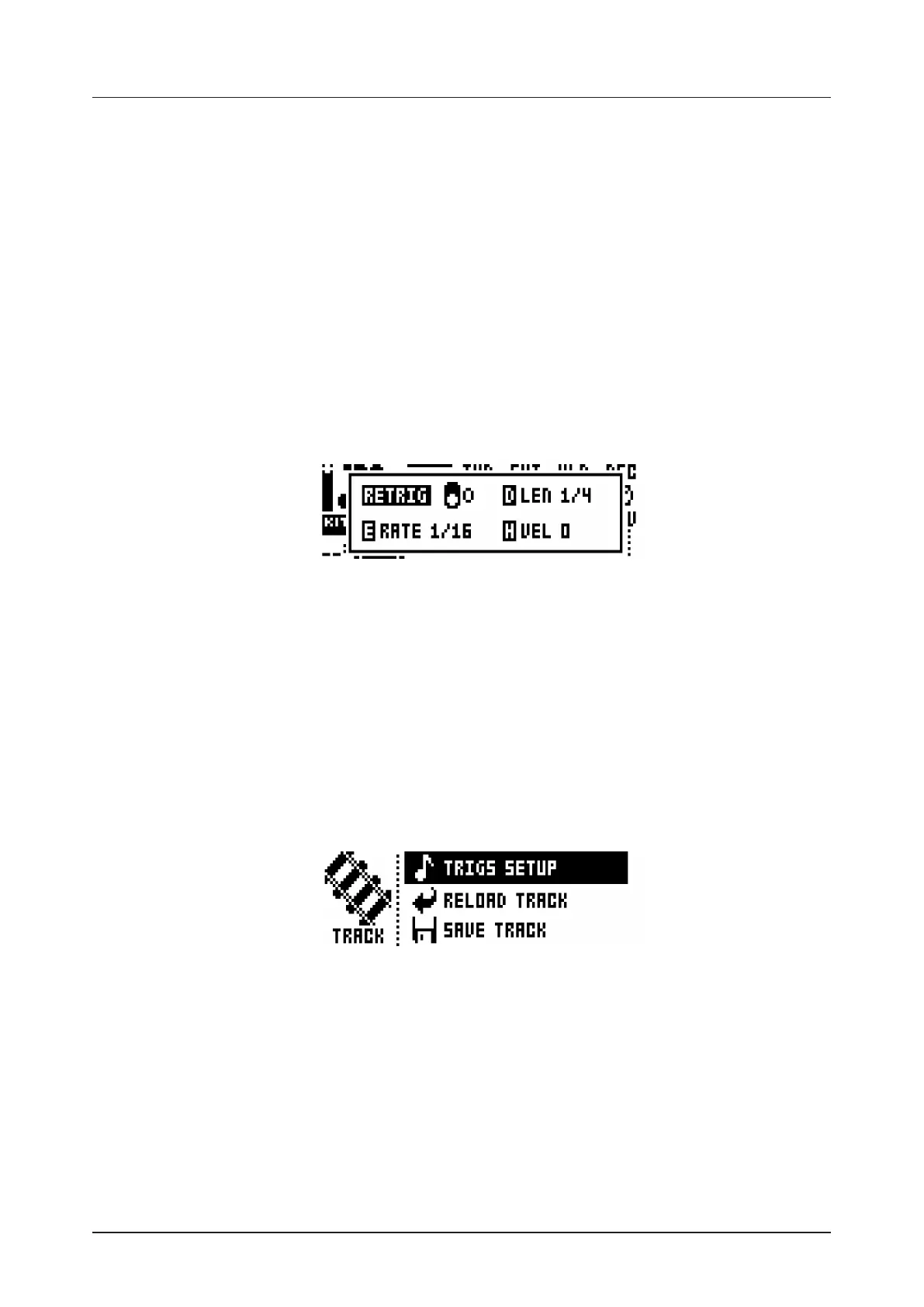
Retrigs can be customized on any of the sequencer steps. Press a [TRIG] key, then press the [RETRIG] key
or the [ARROW] keys [UP] or [DOWN]. This will bring up a pop-up menu on the LCD screen showing four
retrig actions.
As long as the [TRIG] key is pressed, the pop-up menu will remain visible. In order to activate/deactivate
the retrig, press the [RETRIG] key, or turn DATA ENTRY knob A. To set the retrig rate, press the [ARROW]
keys [UP] and [DOWN] or turn DATA ENTRY knob E. Change the length of the retrig velocity curve using
DATA ENTRY knob D. The velocity curve of the retrig is set using DATA ENTRY knob H. The knob works
in a bipolar fashion, spanning the range -128 to 127. Negative velocity values fade out the retrig to the set
amount, positive values fade it in. The retrig settings in this menu can also be accessed from the RETRIG
menu. However, retrig settings placed on a specific trig on the sequencer via the pop-up menu will override
the general retrig settings for the active track. Read more about the functionality of retrig settings on the
previous page.
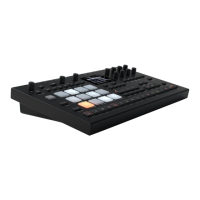
11.5 TRACK MENU
Settings and options for the active track are found in this menu. Open the menu by pressing [FUNCTION] +
[CHROMATIC]. Browse the list using the [UP]/[DOWN] arrow keys or the LEVEL knob. Select by pressing
[YES/SAVE]. Change the track that will be aected by pressing the [TRACK] key + one of the [PADS].
TRIGS SETUP will take you to the quantization menu for the active track. See section “11.7.1 QUANTIZA-
TION” on page 41.
RELOAD TRACK will reload the active track. Since tracks are a part of patterns which are automatically
saved, it will either be reloaded to its original auto-saved state or to a specifically saved state which can
be determined by utilizing the SAVE TRACK command. Press [NO/RELOAD] + [CHROMATIC] for a
shortcut to the RELOAD TRACK command.
SAVE TRACK will save changes made to the active track. This is a special feature available in addition to
the general, automatic, saving of patterns which occurs when patterns are changed. The feature is useful
in situations where an individual track is being worked on, the results are desirable and you want to keep
on working with the track while having the ability to revert it to a specifically saved state. The SAVE
TRACK command makes this possible. When reloading the track, it will not be reloaded to its original,
pattern auto-saved, state, but to the manually saved state. Press [YES/SAVE] + [CHROMATIC] for a
shortcut to the SAVE TRACK command.


 To Next Page