APPENDIX B: FX TRACK PARAMETERS
74
more poignant or more mued. (0–127)
GAI (Shelving Gain) aects the damping of the reverberated signal above the shelving frequency set by
the FRQ parameter. At max value the treble is included in the reverberations; lowering the value gradually
dampens it. (0–127)
HPF (HP Filter) sets the cuto frequency of the reverb high-pass filter. (0–127)
LPF (LP Filter) sets the cuto frequency of the reverb low-pass filter. (0–127)
VOL (Mix Volume) sets the volume of the Reverb output signal. The output is routed either before or after
the Distortion and Compressor eects, depending on the setting of the REV parameter on the DISTOR-
TION page. (0–127)
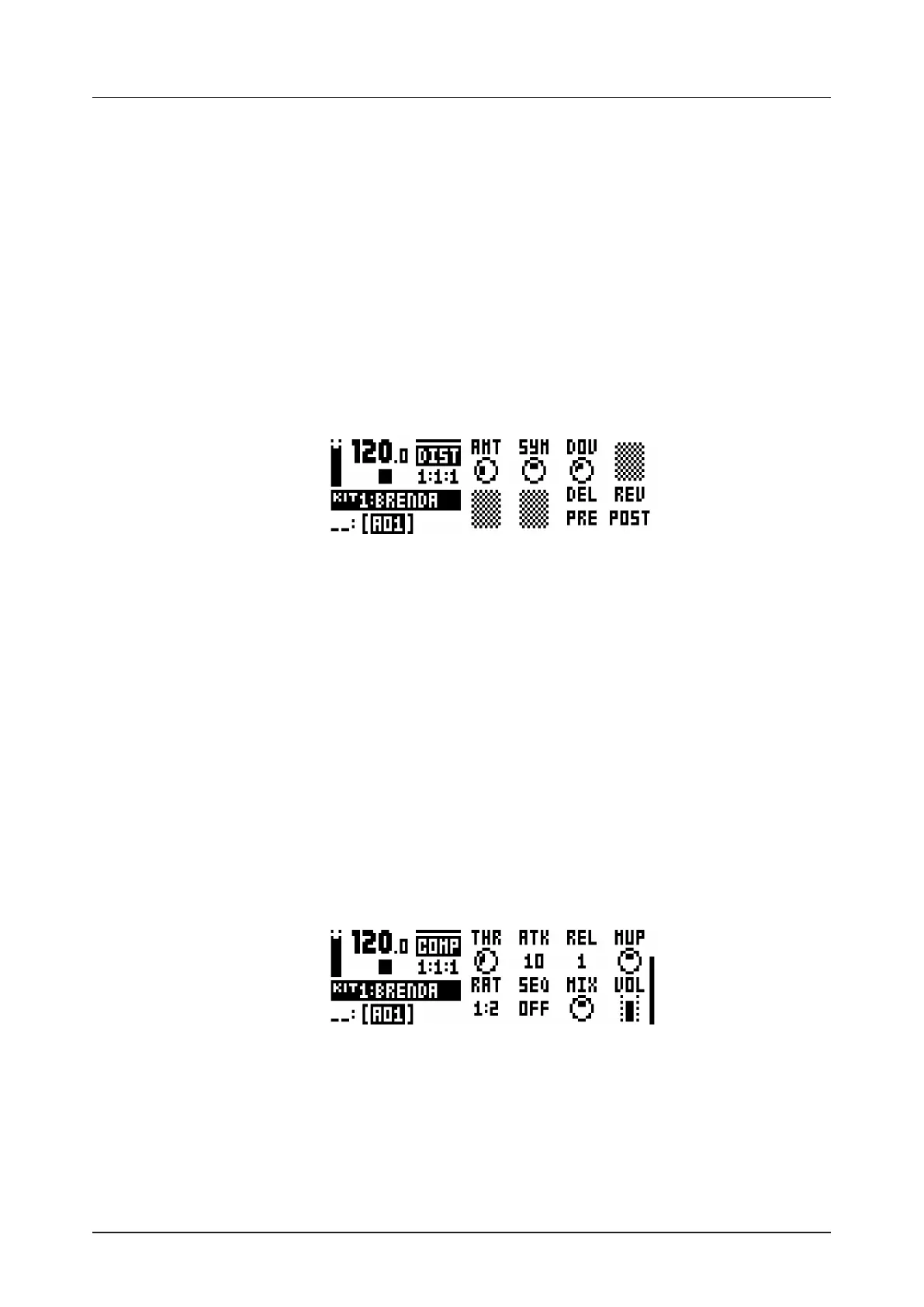
B.3 DISTORTION
The distortion master eect pronounces the peaks of the signal and distorts them. Additionally, the sound
may be oset in its entirety on this page and subjected to non-symmetrical distortion. This page also con-
trols the overdrive of the Delay eect, as well as the routing of the Delay and Reverb eect returns.
DIST
AMT (Distortion Amount) sets the amount of distortion applied to the signal. (0–127)
SYM (Distortion Symmetry) osets the whole signal (in the y direction, if visualized as a wave cycle on
a 2D graph) either up (positive values) or down (negative values) before applying distortion. This makes
asymmetric distortion of the signal possible, fringing only the crests or the troughs of the wave. (64–
+63)
DOV (Delay Overdrive) sets the overdrive of the Delay eect, for a warm, dynamic distortion of the signal.
Set this in conjunction with the FDB parameter on the DELAY page to produce anything from a tinge of
shear to a very aggressive four-pound barrage of overtones. (0–127)
DEL (Delay Dist/Comp) sets the Delay eect to return before (0) or after (1) the signal is subject to dis-
tortion and compression. The default setting is before. (0/1)
REV (Reverb Dist/Comp) sets the Reverb eect to return before (0) or after (1) the signal is subject to
distortion and compression. The default setting is after. (0/1)
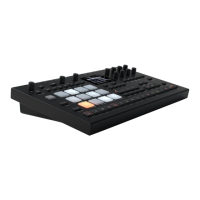
B.4 COMPRESSOR
The Compressor master eect compresses the dynamic range of the signal by reducing the volume of loud
sounds relative to the quiet sounds. There are eight parameters with which the compressor is customized
on this page.
COMP
THR (Threshold) sets the threshold of the compressor. A lower threshold means a larger portion of the
signal will be subject to compression. There is a bar on the rightmost edge of the LCD screen which will
visually represent the amount of compression. (0–127)
ATK (Attack) sets the time of the compressor attack phase, i.e. how quickly the compressor responds to
loud peaks. The time of the attack phase is set in milliseconds. (0.03–30)
REL (Release) sets the time of the compressor release phase, i.e. how long it takes for the compression
to recover in quieter moments. The time is set in seconds. Range (0.1–2, A1 or A2). A1 and A2 are two
types of auto release phases, (A2) being slightly longer than (A1).


 To Next Page