FOR SUPPORT, VISIT ELEMENTELECTRONICS.COM/SUPPORT 11
USING YOUR
REMOTE
A
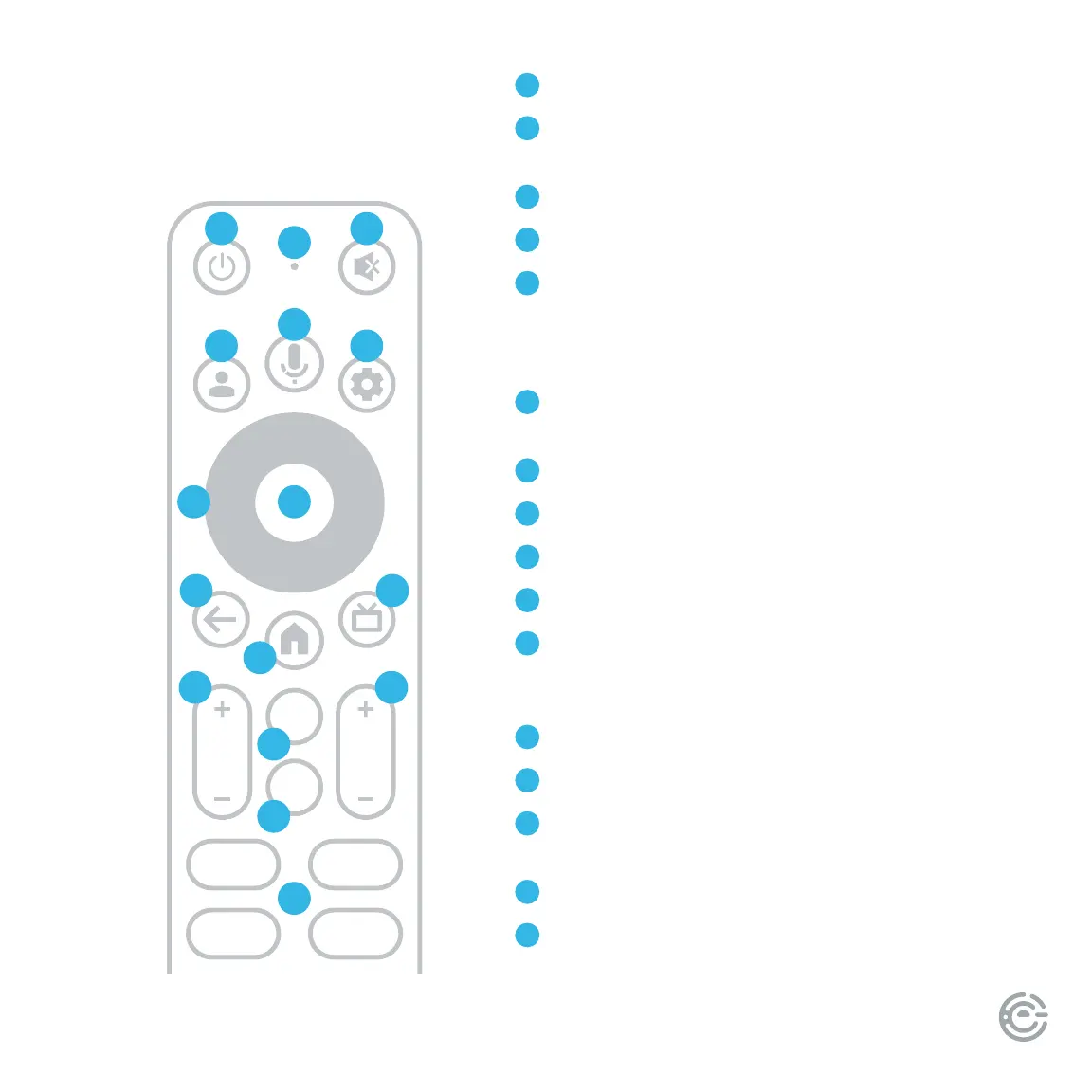
Power Turn your TV on and o
B
Microphone Speak into the microphone aer pressing
the Google Assistant button
C
Mute Turn your TV sound on and o
D
Prole Select your Google prole
E
Google Assistant Ask Google to nd movies, stream
apps, play music, control the TV, and more – all with
your voice. Press the Google Assistant button on the
remote to get started.
F
Dashboard Display the dashboard menu to access
quick TV settings, inputs, and more
G
Navigation Pad Select up, down, le and right
H
Select Conrm your selection
I
Back Return to the previous screen
J
Home Return to the home screen
K
Guide Display over-the-air live TV channels when the
TV is connected to an antenna; or when pressed in DTV
mode, the electronic program guide (EPG) will display
L
Volume Make your TV louder or soer
M
Channel Select the channel
N
Virtual Keyboard Display the on-screen
virtual keyboard
O
Menu Display the Menu settings
P
App shortcuts Launch the labeled app when your
TV is connected to the Internet
MENU
CHVOL
123.
A C
D
G
E
F
H
I
J
K
L M
N
O
P
B


 To Next Page